This step-by-step guide is exclusively available for Lead with AI PRO membership. 🚀 With Lead with AI PRO, you’ll get: ✅ Access to expert-crafted step-by-step guides ✅ AI-powered workflows to boost productivity ✅ Exclusive tools and resources for smarter work Upgrade to Lead with AI PRO and access all premium content instantly.
AI in the workplace is no longer a question of if: it's a question of how well. The companies and individuals who close the AI fluency gap will compound their advantage; everyone else will fall behind.
No one, whether an individual contributor who needs to deliver as much quality work as quickly as possible or a CEO looking at the productivity of tens to thousands of employees, will say no to the gains AI has to offer.
So, what is AI? How do we use AI in the Workplace?
And how do we transform traditional teams and businesses into AI-powered ones?
I’ve transitioned myself and my company, done the research, spoken to the experts, and will share how to go from 0 to AI Hero as succinctly as possible.
What is AI?
You likely have heard of or are using ChatGPT, whose advent raised eyebrows and sparked daily discussions about using artificial intelligence (AI).
However, it's important to note that AI is not a new concept. It has been around for decades, and its evolution has been gradual yet significant.
Artificial Intelligence, or AI, is the ability of machines to simulate human intelligence, including problem-solving and learning.
Artificial Intelligence is technology that enables machines to mimic human intelligence, performing tasks like recognizing patterns, making decisions, and learning from data.
Alan Turning asked some fascinating questions about AI in the 1950s
AI was around in the early 1900s, but it really started flourishing around 1950 when Alan Turing (yup, the guy from the ‘Turing Test”) explored the possibilities of “Artificial Intelligence in a groundbreaking paper.
All of these use cases are examples of Predictive AI, which takes vast amounts of data on historical events to predict the future. Another great example is Amazon, which as NPR reported in 2018, could predict which orders will be placed before they occur.
While powerful, Predictive AI has shortcomings, too.
Predictive AI is a branch of AI that focuses on analyzing historical data to forecast future outcomes or trends, enabling machines to anticipate events, behaviors, or needs with a high degree of accuracy.
For example, it takes immense efforts to collect, clean, and train this data. And, it can't predict 'unknown unknowns,' as it can only dig from its training data.
Until 2022, almost all enterprise AI was Predictive AI: forecast, classify, recommend. The shift that changed work isn't that AI got smarter at predicting; it's that AI started generating, reasoning, and now acting on its own.
What is Generative AI?
Generative AI is a tool powered by artificial intelligence that can create new content based on the inputs provided by a user.
Unlike older language models, ChatGPT and similar apps are based on "Transformers" (the “T in ChatGPT.)
Transformers let the model understand the importance (emphasis) of one piece of data in a sequence as related to others. This allows it to be much 'smarter' than previous models. (This video from Google's Dale Markowitz explains it really well and is easy to understand.)
Generative AI doesn’t stop there. It helps us map out an infinite number of scenarios to a situation, make comparisons, help decision-making with many variables, sift through data, and much more.
New iterations of tools like ChatGPT, Google Gemini, and Microsoft Copilot can even browse the live web to do the research you otherwise would have done.
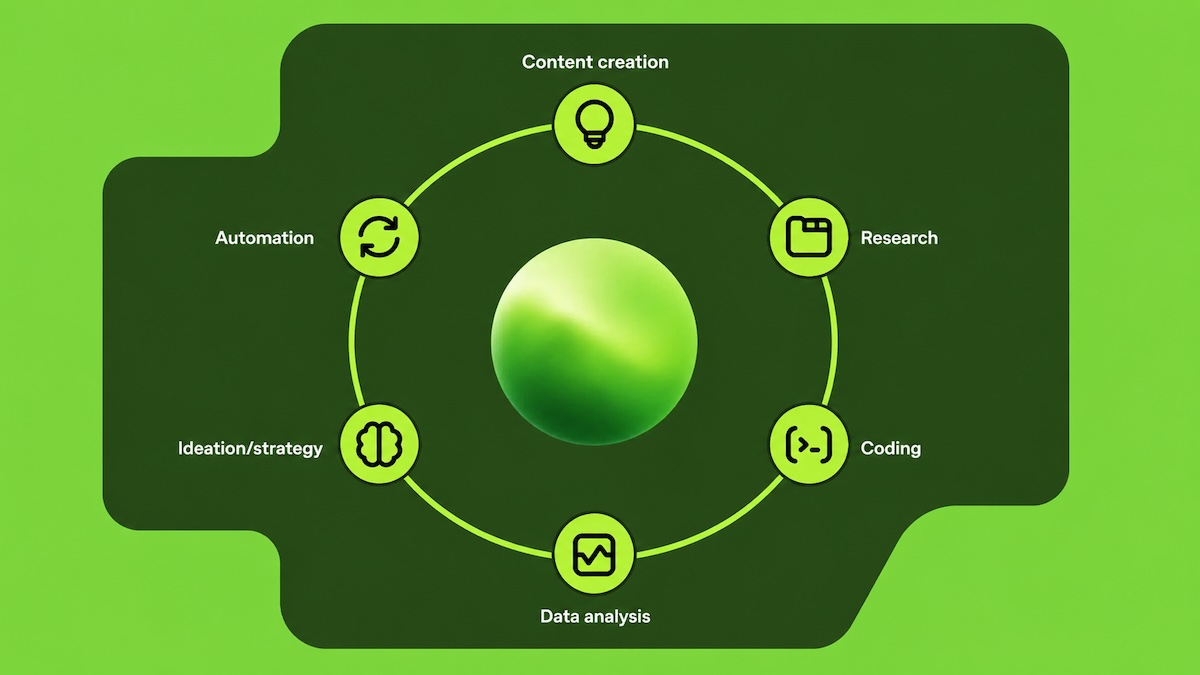
As a result, Generative AI is taking a lot of work out of the hands of those using it: one in two respondents in our Generative AI at Work study said Gen AI helps them automate Email and Communication, and almost as many (45%) use it for Data Analysis and Reporting. 42% use Generative AI tools for research. Email is the most common entry point, which is why we keep a dedicated guide to AI for email.
Three years on, the use case mix has barely shifted at the top. OpenAI's 2025 guidance shows the same pattern globally: research and information retrieval, writing, and "doing" tasks (analysis, planning, decisions) account for the bulk of work usage.
Generative AI’s adoption has been swift because compared to regular AI, the technology is improving daily, creating many interesting use cases, and as experts say, is more "consumer-friendly."
This made it so that choosing AI tools in companies moved from being a tech matter done by the CIO to managers across departments using these tools as an alternative to traditional employee management software.
Microsoft's 2024 Work Trend Index put 75% of knowledge workers using AI at work, with 78% bringing their own tools (BYOAI). Two years later, BYOAI is still the default: most companies still don't have a sanctioned AI stack, and employees aren't waiting. The risk for security teams hasn't gone away; it's gotten louder.
ChatGPT
I’ve been speaking a lot about ChatGPT, so what is ChatGPT, actually?
ChatGPT is a chatbot developed by a startup called OpenAI (which most people learned about thanks to the Sam Altman firing & rehiring.)
ChatGPT, which stands for Chat Generative Pre-trained Transformer, is built on OpenAI’s language models and has been made even smarter with additional learning methods.
Give it a question, and it will answer based on more data than any human can ever process.
Doesn’t Google do this, too? Well, no. Google unlocks information by matching your search keywords to web pages containing information about that topic.
ChatGPT gives you a full answer in human(-like) language rather than just links. It’s like talking to someone who has read the entire internet.
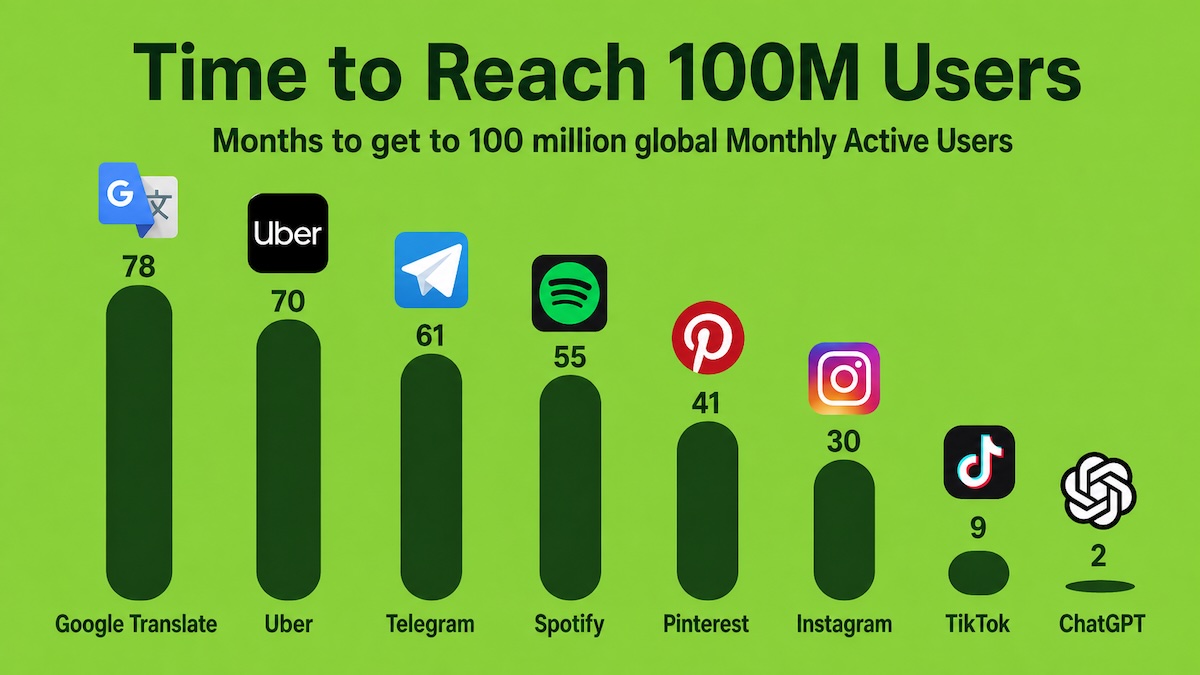
And the public agreed: ChatGPT garnered 1 million users within the first five days of its release, and to 100 million not long after.
ChatGPT was the fastest ever to reach 100 million monthly active users
And as early as July 2024 Report on the Top 100 AI tools for Work, ChatGPT became the undisputed leader in Generative AI:
Today, ChatGPT is not only accountable for over 67% of all Generative AI traffic and searches, it's even bigger than Netflix, Microsoft, Reddit, TikTok, and The New York Times.
It's making its way to the workplace, too.
In our 2023 study, “Generative AI at Work," 75% of knowledge workers in the US said they have heard of ChatGPT. This climbs to 81% of users and 84% amongst Gen Z and Millennial users.
For a tool that’s only been in the market for a year, 75% awareness amongst all ages and industries was incredible. Now, as mentioned above, it's near universal with 1 billion weekly active users. (more ai statistics here.)
But to understand its overwhelming and transformational impact (in case you got used to GPT's power already), take a look at when an earlier version was demoed at TED.
After OpenAI co-founder Greg Brockman explains how ChatGPT works in his TED Talk "The Inside Story of ChatGPT's Astonishing Potential," the Head of TED, Chris Anderson, comes onto the stage, visibly befuddled.
"Oh my goodness, pretty much every single thing about the way I work, I need to rethink," Chris says. "Who thinks that they're having to rethink the way that we do things?," he asks the audience.
Yeah. That’s definitely still the case, and more so than ever.
And, it's no longer only ChatGPT. Claude has surged in enterprise; Gemini is now built into every Google Workspace seat; Microsoft Copilot sits inside Office. And it's not either-or: most AI-savvy leaders in 2026 use two to three AI tools weekly, not one.
From Assistants to Agents
The biggest shift in workplace AI since 2024 isn't a smarter chatbot. It's that the chatbot started doing things on its own.
AI agents follow multi-step workflows: book the meeting, pull the data, draft the email, file the expense, run the analysis, without you stitching it together turn by turn. Microsoft's 2025 Work Trend Index calls organizations that have rebuilt around agents "Frontier Firms," and Bain's 2025 Technology Report named the assistant-to-agent shift the next widening gap between AI leaders and laggards.
A second standard quietly enabled this: the Model Context Protocol (MCP), which lets AI tools plug into your real systems (calendar, email, CRM, Drive) the way USB lets devices plug into a laptop. The result is that AI is moving out of the chat window and into the actual flow of work.
Now, with tools like Claude Cowork and ChatGPT Work, anyone can launch the AI version of digital employees. If you want to build these for your own team, that is exactly what our Agentic AI course covers.
Hallucinations and other AI Risks
ChatGPT and many others suffer from hallucinations, making up facts.
Hallucinations are when AI confidently generates inaccurate information in response to a user question and has no built-in mechanism to signal this to the user or challenge the result.
They happen because of insufficient or biased training data, or incorrect assumptions the model makes.
These hallucinations can have real and damaging impacts, for example, by confirming bias, spreading misinformation, or falsely making someone believe a benign skin lesion is cancerous.
There have been instances where AI-generated content has led to problems.
For example, a lawyer used ChatGPT to prepare a filing in a routine personal injury lawsuit. However, the AI presented fake cases, which the attorney presented to the court. This resulted in the judge considering sanctions against him. Whoops.
Forrester's prediction that hallucination insurance would become a real product line was early but directionally correct: by 2026, several large carriers offer AI liability coverage as a standard rider.
Adopt a multi-model approach, leveraging tools like ChatGPT, Claude, and Perplexity to cross-verify information.
Establish rigorous fact-checking protocols.
For more tips, check out my guide on Preventing AI Hallucinationsand join Lead with AI PRO, our community of business leaders embedding (error-free) AI in their work, teams, and organizations.
Prompt Engineering
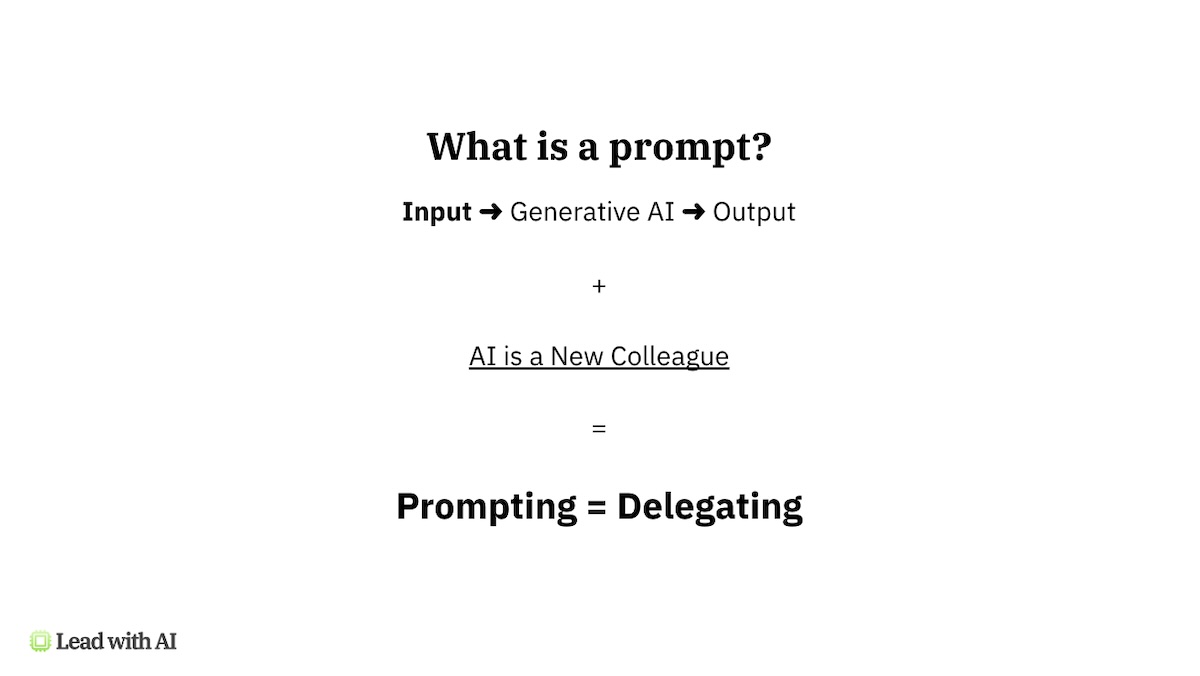
Prompting is the input for generative AI to create its outputs.
Prompting is delegating
The best way to think about, as you get the most out of Generative AI if you treat it like a coworker, not software, is that prompting is like briefing your colleague.
This means, the better your inputs, the better the outputs.
This is why simple prompts, like "write me a social media plan," don't result in great outputs. While AIs like ChatGPT know everything in the world, this prompt doesn't provide it with enough context to output great work.
This is why more people than ever study prompt engineering.
Prompt engineering is about crafting inputs to AI models to get better outputs, a key skill for getting the most out of AI tools.
CO-DO SuperPrompting
CO-DO SuperPrompting
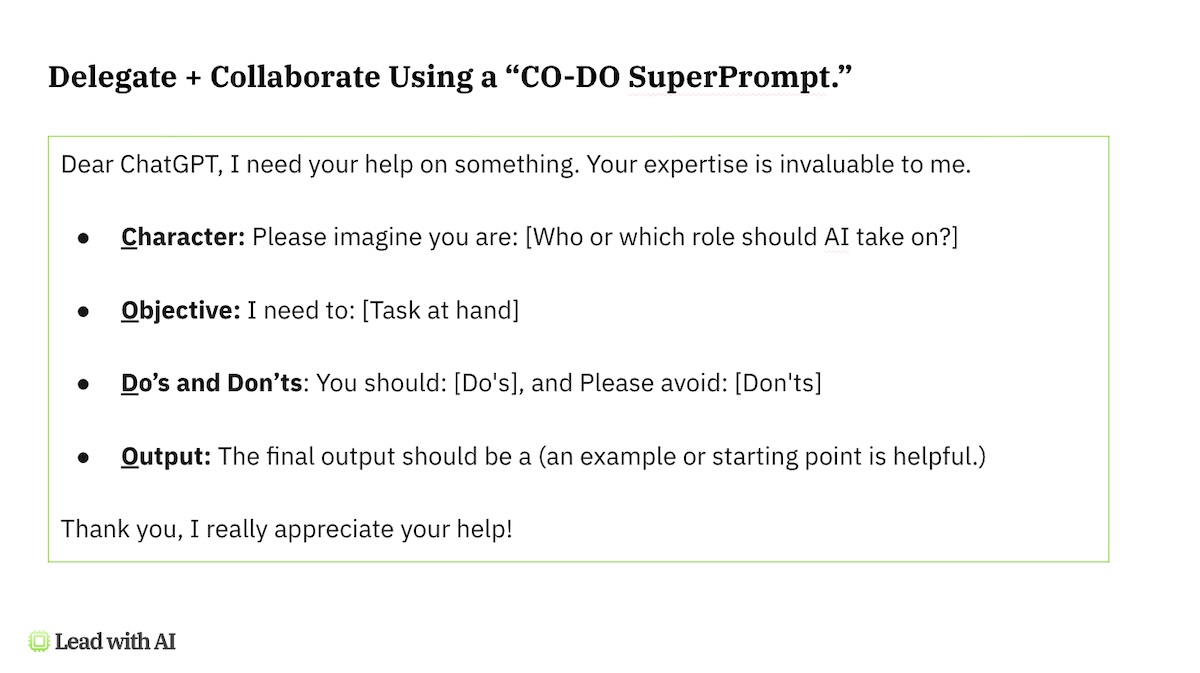
CO-DO Superprompting is one technique that forces you to think through the context required for AI to generate great work in line with your expectations.
CO-DO stands:
Character: Please imagine you are: [Who or which role should AI take on?]
Objective: I need to: [Task at hand]
Do’s and Don’ts: You should: [Do's], and Please avoid: [Don'ts]
Outputs: The final output should be a (an example or starting point is helpful.)
It provides a structure for creating prompts and ensure you provide enough context for the AI to have what they need to successfully execute your briefing. For the full breakdown, see our CODO prompting framework guide.
But you definitely don't have to stop your prompting journey there. Chain of Thought Prompting (CoT Prompting) is another useful method.
CoT Prompting breaks down complex questions into steps, guiding the AI through a reasoning process.
For a business problem, you might have the AI outline the issue, analyze solutions, weigh pros and cons, and recommend actions. This improves response quality and shows how the AI reached its conclusions.
Workers who use AI on professional tasks save 40 to 60 minutes per day, with heavy users saving 10+ hours per week (OpenAI enterprise data, 2025).
Roles requiring demonstrated AI skills command 15–30% salary premiums over the same roles without.
81% of AI users in our research say they see increased productivity (FlexOS).
AI leaders see EBITDA gains of 10–25%, while laggards fall further behind (Bain Technology Report 2025).
That's not to say that there aren't challenges as well.
No matter how valuable the technology, with proper training and a people-centric approach to AI transformation, impact is usually low. A 2026 study from the National Bureau of Economic Research shows that for 90% of firms, AI has had no impact on employment or productivity.
As I wrote recently on the incentives of AI transformation, this is often because AI usage is up, but mostly as isolated use cases, people don’t feel safe sharing wins (or failures), training is shallow or one-off (BCG: Only 36% of employees feel adequately trained), and nobody redesigns workflows because nobody has the space. Closing that gap is what our OVER framework is built for.
Which LLM Should I Choose?
The "best LLM" question doesn't have one answer in 2026.
Each frontier model is now strong enough that the bigger question is which fits your stack and use case. (For real-time benchmarks, Vellum's LLM leaderboard is the cleanest live reference.)
The current frontier (April 2026):
ChatGPT (OpenAI): GPT-5.6 leads agentic tasks, long-context reasoning (1M+ tokens), and multimodal. The default for most knowledge workers; widest ecosystem of GPTs and integrations.
Claude (Anthropic): Claude Opus 4.8 leads coding (SWE-bench Pro) and nuanced writing. Powers Cursor, Claude Code, and many enterprise deployments. Strongest pick if your team is technical or writing-heavy.
Gemini (Google): Gemini 3.1 Pro leads scientific reasoning, multimodal (video, audio, image), and is the cheapest at frontier quality. The pick if you live in Google Workspace.
Microsoft Copilot: Best for Microsoft 365-native organizations; built into Word, Excel, Outlook, Teams. The model underneath is OpenAI, but the integration is the value.
The decision isn't model versus model anymore; it's about routing the right task to the right model.
Most senior leaders we work with use two or three: ChatGPT for agents and broad use, Claude for writing and skills, Gemini or Copilot inside their existing suite.
For the latest data, please visit our article on the Top 10 AI Websites.
Flagship AI Newsletter
The AI Newsletter That Makes You Smarter, Not Busier
Join over 30,000 leaders and receive our insights on AI platforms, implementations, and organizational change management.
Want to reach 30,000+ business leaders applying AI in their work, teams, and organizations? Advertise with us.
Which AI Tools Should I Use at Work?
There are many AI tools beyond the top AI websites like ChatGPT and Claude that are worth trying out. And, if you’re anything like me, you may be hooked forever.
Below are my recommendations for some must-try AI tools that hopefully will fix the digital overload we all face nowadays.
AI Productivity Tools
Let me start with tools that will make you especially more productive.
Because starting your day without sorting through a mountain of emails and sitting in meetings for the rest of it is something we’d all love.
AI tools that will help you improve productivity include:
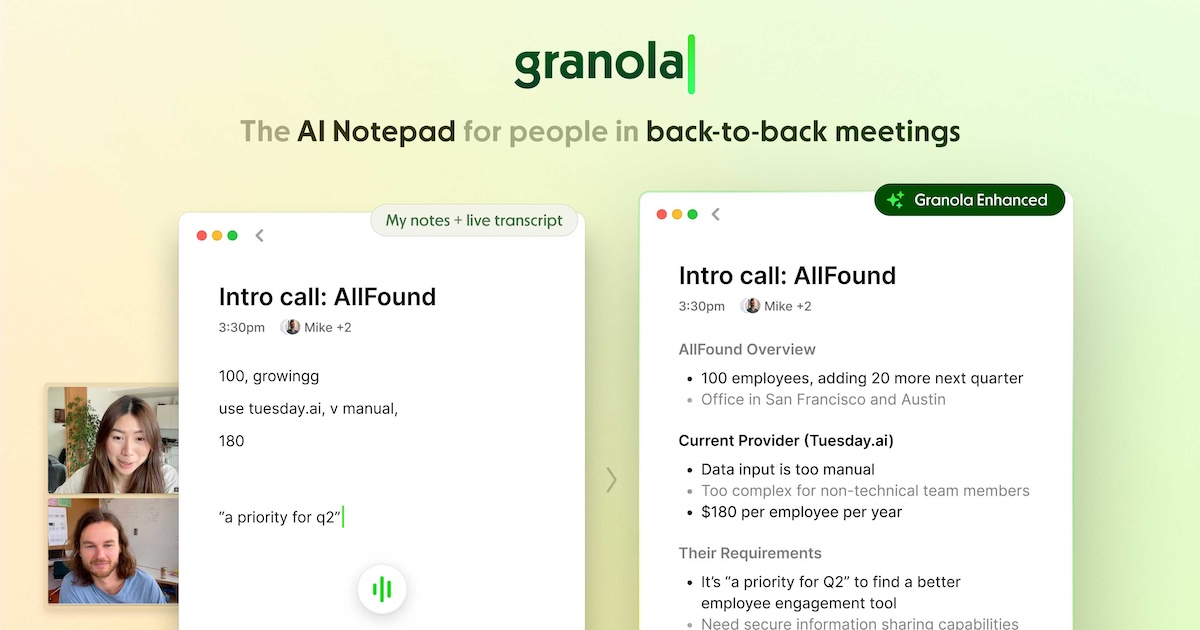
Granola. A meeting note-taking app that attends meetings on your behalf, transcribes them, recaps them, and sends action items. (You can skip this if you already have access to Zoom AI, Microsoft Copilot for Teams, or Gemini for Google Meet.)
ClickUp. A planning tool that got a huge AI upgrade. Its AI assistant can quickly generate subtasks, draft emails, and create or summarize documents. A lifesaver.
Perplexity AI. A search engine with AI powers, Perplexity gives you the answers you need without clicking any blue links. It's an amazing way to speed up your research, although all major AI platforms now have this embedded as well. (For academic inquiries, try Consensus.)
Besides getting more productive, AI can also make you work better. These tools are the best in class for their task, like writing or generating images. My picks:
Writing: While OGs like Copy.AI. still get used, most leaders now use ChatGPT and especially Claude directly for writing, as they're able to innovate and improve faster than anyone. See our roundup of the best AI writing tools for executives.
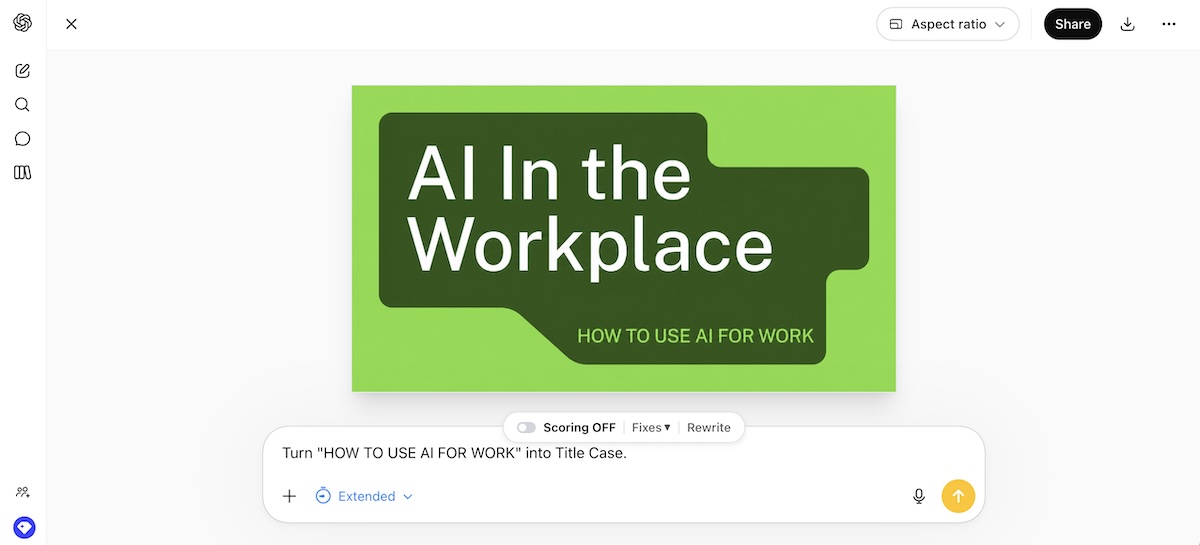
Creating Images: Similar to with writing, the core platforms, especially the new ChatGPT Images 2.0 and Nano Banana Pro on Gemini outcompete specific platforms, although real creatives still often go to Midjourney and Ideogram for specific features.
Creating Marketing Visuals: Canva AI Image Creator. Compared to other AI websites, Canva AI has deeper features, workflow support, and integrations that make a must for especially marketers.
Creating Presentations. Gamma AI. For creating presentations, Gamma AI is your new go-to as one of the most popular AI PowerPoint generators. If you have Microsoft Copilot for PowerPoint or Microsoft 365, or Gemini in Google Slides, you can find many of Gamma's features embedded in your existing (web) apps).
Researching: Perplexity.AI. Often called the “New Google,” Perplexity combines ChatGPT-style intelligence with sources and insights on key topics. If you need to research something, Perplexity-it. (OK, Googling still sounds better.)
Which AI Tools Should I Work Specifically to My Role?
Experts demonstrated early on that with good prompts, GPT-4 (not specifically trained in medicine) beats the best medical LLM, Med-PaLM 2, in answering medical questions.
Two years on, the embedded-vs-standalone tension has tipped decisively toward embedded.
The biggest shift in role-specific AI is that the major platforms now ship AI inside the workflow, Bloomberg for traders, Salesforce Agentforce for sellers, Adobe for designers, GitHub Copilot for engineers, rather than asking users to context-switch into a chatbot.
In many industries, people will likely use existing software rather than toggle between the software they use for work and ChatGPT.
Here are some other examples and tools to check out:
"Selling is interaction and transaction-intensive, producing large volumes of data, including text from email chains, audio of phone conversations, and video of personal interactions. The models are designed to work with these types of unstructured data. The creative and organic nature of selling creates immense opportunities for generative A.I. to interpret, learn, link, and customize."
According to Salesforce research, high-performing sales teams are already 2.8x more likely to use A.I. than underperformers, and CEO Marc Benioff said in late 2025 that AI now handles up to 50% of work at the company, and as a result, customer support headcount has been cut from 9,000 to about 5,000.
Sales teams can use AI to automate everyday sales tasks, such as generating sales strategies, sourcing leads, creating outreach, answering emails, scheduling meetings, sending follow-ups, and negotiating deals.
Sales Development Representatives (SDRs) spend over 60% of their time performing manual and administrative tasks that can easily be automated. With newer tools, AI can take over more 'human' tasks like coaching salespeople.
Some tools to consider include:
AgentForce is Salesforce's approach to creating virtual SDR "agents" that work autonomously.
Grammarly AI creates personalized, persuasive messages and replies and writing coaching
Reclaim intelligently schedules meetings without the back-and-forth
ChatGPT Voice helps you rehearse the most important discussions
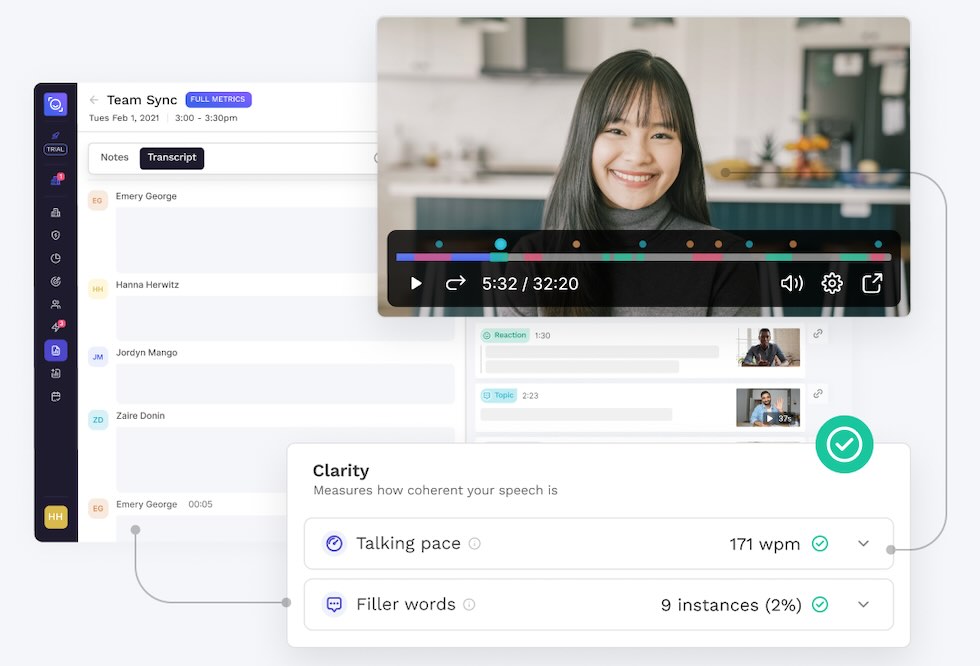
Read AI coaches sales calls by highlighting when to slow down or objections (and solutions) (pictured)
My previous field of marketing (I spent almost 10 years at advertising agency Ogilvy) is one of the earlier adopters of AI, and for good reason.
Besides the hours of admin work (especially for those in client management), advertising has a lot of repetitive tasks where AI can play a handy role.
Looking at all the tools available now, I wish I entered the field 10 years later!
For most general marketing tasks (writing, editing, research, brainstorming), ChatGPT and Claude outperform any specialty tool. But from brainstorming creative ideas to analyzing data and creating content, workflow-specific AI marketing tools still reduce workload, boost efficiency, and ensure consistency.
Several companies have successfully implemented AI Recruiting platforms to enhance their recruitment process such as Electrolux, Cigna, Brother International Corporation and Stanford Health Care.
AI recruiting software offer innovative solutions to traditional hiring challenges by automating mundane tasks, enhancing candidate experience, and improving the quality of hires.
From personalizing candidate engagement to ensuring unbiased selection, AI in recruitment lets people-centric and forward-thinking recruiters and hiring managers focus more on the human aspect of hiring, which is what we need.
Below are some of my picks for AI recruiting tools to improve the hiring process:
Textio: for writing and optimizing job descriptions
According to Mordor Intelligence shows that AI in accounting could become a $6.6 billion market by 2029.
Even in 2026, the accounting and finance industry have started incorporating AI, although due to obvious concerns, it is still early days.
While Claude and ChatGPT now have native Excel plugins, and Copilot for Excel and Gemini for Sheets are continuously evolving, there are some great stand-alone tools too:
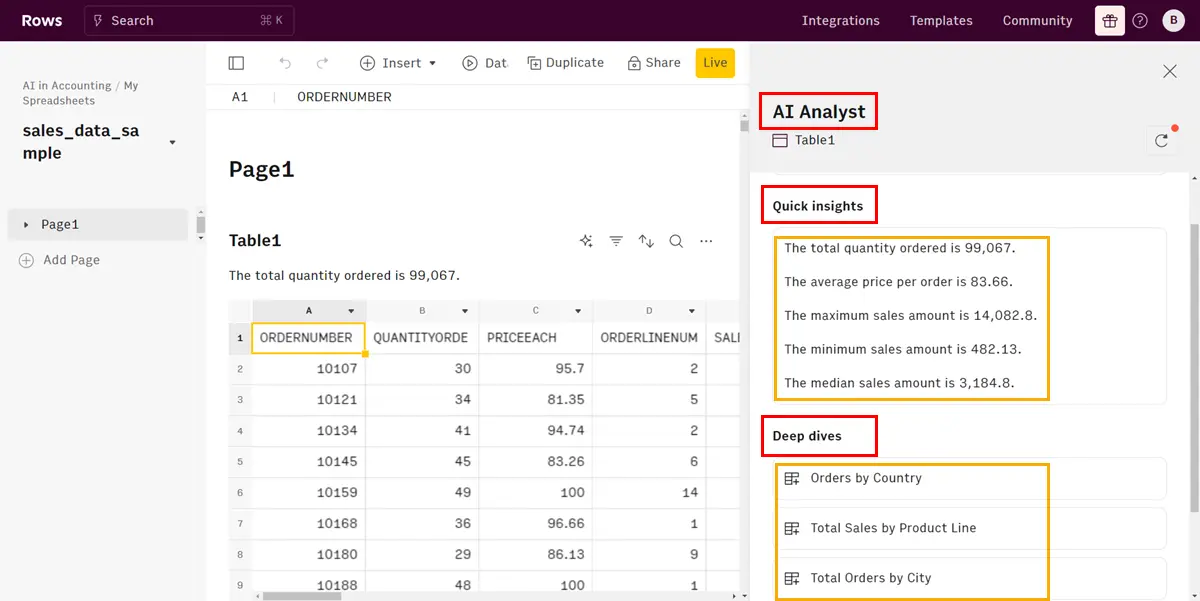
Rows AI: advanced data analysis of accounting spreadsheets
Bill: optimizes AP processes and invoice management
Receipt-AI: speeds up receipt scanning and data entry
For more, check out our complete guide to AI AccountingTools
What Are the Barriers to More Companies Adopting AI?
AI makes sense for work. A lot of sense.
"Having people do routine tasks that A.I. can do is not an option. We will need technology to do the mundane work so people can do higher-value work," said IBM CEO Arvind Krishna
If AI has so many benefits, why aren’t more companies already using AI?
As I wrote in “Three Barriers to AI Adoption,” the reason is, as you may have guessed, threefold. I'll share those, and two more:
The number one reason to not use AI is a “Lack of Relevance or Necessity,” with respondents saying, "My job doesn’t require it,” "no need for them with their current abilities,” and "I don’t know how they would help me with my job.”
And even personal usage and conviction don’t mean that companies have adopted AI as well.
In fact, “Workplace Restrictions and Unavailability” is the number two reason for people not to use AI, with responses such as "the company would rather not," "they haven't been introduced yet in our office," and "our organization doesn't use them at all.”
2. Companies aren't digitized enough for AI to be truly advantageous.
Only when companies are highly digitized can we fully reap the benefits of AI.
This means company leaders have a big job to do to get all their proprietary data into (custom) LLMs.
As Harvard Business School professor Karim Lakhani says:
"Digital transformation and A.I. are the same things. You need to have data streams ready – the digitization imperative only increases as companies without data won't benefit."
McKinsey's Lilli is a great case study of the opportunities of knowledge management meeting AI. The consultancy created its own AI from decades of client reports and research that only its team can access.
Future of Work Strategy Leader Phil Kirschner recently recounted how Lilli helped him prepare a presentation with such unique ideas that would not have been possible without AI and McKinsey’s commitment to knowledge management.
In the future, companies’ proprietary data sets and how their teams unlock through AI will be a major competitive advantage.
3. Data and Privacy Issues
Privacy and Trust have emerged as new reasons companies do not embrace AI.
The third-most mentioned reason in our study about Generative AI adoption is Privacy and Trust.
A notable number of responses express distrust or concern for privacy, highlighted by statements like "I don’t trust it to protect my privacy" and simply "I don't trust it."
Companies agree: they’re scared to death employee or customer data would leak by uploading it to an LLM.
It’s why many companies, especially those in heavily regulated industries like finance, government, defense, and healthcare, have said no to Generative AI so far. This includes Apple, Amazon, JPMorgan Chase, Northrop Grumman, and Citigroup.
“2024 opens with a gift to corporates. The new ‘Team’ version of ChatGPT removes the number 1 reason so many of you have not been making the most of Generative AI - not wishing to upload anything proprietary into the open bucket of OpenAI.”
The privacy objection now has fewer legs than it did in 2024, but BYOAI is still rampant, which means the practical risk has just shifted from "no enterprise option exists" to "people aren't using the enterprise option."
Gaps Between Executives and Employees
But there's one more challenge preventing companies from adopting AI: executives see the promise of AI very differently from their employees.
In my interview with Rebecca Hinds, Ph.D., Head of The Work Innovation Lab at Asana, she shared that according to Asana research, there are three big gaps between how executives and individual contributors view AI:
Optimism Gap: Executives see the promise and potential of AI more than Individual Contributors do.
Transparency Gap: Executives think they are more transparent in using AI than they are according to individual contributors.
Resource Gap: 25% of executives say they provide AI training, but only 11% of ICs agree.
Leaders must close these three gaps to gain the benefits of AI in organizations.
Executives are bullish on AI compared to individuals contributors
But she also told us about the great potential that’s around the corner for companies who do adopt AI:
“To fully harness the potential of AI, it will take concerted effort—rigorous upskilling and reskilling programs, intentionality, and a strategic approach. But the promise is there. Generative AI could revolutionize our workspaces, transforming these tools from simple efficiency boosters to partners in our journey toward greater creativity and skill mastery." – Rebecca Hinds, PhD., Head of The Work Innovation Lab, Asana
The gap is widening, not closing.
A 2026 Financial Times poll of 4,000 workers found that the highest-paid and most senior workers are adopting AI in their daily jobs much faster than junior peers — partly because they have better access to paid tools, dedicated training time, and the autonomy to experiment. The result is a compounding career mobility gap that will reshape promotions and pay through the rest of the decade.
What Trends Will Shape AI in 2026 and Beyond?
As AI advances so quickly, it's hard to predict what 2026 has in store for us. But it's safe to say that we'll at least see:
The Frontier Firm.Microsoft's 2025 research identifies a new org type built around AI from the inside out, with org-wide deployment, agent integration, and an AI maturity index. These are the first true AI native organizations. Expect this to become the dominant org design conversation through 2027.
Agents replace apps for routine work. Booking, scheduling, expensing, status reporting, basic research — these are moving out of SaaS interfaces and into agent flows.
Multi-model as the default. No single model wins every task. Routing layers, not chatbots, are where enterprise value sits.
What is AGI, and How Close Are We?
Artificial General Intelligence (AGI) refers to AI systems with cognitive ability that matches or exceeds humans across virtually every economically valuable task. The goalposts move constantly, but the consensus among major lab leaders has shifted significantly since 2024.
NVIDIA CEO said that for all intents and purposes, AGI is already here.
For workplace leaders, the practical question isn't "when does AGI arrive?", it's "what do I do with the systems we already have, while they're getting more capable every quarter?"
The frontier models of 2026 already match or exceed average human performance on most professional benchmarks. The work isn't waiting for AGI; it's adapting to AI that's already here.
What Jobs Will AI Replace and How?
Even without AGI, AI can perform tasks that usually required our brain power, like processing language, recognizing patterns, and decision-making.
And thanks to ChatGPT’s widespread adoption, AI is more accessible than ever.
Generative AI is so powerful that it will change work forever, potentially impacting and eliminating hundreds of millions of jobs.
What could that look like?
AI Godfather Geoffrey Hinton thinks AI will make people focus more on the creative end of jobs. Like when ATMs were introduced, bank tellers focused on more complicated things.
In my 2024 predictions, I shared takes from known VCs who believe the first 3-person unicorn – a startup valued at over $1 billion, will become a reality soon.
This has led to increased efficiency as AI performs everyday tasks like taking meeting notes, sending emails, and writing documents (tasks that take up to 60% of our time and are the leading causes of our digital overload.)
That’s the good news.
The bad news is that many jobs become redundant as AI improves at taking over our work. Especially once AIs can train and manage their own AIs (also known as AutoGPT.)
First, we need fewer people to do the same amount of work, causing a marketing team to downsize by 50%. Then, there will be roles that are completely unnecessary because AI can do them.
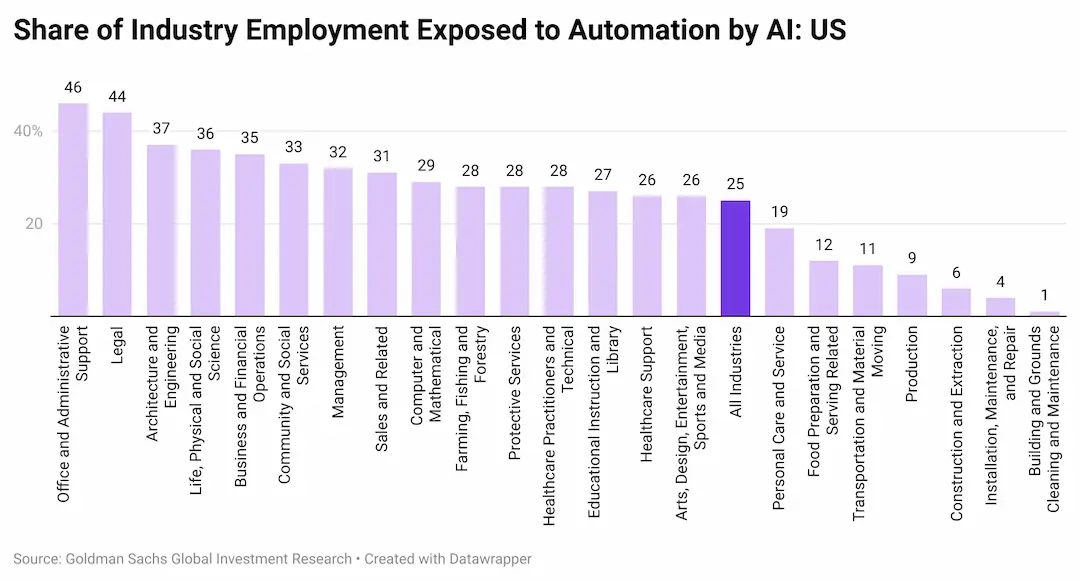
According to Goldman Sachs, roughly two-thirds of jobs will be affected by AI, eventually eliminating 300 million full-time jobs, or 18% of jobs globally.
The exposure is enormous; the actual displacement so far is much smaller, which is exactly the gap that creates both opportunity and uncertainty for workers and leaders right now.
The World Economic Forum’s "Four Futures" key insight is that AI will not simply destroy work, but recompose it: by 2030, 22% of jobs are expected to be disrupted, with 92 million roles displaced and 170 million new ones created, producing a net gain of 78 million jobs.
The real challenge, then, is not mass unemployment alone, but mass transition. Workers, teams, and companies will need to move from routine task execution to higher-value work: judgment, creativity, problem-solving, human relationships, and AI supervision.
That’s why the future worth fighting for is not an AI economy that replaces people wherever possible, but a Co-Pilot Economy that uses AI to make people more capable before it makes them redundant.
Jobs AI Will Replace
Jobs AI will replace include especially jobs with administrative and legal tasks, according to Goldman Sachs, but that’s far from the only category:
AI will disproportionately affect higher-paid jobs, counter to what’s been happening in the 21st century when automation mostly affected blue-collar jobs. As reported by Wired:
"Studies by Oxford and McKinsey had predicted that lower-wage, lower-skill jobs would be hardest hit, as indeed they have been throughout the entire history of automation going back to the steam-powered weaving loom.
The conventional wisdom is now that higher-paid jobs and creative jobs (including mathematicians, tax preparers, quants, writers, and web designers, to name a few) are the most highly exposed to automation (100 percent exposure for the professions just listed.)."
More specifically, AI could replace:
Coders. Salesforce announced it would not hire any new software engineers in 2025, citing AI coding productivity gains. Hiring for entry-level engineering roles has slowed measurably at firms that adopted AI heavily. Anthropic says that AI now writes all of its code.
Customer service representatives. If you’ve used the Voice function on the ChatGPT app, you know fully AI’d customer service can’t be far away. AI can provide quick and accurate answers at a fraction of the cost. Already boosting the performance of lower-skilled employees by up to 35%, AI may soon be capable of handling all help desk questions.
Designers. The progress of image-generating tools in just one year is astonishing. It’s not hard to imagine that anything you can, well, imagine, AI can produce. Because of this, game designers and photographers (see: This Model Doesn’t Exist) may also find themselves out of a job fairly soon.
Writers: The obvious one in this list is that AI will heavily affect writers. The New York Times shared that AI-powered assistants like ChatGPT can perform writing more efficiently than humans. Multiple publishers experimented with AI, including CNET (which failed partially), Buzzfeed, and many others. Industry publication Publisher Weekly concluded: “It’s too late to avoid AI.”
Companies that have started reducing jobs due to AI
Some companies have already started to hire less people or even downsize due to AI.
Klarna: The cautionary tale. After CEO Sebastian Siemiatkowski announced AI was doing the work of 700 customer service agents, the company reversed course in 2025 and started rehiring humans, citing "lower quality" outcomes.
July: Atlassian cut several hundred customer service and support roles, with reporting that some of the work would be replaced by AI.
December: Salesforce cut ~4,000 customer support jobs after CEO Marc Benioff said AI now handles ~50% of work; an additional ~1,000 cut in early 2026.
If you’re on Lead with AI, chances are you are a modern, people-centric, and tech-savvy leader. Well, for good or bad, AI is coming for you.
Because if work changes, management changes.
With my favorite definition of the word being that management is "getting work done through other people," how people do their job significantly impacts what management will be like.
When individual contributors are supercharged by AI and less work to be traffic controlled, managers will likely pivot towards coordination and coaching.
And that’s good, because even though we all know why managers are important, they are overloaded and burned out. According to 2023 Humu research, managers have "TWICE the attrition risk compared to other employees and a 25% increase in burnout.”
And the 2026 Gallup engagement data underscores this: leaders are substantially more likely to experience stress (+7 points), anger (+12 points), sadness (+11 points), and loneliness (+10 points).
Of course, if AI does a bit too well, we may not need managers at all. As ChatGPT told me: “If AI is capable of doing most of what human managers do, it's possible that AI systems could take on the role of managing human workers.”)
Microsoft's 2025 Work Trend Index found that 35% of managers are considering hiring AI trainers to guide adoption in the next 12–18 months. The role of "manager" is bifurcating: traditional people management on one side, and AI-coaching/agent-orchestration on the other. The leaders who do both well are the ones building Frontier Firms.
For a more in-depth look into this topic, check out my article AI in Management: How Artificial Intelligence Will Transform Management
AI’s Impact on the Job Market and Salaries
According to research from LinkedIn, AI job postings more than doubled between July 2021 and July 2023, while applications for AI roles rose by 19% in the US and 11% globally.
AI literacy is now the #1 most in-demand skill of 2025, per LinkedIn, a category that didn't even exist as a tracked skill three years ago. AI-related skills now appear in roughly half of all job postings on LinkedIn for knowledge work, and demand growth continues to outpace supply.
But it’s not just AI. As Karin Kimbrough, LinkedIn’s Chief Economist, commented, AI will impact jobs in all industries:
“The transformative effect of Generative AI on the workforce will have been seen far beyond the Technology industry alone. Nearly every industry will be impacted to some degree - most notably Retail, Wholesale, Financial Services and Professional Services.” – Karin Kimbrough, Chief Economist, LinkedIn.
The top five in-demand AI jobs that pay over $100,000 include Supply Chain Specialist, Sustainability Manager, and Sales Manager – not at all tech jobs. And many of them can be done from home, too!
A 2023 Amazon study found employers willing to pay 47% more for employees with AI skills. 2026 compensation and labor-market data show that AI skills can command meaningful salary premiums: Lightcast found a 28% salary premium in job postings requiring AI skills.
Change Management for AI: Successfully Rolling Out AI Initiatives
There are a few ways to speed up AI adoption:
One CEO made ChatGPT the first page to load when opening Chrome for all employees
Another made A.I. accomplishments part of monthly celebrations.
Professor Tsedal Neeley told HBR that organizations must ensure people fully understand the technology and create "A.I. fluency."
Another Microsoft advice, therefore, is to train frequently.
"Leaders we surveyed said it's essential that employees learn when to leverage A.I., write great prompts, evaluate creative work, and check for bias. As A.I. reshapes work, the human-AI collaboration will be the next transformational work pattern—and the ability to work iteratively with A.I. will be a crucial skill for every employee."
A few more tactics that consistently move adoption:
Separate adoption from transformation. Adoption gets you individual gains of 20 to 40 percent and spreads on its own. Transformation targets 3x to 10x by redesigning the work itself, job descriptions included.
Redeploy, do not discard. When AI takes over part of a role, treat it as a signal to move people into higher-judgment work, not a reason to cut headcount.
Answer job-security questions honestly, not reassuringly. When people ask whether AI will take their job, the credible answer is the honest one, paired with a real commitment to make them elite AI-supported professionals.
One of the most reliable ways to scale this is to build AI champion programs and pair them with structured team AI training. These are just a handful of the tactics that work. For the complete playbook, see our full guide to AI change management, with 58 tactics for rolling out AI without triggering resistance.
What about Women and AI?
A conversation not enough people have is about Women and AI.
Because while conversations about AI on LinkedIn increased by 70% in the past year, they are predominantly driven by men, with 58% participation, compared to only 31% by women.
According to the study, men are more inclined to learn AI skills than women, up to twice as much in markets like Italy and the UK.
According to our "Generative AI at Work" survey data, it was found that while 57% of all respondents use Generative AI tools at least once a month on average, only 45% of women use them.
Additionally, the survey revealed that men use Generative AI much more frequently than women, with men being twice as likely to use the technology on a daily basis.
The "why" matters as much as the gap itself. Research from the Harvard study found women are about as optimistic as men on AI's time-saving potential, but they face higher adoption frictions, especially around training, and they are more concerned about being judged for "cheating" by using AI.
Even when access is fully equalized (a Kenya field study controlled for this), women are still ~13% less likely to engage with the tool. The gap isn't access; it's permission, training, and culture. Closing it is a leadership job.
The Bottom Line: AI in the Workplace
AI has fundamentally transformed how knowledge work gets done, and 2026 is the year the gap between those who use it well and those who don't became impossible to ignore.
A few key takeaways:
AI in the workplace is the default, not the edge case. 92% of Fortune 500 companies use ChatGPT; 91% of organizations use at least one AI tool. The question for leaders is no longer whether to adopt AI, but how to extract real value from it.
The productivity ceiling is real. Most teams see 10–15% gains from AI; leaders who redesign workflows see 25–30%+. The difference is workflow literacy, not better tools.
AI literacy is the most in-demand skill of 2025, per LinkedIn. Yet only 13% of employees have received any AI training. The companies winning are training first, deploying second.
The shift in 2026 is from assistants to agents. AI is moving out of the chat window and into multi-step workflows that book, draft, analyze, and execute on their own. The Model Context Protocol (MCP) is making this real at enterprise scale.
Multi-model is the default. No single model wins every task. Most senior leaders now use Claude, ChatGPT, and Gemini side by side — routing the right task to the right tool.
BYOAI is still the reality. 78% of professionals bring their own AI tools to work. Companies without a sanctioned stack are leaking data, not preventing AI usage.
AI fluency is now a career multiplier. Roles requiring demonstrated AI skills command a 15–30% salary premium. The adoption gap among workers compounds quarter over quarter; closing it now is the highest-ROI career move available.
To stay ahead of AI in less time, consider joining Lead with AI PRO, the membership for leaders, or go deeper with AI Leader Advanced, our hands-on program.
Frequently Asked Questions
What is AI in the workplace?
AI in the workplace is the use of artificial intelligence tools (like ChatGPT, Claude, Gemini, and Microsoft Copilot) to do or accelerate knowledge work. In 2026, that includes drafting emails, analyzing data, summarizing meetings, generating presentations, writing code, and increasingly, executing multi-step workflows on the user's behalf via AI agents.
How many companies use AI in the workplace?
91% of organizations report using at least one AI tool, and 92% of Fortune 500 companies use ChatGPT specifically, with over 7 million enterprise seats deployed by early 2026. Adoption at the individual worker level is more uneven: roughly 75% of knowledge workers use AI, but only ~21% use it in their daily work in a meaningful way.
What's the difference between AI assistants and AI agents?
An AI assistant responds to prompts: you ask, it answers. An AI agent executes multi-step workflows on its own: you give it a goal, it plans the steps, calls the tools, and reports back. Agents represent the biggest shift in workplace AI since ChatGPT launched, and the gap between AI-leader companies and laggards is widening fastest along this axis.
Which AI tool is best for work in 2026?
There isn't one. GPT-5.6 leads on agentic tasks, long-context reasoning, and broad ecosystem. Claude Opus 4.8 leads on coding and nuanced writing. Gemini 3.1 Pro and Microsoft Copilot win inside the Google andMicrosoft environments. Most senior leaders use two or three, routing each task to the right model.
How much productivity can AI actually deliver?
At the individual level, AI users save 40–60 minutes per day on average; heavy users save 10+ hours per week. At the team level, most see 10–15% productivity gains. At the organizational level, leaders who redesign workflows around AI see 25–30%+ gains and 10–25% EBITDA improvement (Bain). The gap between individual gains and business gains is real, and almost always traces back to workflow design.
What's the biggest barrier to AI adoption at work?
The training gap. 77% of employers plan to reskill workers for AI, but only 13% of employees have received any AI training. (Check the best Generative AI courses.) Most adoption failures aren't tooling problems; they're enablement problems. The runner-up barrier is "Bring Your Own AI" creating data security risk for companies without a sanctioned AI stack.
Will AI replace my job?
For most knowledge workers, AI will reshape your role rather than replace it. Translation, marketing consulting, office administration, and graphic design have seen real employment compression. By 2030, the World Economic Forum projects AI will create 170 million new roles while displacing 92 million, for a net gain of 78 million. The workers who stay employed are the ones who use AI to multiply their output; the ones who don't, fall behind AI-skilled peers.
How do I get started using AI at work?
Start with one tool (Claude, ChatGPT, or Gemini), one real work problem you face weekly, and one prompting framework like CO-DO. Use it for two weeks before adding anything else. Most adoption failures aren't from picking the wrong tool; they come from trying to learn five tools at once and never getting past surface-level use. Fluency compounds; collection doesn't.
Flagship AI Newsletter
The AI Newsletter That Makes You Smarter, Not Busier
Join over 30,000 leaders and receive our insights on AI platforms, implementations, and organizational change management.
Want to reach 30,000+ business leaders applying AI in their work, teams, and organizations? Advertise with us.











.webp)