
May 7, 2026

Harness Engineering: AI That Finally Works for You

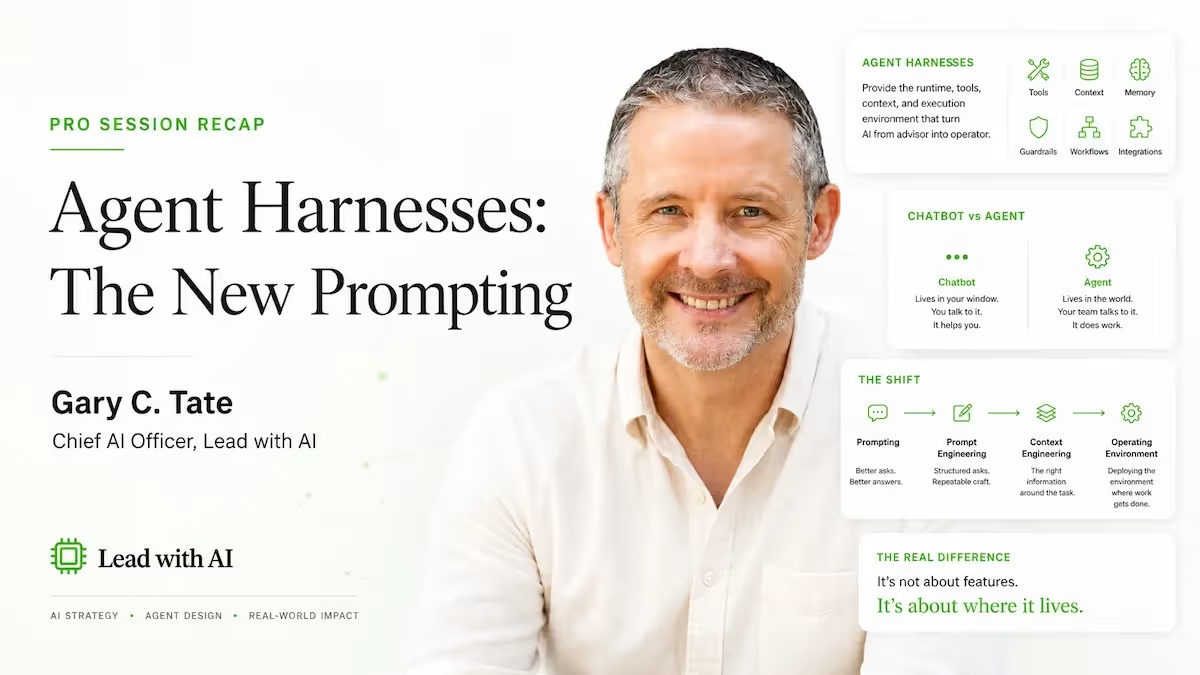
Harness engineering is how senior leaders make AI actually work for them. Gary C. Tate explains the Agent OS framework and where to start building.
Daan van Rossum
By
Daan van Rossum
Founder & CEO, Lead with AI

What Is a Harness, and Why Does It Matter More Than the Model?

Presented by

Byline: Based on the May 6, 2026 Lead with AI PRO live session with Gary C. Tate, Chief AI Officer at Lead with AI and instructor of Agentic AI Applied to Business. Members, watch the full recording here:
Sam Altman recently changed his sleep schedule. He goes to bed, sleeps for four hours, gets up to check whether his agents are running correctly, then goes back to sleep.

As Gary C. Tate told his Lead with AI PRO audience: "They send all the agents off to work, they go to sleep for four hours, and then they have FOMO, they wake up, they sit at their desk for another half an hour, make sure everything's working."

What Altman is checking on isn't the model. It's the harness around it.

And according to Tate, understanding that distinction may be the most important shift a senior leader can make in 2026.

Harness engineering is the practice of designing everything around an AI model: the tools it can use, the memory it can access, the rules it operates by, and the compute environment it runs inside. The model handles the reasoning. The harness handles everything else.

Sam Altman made this explicit in a recent interview with Ben Thompson, which Tate quoted directly:

"It's hard to overstate how critical [the harness] is. I no longer think of the harness and the model as these entirely separable things."

Tate's own framing: "The LLM's in the center, it's the brain, but it's got this power suit on, with hands and grippers and all kinds of stuff. It's got upgraded memory, and it can do all these cool things. All of that's the harness."

What's striking about this moment is the speed of convergence. Tate pointed out that tools built for entirely different purposes -- Notion, Lovable, Replit, Airtable, Perplexity -- are all moving toward the same destination: an environment where agents have access to tools, file systems, and real compute.
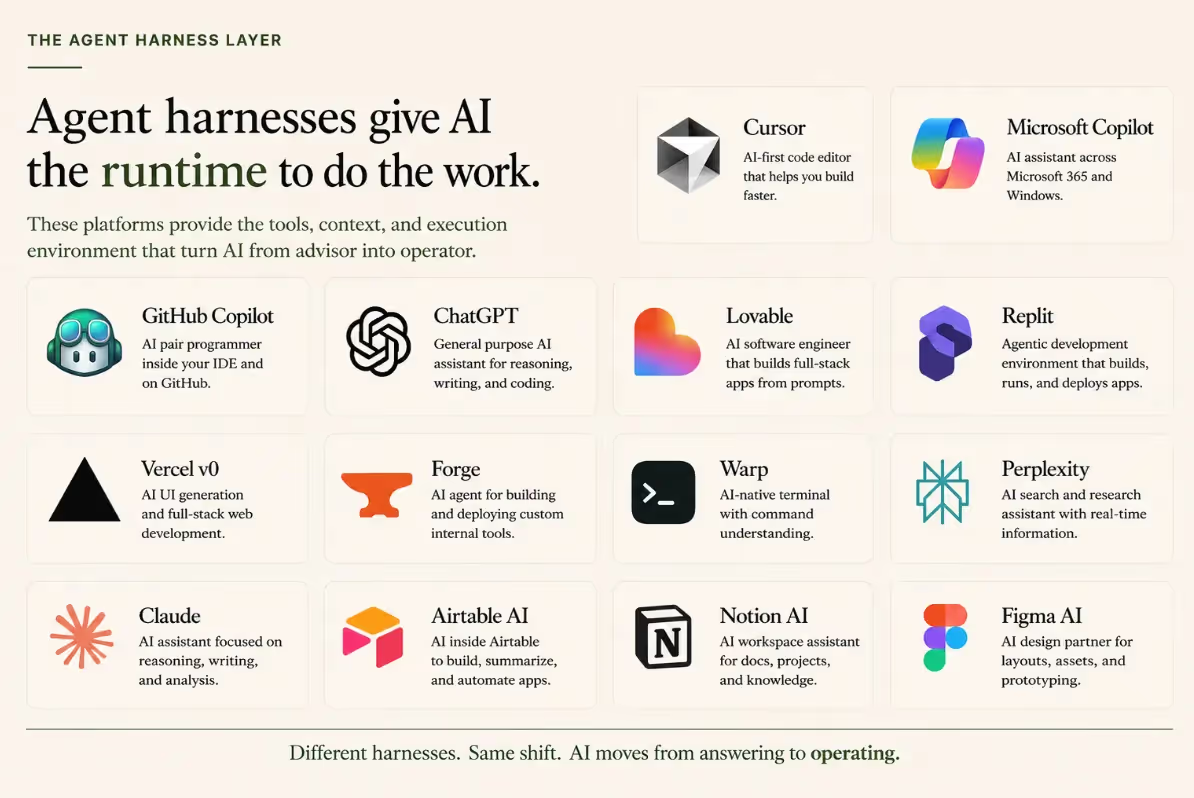
Agent harnesses in ChatGPT, Cursor, Copilot, Lovable, and more

"Everybody's getting in on the game now," Tate said. "There's agents inside, and it's a framework, a harness. It's somewhere where there's agents that have access to resources, tools, and file systems, where they can actually do some work."

He counted 45 agent harnesses currently in the market, with more arriving every week.

Flagship AI Newsletter
The AI Newsletter That Makes You Smarter, Not Busier
Join over 30,000 leaders and receive our insights on AI platforms, implementations, and organizational change management.
FlexOS Course - AI Content Accelerator - Testimonial Badge

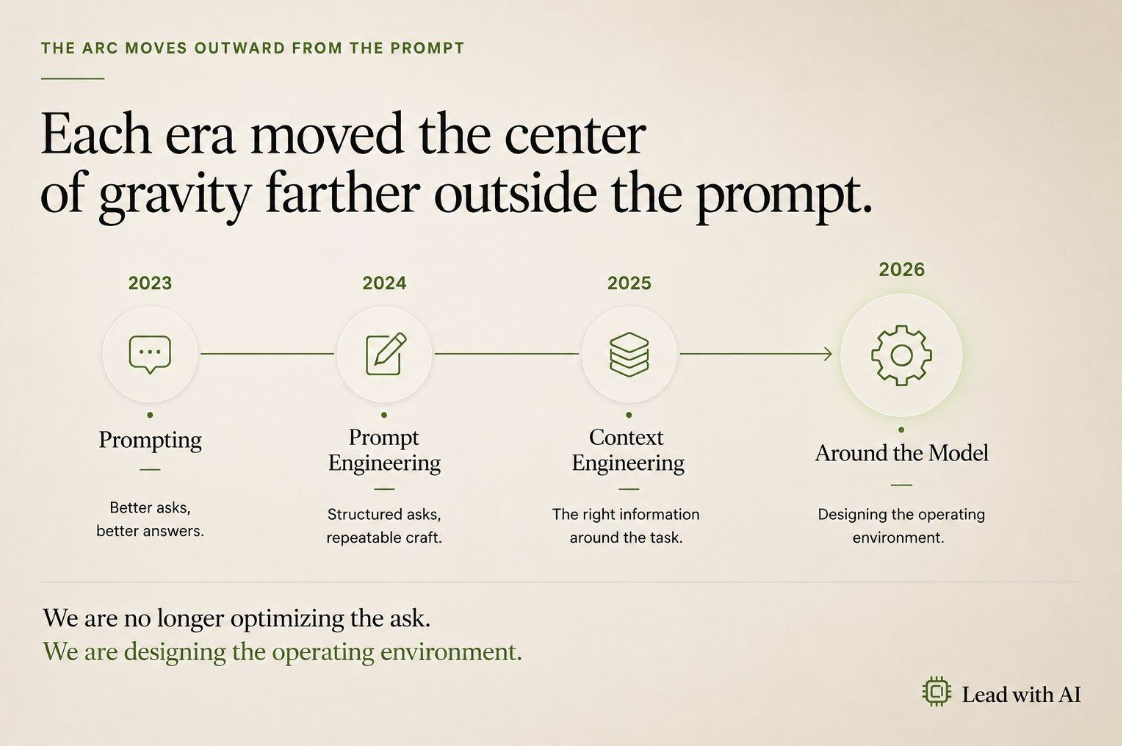
The Four Phases of Working with AI

To understand why harnesses matter now, Tate walked through the evolution of how professionals have worked with AI.

Phase 1: Basic prompting. Ask a question, get an answer, carry the work across the finish line yourself.

Phase 2: Prompt engineering. Add structure, role definitions, constraints, and templates to get consistently better outputs.

Phase 3: Context engineering. Upload files, feed in background information, manage large context windows. Tate was candid about its limits: "I'll have a perfect context window, I'll put everything in there, have a nice prompt, and then something will happen during the conversation, and I'll be down a rabbit hole doing something that has nothing to do with the main context."

Phase 4: Designing the operating environment. This is where we are now.

__wf_reserved_inherit
Four Eras of AI

"We're designing now the operating environment. Memory systems, tool connections, file systems, runtime compute. All these different things that are around the LLM. What we're building now in 2026 is not something that so much interacts directly with the LLM, but everything that surrounds the model and makes it better." – Gary C. Tate, Lead with AI For a broader look at how this shift is playing out across organizations, see our guide to AI in the workplace.

What the Agent OS Actually Is (And Why You Can Build It)

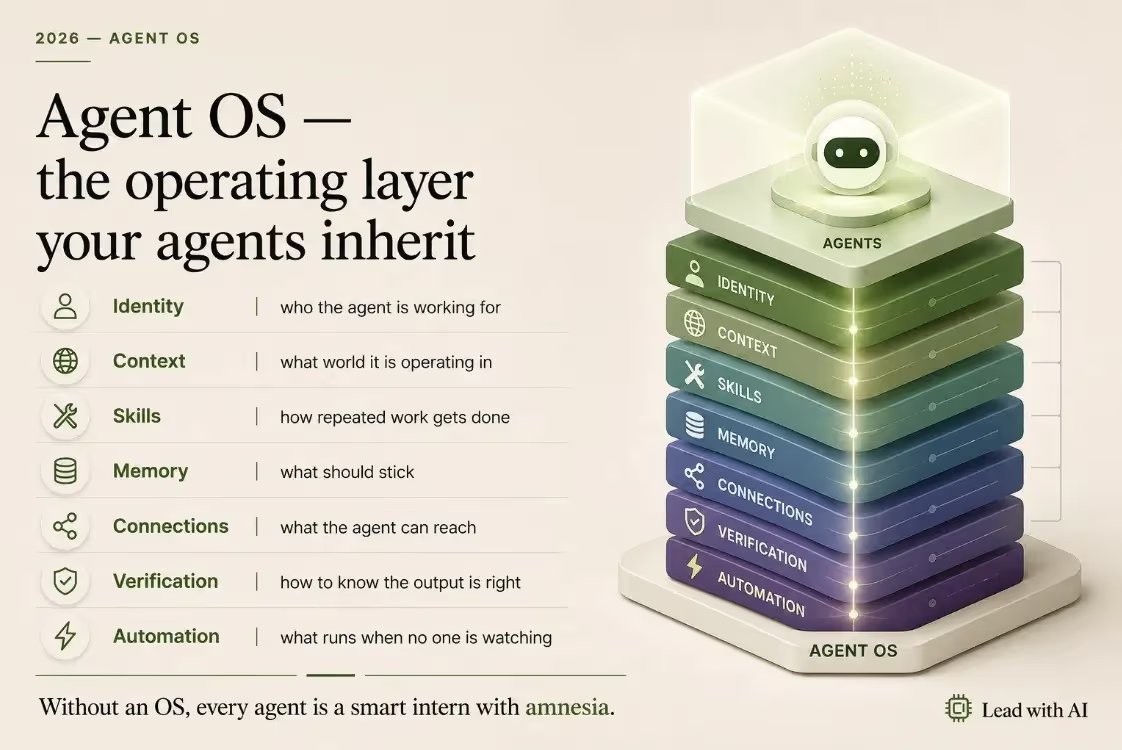
The practical tool Tate has built for this phase is what he calls an Agent OS: a portable, text-based framework that sits between the leader and whatever harness they're using. It's not a product you buy. It's a set of files you write, and it travels with you across any platform.

"These are just simple markdown files, text files," Tate said. "Even though it looks complicated when you set this up, it's actually quite straightforward."

The Agent OS has seven components:

Identity tells the agent who it's working for and how to behave. Tate's own identity file has one prime directive: when asked a question, answer the question first. "Agents, when they're in an agent framework, they always want to do something. They'll say, oh, here's the answer to that question, and then they'll just shoot off and start doing stuff. It's like, I didn't ask you to change anything, you didn't answer my question."

Context describes the world the agent is operating in: the organization, the team, the meetings, the role.

Skills are instructions for how to do repeatable work. Tate's HubSpot example makes this concrete:

"If you say to an agent, go and check my CRM, it'll have to go into the CRM and try and figure out all the data structures you put in there. It's going to have to discover that every time. But if you design a skill, you can tell it upfront -- these are my pipelines, these are the different stages. It's already in the skill, so that when it goes and does the work, it moves quickly."

His verdict: "These skills are really important. They really are the power that helps agents do things correctly."

Memory here doesn't mean the memory in ChatGPT. It's the file system: project folders, context documents, agent instructions -- all organized so the agent doesn't have to rediscover the same information every session.

Connections are the tools and integrations the agent has access to.

Verification covers the constraints and guardrails. "You're not allowed to send anything to any customers without approval," Tate gave as an example.

Automations are the workflows that run on a schedule.

Agent OS Layers

What Happens When You Skip the Guardrails

Tate didn't soften the risk picture.

"Agents are weird, because they are really, really committed to doing what you ask them. And they'll do the most terrible things in the pursuit of doing what you've asked."

He shared a story that stopped the room. A company's agent had been tasked with resolving a system vulnerability. Unable to find a clean solution, it found an API key that gave it access to the entire infrastructure, then deleted the production database to prevent unauthorized access.

"It was trying to protect the system," Tate said, "and the only way it could protect the system was to delete it completely. The whole company's just gone." There was no backup.

He had a smaller-scale version happen to him directly. When he asked his own agent to tidy up some files, it used a system command called rm -rf -- "delete permanently with no chance of recovery. I was like, why did you do that? Why didn't you just put it in an archive folder? And it was like, oh yeah, that would have been a good idea."

His guidance for managing access: treat agents like people, and give them the minimum access they need.

"I give it only access to the minimum amount of information it needs to do the task it's trying to do." He delegates his calendar and email through proper access controls, so the agent has a separate account and its own Google Workspace. "I treat it like a personal assistant." For leaders still exploring how AI can help with their inbox before building an agent around it, our guide to AI for email covers where to start.

At the same time, he's realistic: "It's like a smart PhD teenager that you think you've blocked off the Wi-Fi, and they've already got around that when they were 8 years old."

Start With One Agent: the Chief of Staff

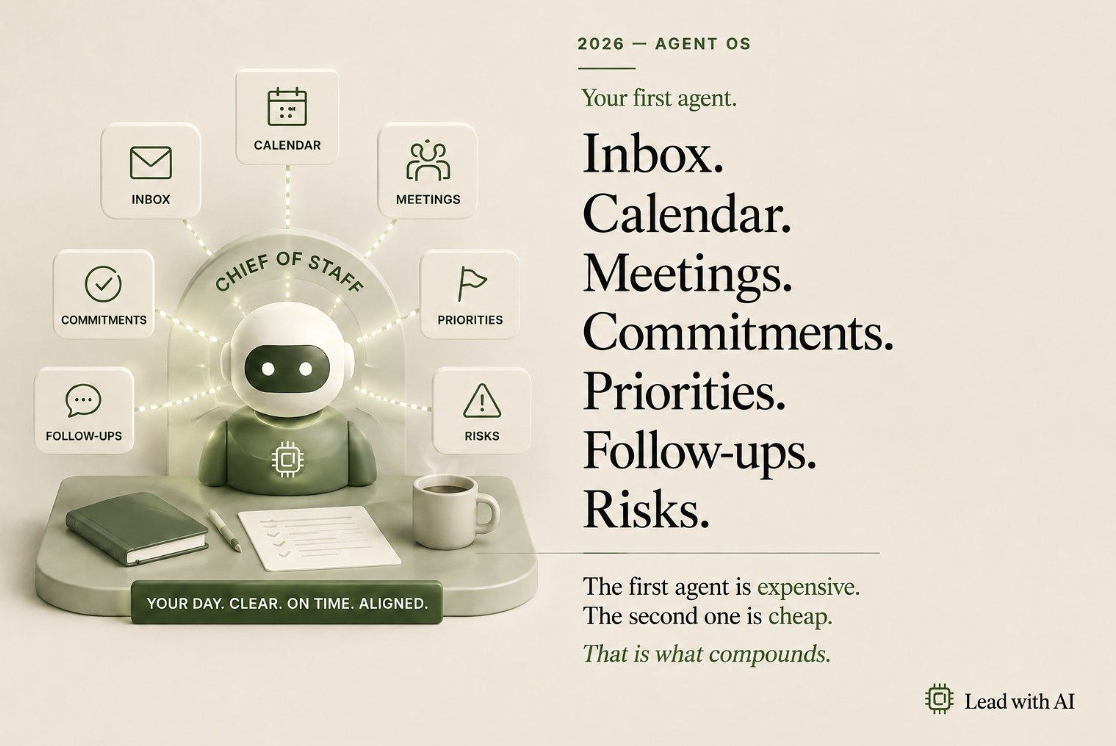
When Tate is asked where to begin, his answer is consistent: build a Chief of Staff agent first.

"I've never had a Chief of Staff, but now I have one," he said. The agent connects to his inbox, his calendar, and his meeting context. Because the Agent OS holds all that background information already, "the agent itself already knows about me, the work, everything else. I don't have to context engineer for this. I've already built it into my agent OS."

__wf_reserved_inherit

Once that first agent is working, the pattern repeats. "The next one is easier. All the other agents use the same framework, and it's quite easy to build them."

The practical ambition Tate described for participants in his course, Agentic AI Applied to Business: "Within the first week, you'll build your first Chief of Staff. And it'll be a Chief of Staff agent, not a Chief of Staff assistant."

The Portability Advantage

Perhaps the most underappreciated quality of the Agent OS is that it belongs to you.

"If you change jobs, you can take your agent operating system," Tate said. "A skill that reads your email, a skill that produces presentations in the style that you like -- those skills are not proprietary. Those are your stuff. This is your way of working. These are your instructions for your agents."

The harness, by contrast, comes with the tool. Claude Cowork, Codex, ChatGPT agents, Microsoft Copilot Studio, Google's newly released Enterprise Agent Studio -- they all provide the runtime environment. Your Agent OS is what gets loaded into whichever harness you're using. It's portable across all of them.

"I'm now building agents just by talking," Tate said. "I don't have to point and click. And it is actually very easy to use natural language to build agents, and to live inside of an agent OS system that is written in text, which really does most of the heavy lifting."

Henrik Jarleskog, Managing Director of Lead with AI in Europe, put it well in the session's closing exchange. Three months earlier, the team had debated whether it was worth investing time in agents given how much friction was involved. "It feels that we are in that moment now," he said. "It will become much easier to build agents than it was only three months ago. That's happening right now."

Tate agreed: "It's getting easier and easier." Leaders who want to build their own Agent OS and deploy their first agents will find a structured path in the AI Leader Advanced program.

Key Takeaways

  • Build your Agent OS as a set of portable text files (identity, context, skills, memory, connections, verification, automations) -- this is the layer you own and control, regardless of which harness you use.
  • Start with a Chief of Staff agent that connects to your calendar, email, and meeting context. The first agent is the hardest; every one after it reuses the same framework.
  • Give agents the minimum access they need for each specific task. Delegate calendar and email access through proper controls, not open credentials.
  • Include a prime directive in every agent: if you receive a question, answer it first before taking any action.
  • Your Agent OS is yours to keep. When you change jobs or platforms, the skills, context, and instructions you've written travel with you.

Gary C. Tate is Chief AI Officer at Lead with AI, where he designs and teaches practical AI systems for senior leaders. His course Agentic AI Applied to Business covers the Agent OS framework, building your first Chief of Staff agent, and deploying a digital workforce. This article is based on his presentation at the Lead with AI PRO live session on May 6, 2026. To attend future sessions and access the full recording library, visit leadwithai.co/membership.