

Updated October 2026
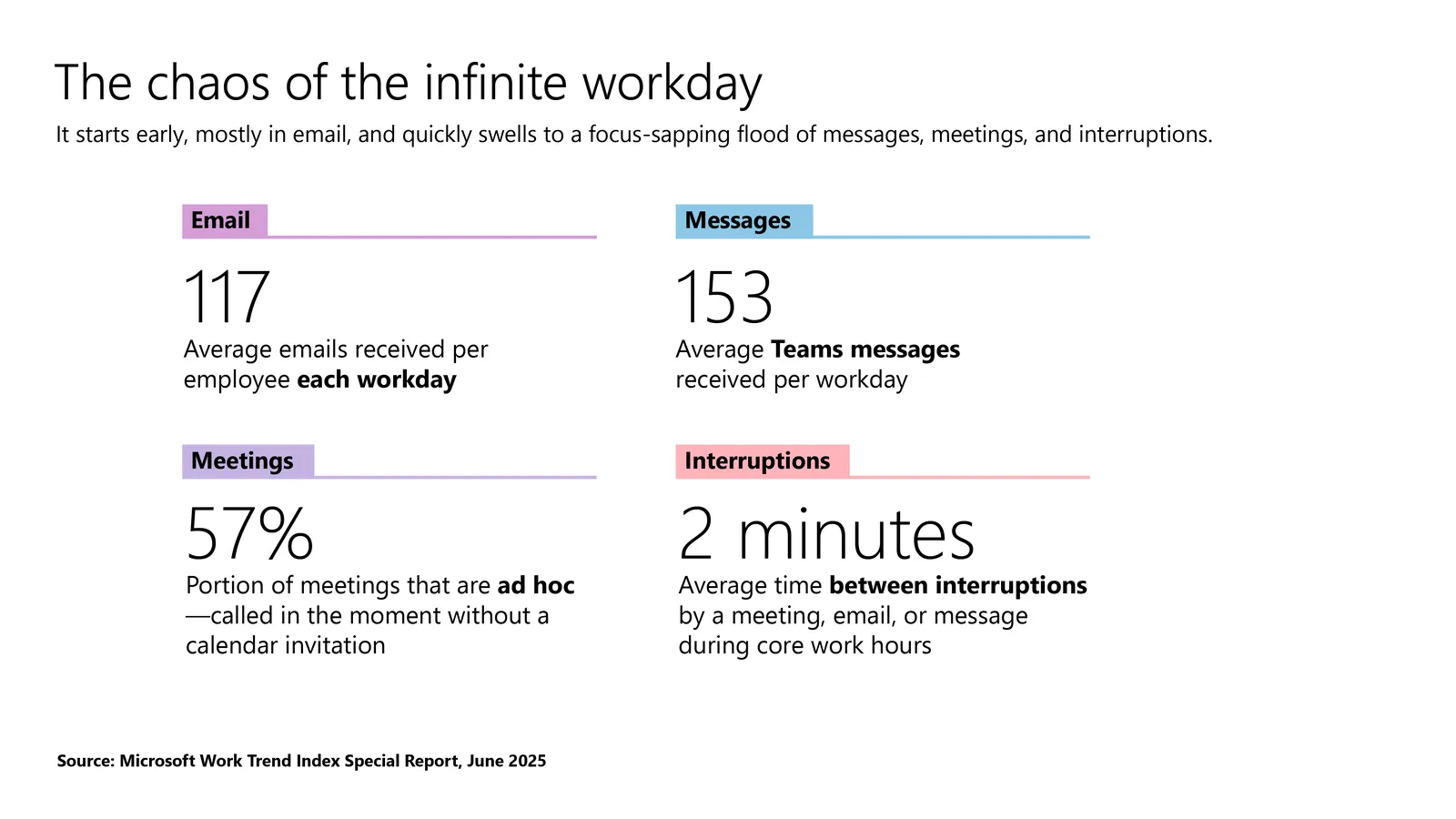
Every leader knows the struggle of time management. Microsoft's research on the "infinite workday" found that the average employee is interrupted every two minutes, or 275 times a day, by meetings, emails, or chat notifications.
Despite all the books, apps, and advice, the core challenge remains: how do you control your time instead of letting it control you?
I struggled with this for years. Ironically, every time management system I tried felt like more work to manage.
That changed once I started using AI. It made me more efficient, and it also gave me a fundamental way to rethink how I spend my time.
Below are the practices our own team at Lead with AI uses, each with a prompt you can copy.
Avoid the Parkinson's Law Trap
There is one warning before we dive in. AI can give you back hours every week, but if you are not careful, those hours fill up again with more meetings, emails, and busywork.
More lanes on a highway do not reduce traffic, because they invite more cars. The same thing happens to your calendar. This is Parkinson's Law: work expands to fill the time available. C. Northcote Parkinson first described it in The Economist in 1955, writing about bureaucracies that kept growing while their actual workload shrank.

So decide where reclaimed time goes before AI frees it up. We call this your AI North Star: the single most valuable thing you would do with a reclaimed day per week. Write it down before the time arrives, and you will be ready to claim it the moment it does.
Recovering time is only half of what we call Impact per Hour. The other half is using that time for work you could not do before. Without a North Star, AI tends to make you busy in new ways.
How Our Team Uses AI to Win Back Time
The best time management practices I have seen this year came from the people closest to the work. These are the real practices we use in our own working lives.
Each prompt works best when your AI can see your email, calendar, and files. AI becomes more powerful the more context you give it.
1. Audit your time, then hand off what repeats
Start by giving AI a goal, such as your North Star, and asking where your time is not serving it. AI is remarkably good at connecting the dots across your meetings, messages, and chats, and run weekly, it tracks your progress too.
When we ran it on our own finance and HR work, it came back with a table of categories, subtasks, approximate hours, and the share of capacity each one takes. About 30% of the week went to repeatable administrative tasks.
That answer changes how you use AI. Instead of asking for individual outputs, you start building reusable instructions for the work that repeats. For us, that became two assistants: one for payroll and HR and one for financial planning.
The biggest lesson is that most of the work is making your own decision rules explicit. That is the key to any AI workflow: getting tacit knowledge out of your head and into instructions. We walk through one way to capture it in our article on recording a skill.
Prompt: find where your time goes (run it weekly as a scheduled task)
My goal is to [become X / achieve Y]. Check my meeting transcripts, Slack messages, and my chats with you, and tell me where I am spending time that is not helping me make progress toward it, and how to fix it.
Prompt: turn a repeat task into instructions
I do [task] every [day/week]. Interview me about it one question at a time: the inputs I use, the decisions I make and the rules behind them, what a good result looks like, and the mistakes to avoid. When you have enough, write reusable instructions I can save as a skill or project. Then let us test them together on a real example.
2. Get briefed before you walk in
We use scheduled tasks that prepare a brief for each facilitator the evening before our live sessions, using program details from Notion and Google Calendar. Two hours before the session, the brief refreshes with anything new, and the facilitator gets a notification. Nobody has to ask for it.
Prompt: a daily meeting brief (run it as a scheduled task)
Every weekday at 6 p.m., look at tomorrow's calendar. For each external meeting, write a one-page brief: who is attending and their role, our last interaction from email and meeting notes, open commitments on both sides, and the one outcome I should aim for. If you cannot find something, say so rather than filling the gap. Notify me when the briefs are ready.
3. Let AI filter your Slack and email
Slack feels like it needs an instant answer, and checking whether something new has arrived quickly becomes a habit. That is by design. (Nir Eyal wrote the book on habit-forming products, Hooked, and then wrote Indistractable on how to take your attention back.)
So I let AI screen both. An hourly scheduled task reviews my Slack channels and mentions and only alerts me when something truly needs an answer within four hours. For email, a flow in Google Workspace Studio runs every incoming message past Gemini, which decides whether it needs me. Anything that does not is archived automatically.
Together, these two cut my email and Slack time by about 90%. Have I missed something because of them? Occasionally, but that is a small price to pay for filtering out hundreds of messages and emails.
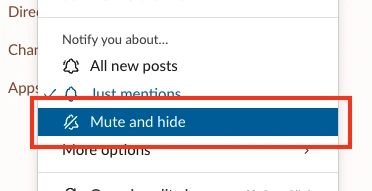
One more step makes it work: mute every Slack channel, so you are only notified when someone actually asks you something.
Prompt: the urgent-only Slack filter (run it hourly as a scheduled task)
Review my Slack channels, DMs, and mentions since the last check. Alert me only to messages that need my reply or decision within the next four hours. Filter out routine updates, FYIs, automated notifications, social chatter, and anything someone else is already handling. For each item, give one line on what is needed, who is asking, and a direct link. Do not repeat items you already flagged unless something changed. Only read; never post or reply on my behalf. If nothing is urgent, say so in one line.
Prompt: the email screen (the Decide step in a Google Workspace Studio flow)
Act as a priority inbox assistant. Decide whether this email is safe for me to ignore. For example, it is safe to ignore if it is a back-and-forth (second email or later) where someone on my team is already looped in and no action is required from me. From: [sender] Subject: [subject] Content: [email body]
In the flow, the starter is "When I get an email", followed by the Decide step above, a check on whether the decision is true, and an action that archives the email.
4. Build the tool you wish existed, and share it early
Scheduling our client programs meant endless back-and-forth: matching client time zones, facilitator calendars, and public holidays. So we vibe coded a scheduling tool. It suggests open slots, places calendar holds that expire if a client does not confirm, and writes a proposal summary you can paste straight into an email.
Two things stand out to me. The person who knows the work best built the best tool for it, step by step with AI, without a long product brief. And the tool itself uses no AI at all. Because it runs on Google Apps Script, it costs nothing in AI tokens to operate. Vibe coding means using AI to write code, and that code can be a plain, reliable tool.
Another build went further: a chief of staff system of five agents and eight automations that connects client conversations, CRM updates, and content. It sat unshared for a while because its builder was not sure it was good enough. When it was finally shared, the team loved it. That hesitation is exactly why trust is crucial: people only show unfinished work when they feel safe doing so. Build that safety, and share what you build early.
Building a Future-Proof Time Management Strategy
The real power of AI in time management is helping you focus on what truly matters.
- Set your North Star first. Write down the single most valuable thing you would do with a reclaimed day per week, and use AI to create space for it.
- Protect the time you win back. Block it on your calendar for your North Star before meetings and email claim it.
- Hand off one recurring task at a time. Our GED-RT framework helps you choose which tasks to give AI first.
- Redefine your calendar. Move beyond the zebra pattern of fragmented days. Your calendar should reflect your priorities as much as your obligations.
I often quote Seneca, who said that “We’re tight-fisted with property and money, yet think too little of wasting time, the one thing about which we should all be the toughest misers.”

Time is our only non-renewable resource. With clear, purpose-driven practices, AI can help you move from perpetually busy to truly effective.
Frequently Asked Questions
What is AI time management?
AI time management means using AI to plan your calendar, prepare for meetings, handle routine communication, and automate recurring tasks, so more of your time goes to high-value work.
What are the best AI tools for time management?
A general assistant such as Claude or ChatGPT, connected to your email, calendar, and files, covers most of it: auditing your time, writing meeting briefs, filtering Slack and email, and running recurring tasks on a schedule.
How do I stop the time AI saves from filling up again?
Set an AI North Star: decide in advance the one high-value thing the reclaimed hours are for, and protect that time on your calendar. Otherwise, Parkinson's Law fills it with more meetings and email.
What is the easiest way to start?
Give your AI one goal and access to your meetings and messages, ask where your time is not serving that goal, then hand off the one recurring task that costs you the most.