
March 10, 2026

Build Your AI Executive Daily Briefing

Plus: GPT-5.4 and NotebookLM Cinematic Video Overviews.
Evelyn Le
By
Evelyn Le
Strategic Product Lead

Build Your AI Executive Daily Briefing

Presented by

Every morning begins with the same routine: checking email and reviewing the calendar.

This AI Daily Briefing prompt helps you cut through the noise by automatically generating a short report that highlights:

  • The three priorities that deserve your attention today
  • Emails that actually require a reply
  • Meetings you need to prepare for
  • Risks or conflicts in your schedule

All in one concise briefing you can read in under three minutes.

Copy this prompt (for ChatGPT users, click this link to use the prompt):

You are acting as my AI Chief of Staff.

Your job is to generate a concise Daily Briefing using information from my email and calendar.

Analyze:

  1. All emails received in the past 24 hours
  2. My calendar events for today
  3. Any open loops or tasks mentioned in email threads

Your goal is not to summarize everything, but to help me quickly understand what actually requires my attention.

Create a Daily Briefing with the following sections.

---

1. Top Priorities Today

Identify the 3 most important things I should focus on today based on incoming emails, deadlines, and scheduled meetings.

Explain briefly why each item matters.

---

2. Urgent Emails Requiring Reply

List emails that likely require a reply from me today.

For each email include:

  • Sender
  • Topic
  • Why it matters
  • Suggested next action
  • A short draft reply I could send

Only include emails where my response is likely expected.

---

3. Delegation Opportunities

Identify emails or tasks that I should delegate instead of handling personally.

For each item include:

  • Task summary
  • Who it could be delegated to
  • Suggested delegation message

---

4. FYI Only (No Action Required)

List emails that are informative but likely do not require my response.

Provide a one-sentence summary for each.

---

5. Meetings Today: Preparation Notes

For each meeting on my calendar today include:

  • Meeting title
  • Attendees
  • Objective (inferred from emails or event description)
  • What I should prepare
  • One smart question I could ask

---

6. Potential Risks or Conflicts

  • Flag anything that could cause problems today such as:
  • Missing preparation for an important meeting
  • Conflicting commitments
  • Unanswered critical emails
  • Deadlines approaching

---

7. Quick Wins (10–15 min tasks)

Suggest 2–3 quick tasks from my inbox that could be cleared quickly.

---

Formatting rules:

  • Keep the briefing concise and highly skimmable
  • Prioritize decisions over summaries
  • Do not include trivial emails
  • If something is unclear, state assumptions

The goal is that I can read this briefing in under 3 minutes and know exactly what matters today.

Pro tip: Make sure to choose “Thinking Mode” when using this prompt in ChatGPT. You can also turn it into a ChatGPT Task, Gemini Scheduled Action, or Copilot Task to receive your briefing automatically every morning.

For pro members, you can also check out how to Craft an Outreach Email campaign with Gemini in Gmail.

Flagship AI Newsletter
The AI Newsletter That Makes You Smarter, Not Busier
Join over 30,000 leaders and receive our insights on AI platforms, implementations, and organizational change management.
FlexOS Course - AI Content Accelerator - Testimonial Badge

AI isn’t saving you time—yet.

Most leaders use AI to do more work, faster. That’s a trap. True AI Leadership is about subtraction: using AI to take work off your plate so you can focus on high-impact strategy.

Join the waitlist for our April 3rd AI Leaders Advance cohort (March 6th cohort has sold out!) and build your own "Executive Team" of 6+ tailored AI assistants in just 2 weeks (30 mins/day). Powered by our LeadOS personalization engine, we don't just teach tools—we build your specific workflows.

Why join the April 3rd Cohort?

  • Role-Specific: Your assistants are built for your constraints and goals.
  • Efficient: Just 30 minutes a day (100% build-focused).
  • Elite Network: 88 NPS and a community of leaders from Amazon, Harvard, and Ericsson.
Want to reach 30,000+ business leaders applying AI in their work, teams, and organizations?​
Advertise with us​​.

Your AI Team: GPT-5.4 and NotebookLM Cinematic Video Overviews.

Every week, I report on the top updates to your favorite AI tools.

OpenAI Introduces GPT-5.4

OpenAI has released GPT-5.4, its newest frontier model designed for complex professional work such as coding, research, and multi-step analysis. The model powers new capabilities across ChatGPT, the API, and Codex, with a focus on reliability, large-context reasoning, and tool-driven workflows.

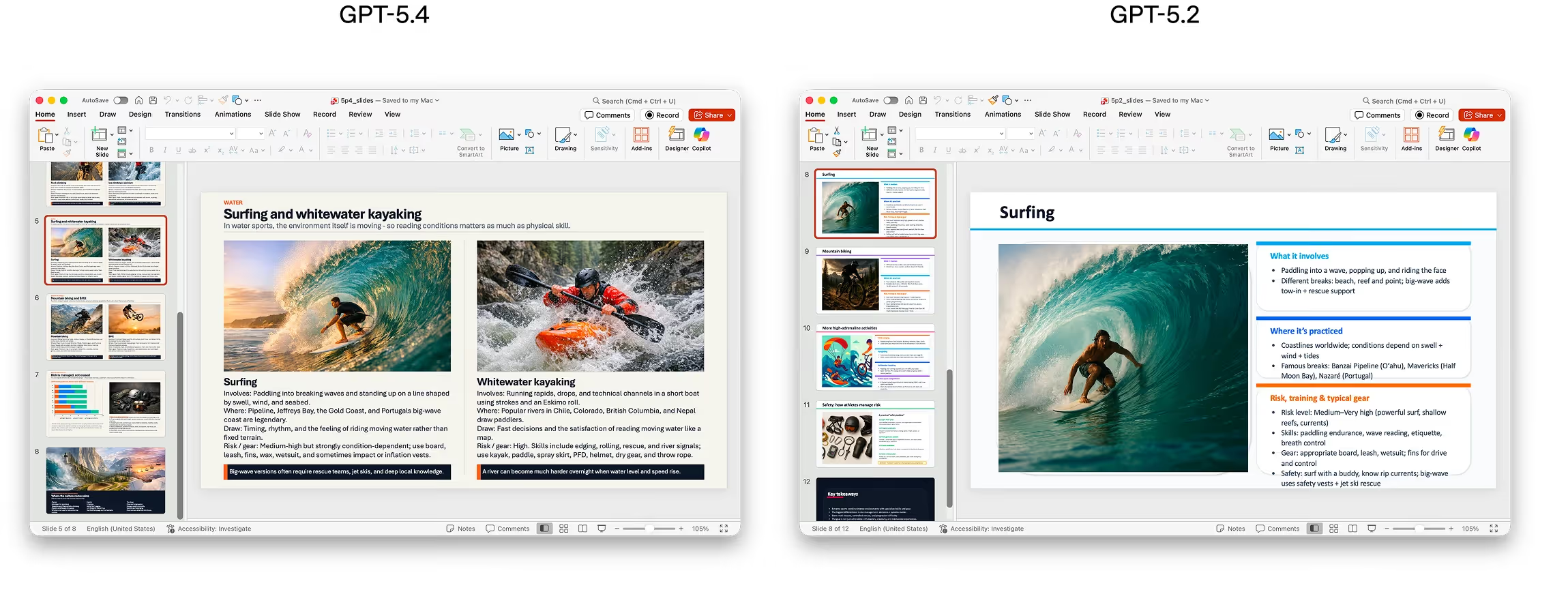
Side by side example of slide outputs from GPT-5.2 vs GPT-5.4

It is also available as GPT-5.4 Thinking inside ChatGPT and GPT-5.4 Pro for high-performance tasks.

Key Highlights

  • Massive context window: The model can process up to ~1 million tokens, enabling it to analyze very large documents, datasets, and conversations in a single session.
  • Native computer use: GPT-5.4 is the first general-purpose OpenAI model with built-in computer-use capabilities, allowing it to operate software, navigate interfaces, and execute multi-step workflows across applications.
  • Stronger productivity work: On a benchmark of spreadsheet modeling tasks similar to those done by junior investment banking analysts, GPT-5.4 scored 87.3% vs. 68.4% for GPT-5.2. In presentation tasks, human reviewers preferred GPT-5.4 outputs 68% of the time for better visuals and structure.

​Read OpenAI’s announcement of GPT-5.4​​

NotebookLM introduces Cinematic Video Overviews

Google has introduced Cinematic Video Overviews in NotebookLM, allowing users to automatically turn research notes, documents, and sources into animated, narrative-driven videos that visually explain key ideas from your materials.

​Explore Cinematic Video Overviews in NotebookLM​​

Microsoft introduces Copilot Cowork with Anthropic

Microsoft has unveiled Copilot Cowork as part of Microsoft 365 Copilot Wave 3, bringing long-running, multi-step AI workflows into enterprise productivity tools. Built with Anthropic’s agentic technology, Cowork allows users to delegate complex tasks that unfold over time, such as reasoning across documents, tools, and data.

​​Learn more about Copilot Cowork​​

ChatGPT for Excel brings AI directly into spreadsheets

OpenAI has introduced ChatGPT for Excel, enabling users to analyze data, generate formulas, and build models directly inside spreadsheets using natural language. The integration allows ChatGPT to work across tables, financial models, and datasets without requiring manual formulas or scripting.

​​Explore ChatGPT for Excel​

Want to reach 30,000+ business leaders applying AI in their work, teams, and organizations?​
Advertise with us​​.