
June 27, 2026

What Every Executive Needs to Know About AI Right Now (June 2026)

AI fluency slips fast. Here's what executives need to know in June 2026: botsitting, botshitting, the Doist OS case study, and the three things worth trying now.
Daan van Rossum
By
Daan van Rossum
Founder & CEO, Lead with AI

Presented by

Based on the Lead with AI PRO Executive Briefing with Daan van Rossum, Founder and CEO of Lead with AI. Watch the full recording (PRO members only).

You could have ignored AI for the past month and come back today completely lost.

That's not because AI changed, but because the gap between what AI can do and what most executives are actually doing with it keeps getting wider.

If your AI fluency has slipped, here's everything you need to know to get back up to speed.

How Big Has AI Actually Gotten?

The numbers from the past few months are staggering.

According to Sensor Tower data, ChatGPT now has a billion monthly active users.

Google announced at I/O that Gemini has reached 900 million active users.
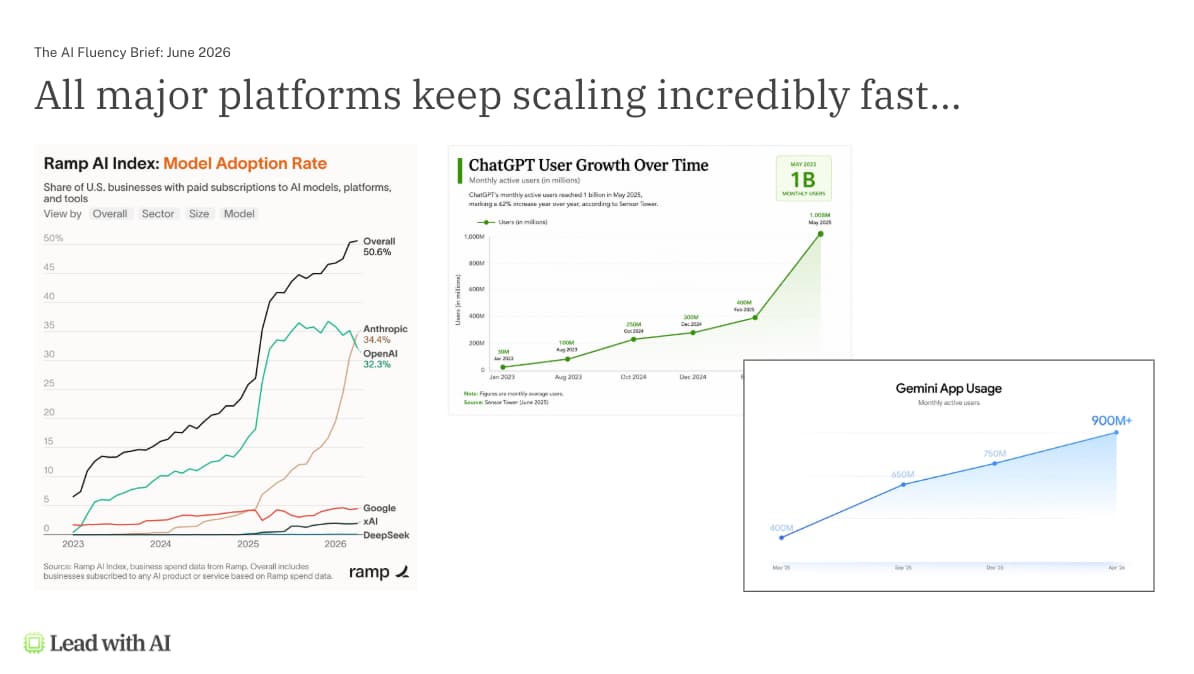
And for the first time, a notable spending shift has emerged: Anthropic has overtaken OpenAI on the Ramp Index, with business spending on Anthropic now exceeding spend on OpenAI. About half of US businesses are now using AI regularly.

The scale matters because it sets the baseline. If you're not using AI actively and iteratively, you're not at parity with your peers -- you're behind them.

Why Are People Not Getting ROI from AI?

This is the central question right now, and the Glean Work AI Index 2026 is the most rigorous attempt yet to answer it. The study surveyed 6,000 digital workers across the US, UK, and Australia, with researchers from Stanford, UC Berkeley, and five other universities.

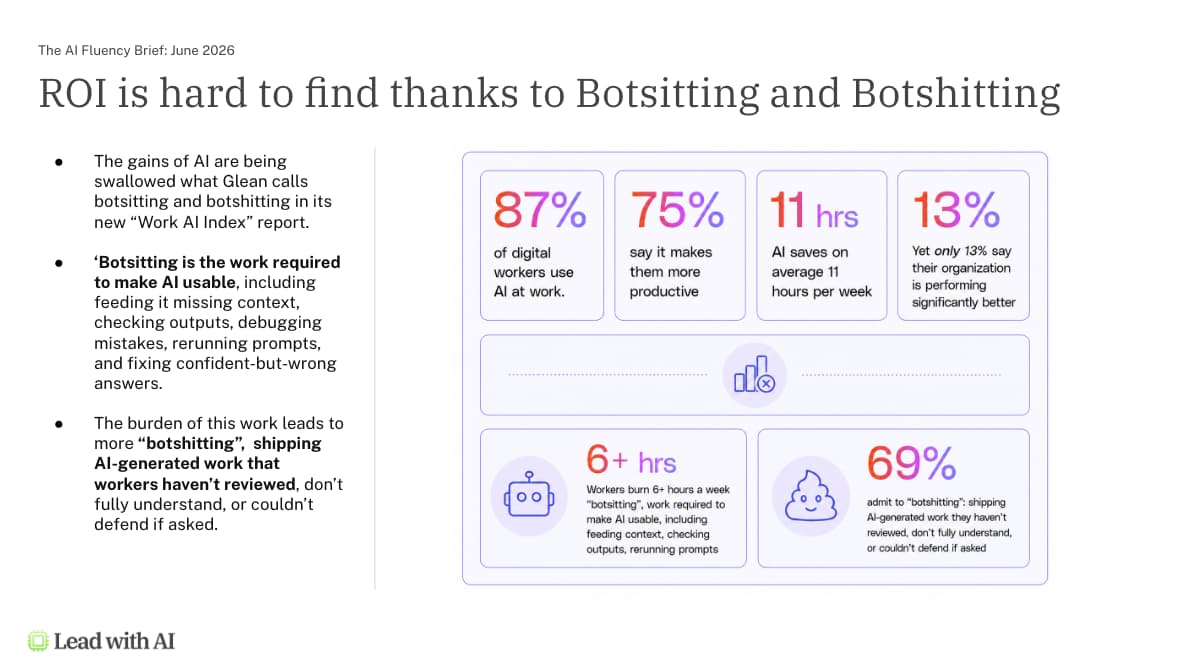
The headline numbers are uncomfortable: 87% of digital workers use AI and report saving 11 hours per week. Yet only 13% say their organization is performing significantly better because of it. Where is all that saved time going?

The answer is two new terms worth adding to your vocabulary.

Botsitting is the 6.4 hours per week the average knowledge worker spends on the invisible labor of making AI usable: feeding it context, checking outputs, debugging mistakes, re-running prompts, and cleaning up confident-but-wrong answers. That is more time than they spend actually producing work with AI.
Botsitting and Botshitting

When the botsitting load gets heavy enough, workers stop checking. They ship work they haven't reviewed and couldn't defend if challenged. The study calls this botshitting -- and 69% of AI users admit to doing it. This is what others have called "work slop": the predictable output of giving people a button that generates work product without requiring them to understand it.

Here's the part that should concern every leader: the heaviest AI users do the most botshitting. The more people use AI, the more this behavior increases, not less.

The fix is not better prompting. It is work redesign.

Putting a rocket engine on a broken bicycle is not going to get you anywhere.

The only way to get real ROI is to sit with people individually, understand what their work actually looks like, find where AI creates genuine overlap, and build from there. This is what Stanford calls workflow literacy: do you actually know how your day breaks up, and where AI changes the equation?

I met Rebecca Hinds, one of the study's lead authors, in person while I was in Mountain View -- alongside two other professors. Their conclusion maps exactly to what we've been saying for three years: AI adoption is failing because we skip the redesign step.

Flagship AI Newsletter
The AI Newsletter That Makes You Smarter, Not Busier
Join over 30,000 leaders and receive our insights on AI platforms, implementations, and organizational change management.
FlexOS Course - AI Content Accelerator - Testimonial Badge

Learning from AI-Native Organizations

One of the clearest ideas I picked up in Silicon Valley is the contrast between legacy structures and AI native organizations.

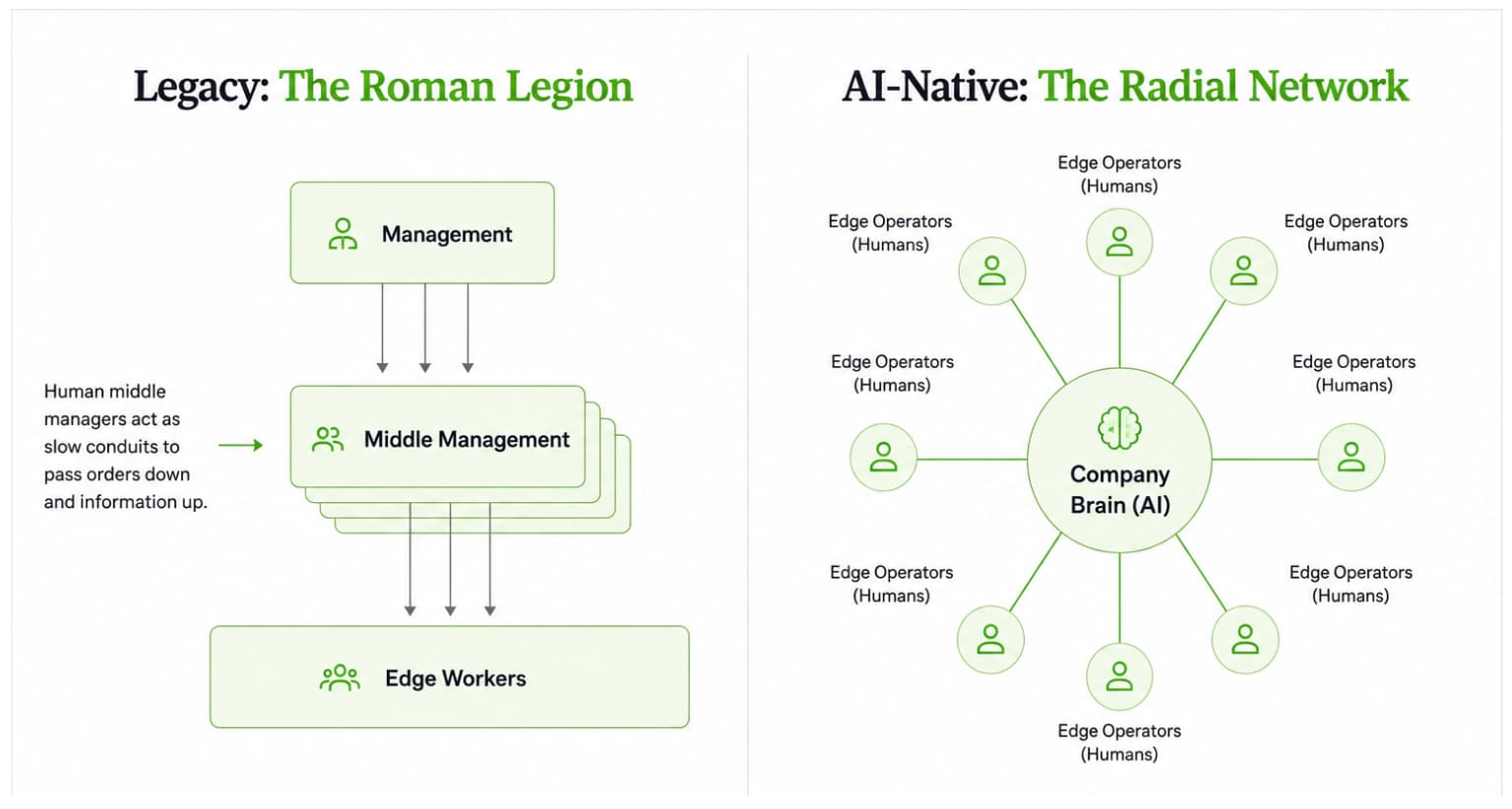
In most organizations today, knowledge and instruction flow from leadership down through middle management to workers. By the time it arrives, the information is outdated, distorted, and often irrelevant. The structure was never designed to be fast. It was designed to manage information scarcity.

AI-native companies flip this. They start by capturing all of the company's knowledge, workflows, and intelligence in a centralized brain. They then put senior owner-operators at the edges of that brain -- people who are very good at critical thinking and judgment, the things AI cannot do -- and let them tap into it to do real work.

Tapping the AI company brain

The best live example right now is Doist, the fully remote company behind Todoist.

Chase Warrington, their Head of Operations, showed our PRO community how they built Doist OS: a shared AI workspace that connects every tool where the company's knowledge lives, so any team member can ask questions and take action across all of them from a single interface. The system connects Todoist, Twist, their 1,800-page company handbook, GitHub, and Google Workspace.

What made it possible was Doist's long-standing culture of documentation by default. Because they've been fully remote since 2007, almost everything the company knows lives in writing. If a meeting wasn't captured by a transcriber, it didn't happen -- because it cannot be added to the body of knowledge the AI operates from.

Crucially, Doist built this not with engineers, but with normal people, because the end users would be normal people. The product became the highest-scoring internal product in Doist's history on their own product-market-fit survey.

The lesson is not that you need to rebuild your entire company. Start small: one team, one use case, one centralized knowledge base. Show results. Then expand. This is exactly how we approach it with our clients -- we start with leadership, take one functional team through the process, then scale from there.

The Three Things Worth Trying Right Now

With so many new features launching, it's easy to lose focus. Here are the three most impactful areas for executives this month.

1. Use the strongest models for your most important work.

Since the last briefing, two major new models have launched: Claude Opus 4.8 (released end of May) and ChatGPT 5.5 (released end of April). Both companies have also updated their prompting guidance. The shift: rather than specifying exactly how to get an output, you explain your end goal and let the model choose how to get there. Provide as much context as possible. The token windows are now large enough to absorb it.

Also worth knowing: Microsoft Copilot users can now select Opus 4.8 and GPT 5.5 directly in the model selector. A model like this is potentially 10 to 100 times more powerful than the default. If you're using AI for decision-making or producing important work product, the model you're on matters enormously. We have detailed walkthrough videos on how to prompt both models in the AI Leader Advanced program.

2. Bring AI into the apps where you already work.

The era of toggling between 20 different tools is ending. Claude now has native plugins sitting inside Excel, PowerPoint, Word, and Outlook (the last in beta).

ChatGPT has native plugins for Excel, Google Sheets, and PowerPoint. When you use Claude in the sidebar of a Microsoft app, it remembers things between sessions -- so what it learns in your Excel sheet carries into your PowerPoint deck.

You can now put the strongest models available directly into the workflows where you already spend your time, rather than context-switching to a separate interface.

3. Pick one new feature and actually implement it.

Every platform shipped something meaningful this month, and the right one to try depends on where you are and what you use. The goal here is not to test everything -- it's to go one level deeper on whichever capability is most relevant to you right now.

If you're earlier in your AI journey, ChatGPT Skills is the highest-leverage starting point.

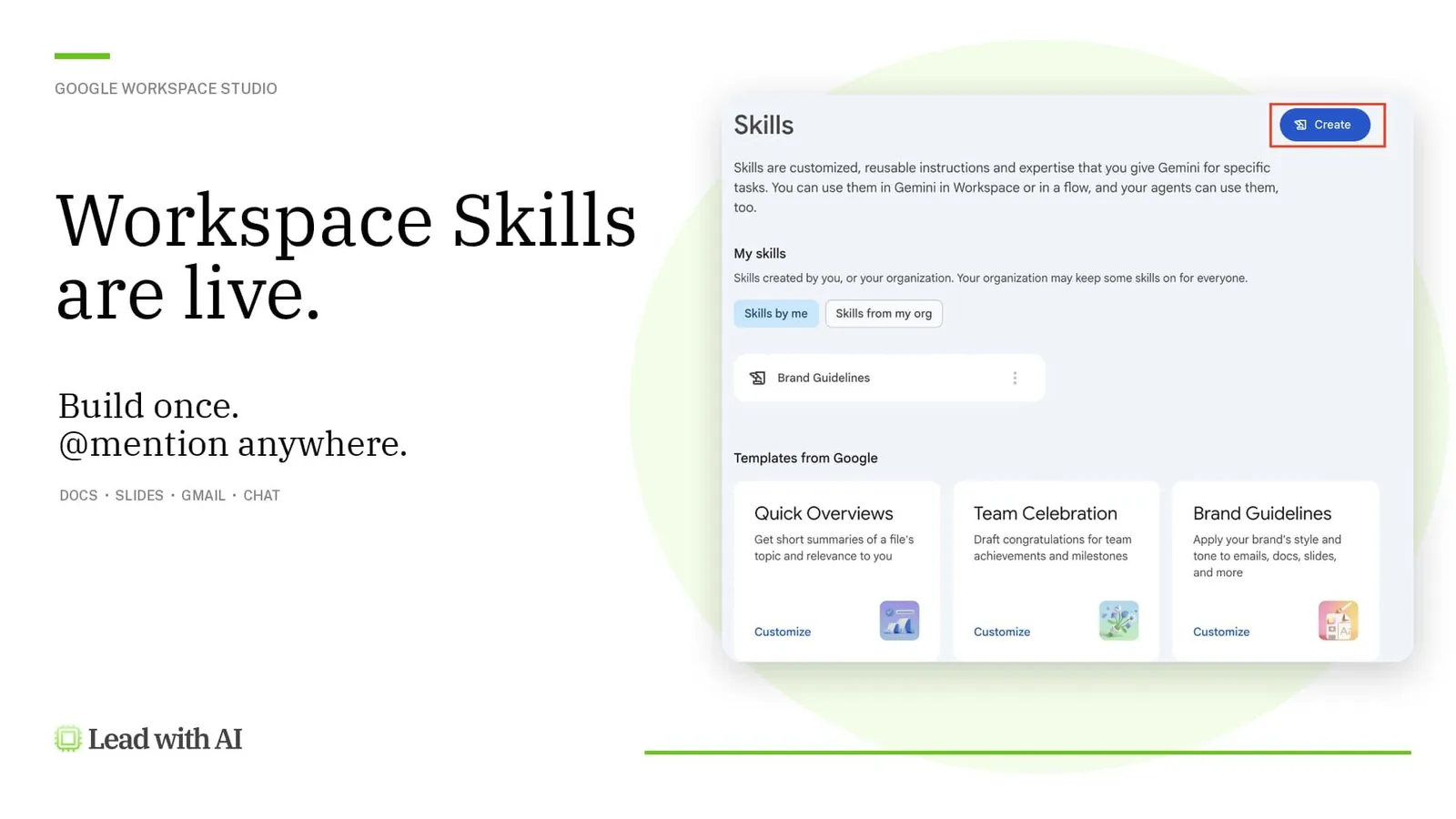
It lets you build portable descriptions of how you do specific work, with connection points to the tools you use. You can stack them in a single chat and they trigger automatically -- moving AI from a generic tool to something that actually knows your workflows.

If you're on Claude and spending time on browser-based tasks, Claude for Chrome is the one to install.

Give it any command and it will do the work directly in your browser -- clicking through profiles, checking your calendar, sending personalized messages. I used it for outreach during my recent travels in San Francisco and New York, fully automating what would have been hours of manual work.

If you're a Gemini or Google Workspace user, Gemini Canvas for Google Sheets is remarkable.

Build an entire interactive interface on top of a spreadsheet -- an executive dashboard, a financial model with scenario toggles, a Kanban board -- with two-way sync between the interface and the underlying data. I used this to send my board an interactive financial model instead of static charts.

And if your organization runs on Microsoft 365, Copilot Cowork -- now released to the general public -- lets you build persistent agents that run 24 hours a day, seven days a week on your actual company data.

Note: these agent features are charged separately from standard subscriptions on every platform, so make sure the workflow is doing real work before deploying. But when it is: this is replacing headcount, not just saving time.

The Capability Overhang Is Widening

If there is one idea to carry out of this briefing, it is this: the capability overhang, the gap between what AI is technically capable of and what most people are actually adopting is growing, not shrinking.

The faster capabilities develop, the wider that gap becomes.

The Capability Overhang in AI

Even people deeply immersed in AI every day would estimate they're using maybe 20 to 30% of what AI can actually do. For executives with limited time to explore, the number is almost certainly lower.

This is the core of the AI fluency challenge in mid-2026. It's not that fluency is hard to build. It's that fluency decays if you step away -- and the platform you return to is significantly more capable than the one you left. Every month off creates a larger reentry gap.

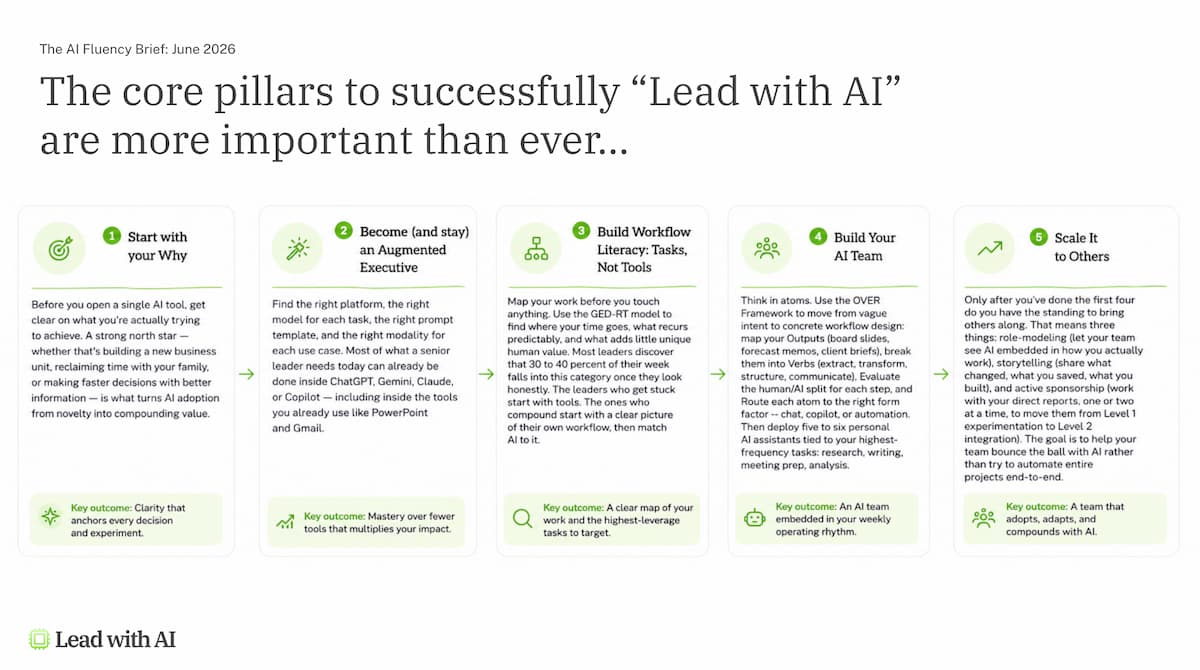
The answer is not to chase every update. It is to keep returning to the same framework: start with your specific work, find where AI creates genuine leverage, build the habit, and keep iterating. One workflow at a time, one team at a time, one month at a time.

The process for impactful AI Fluency

If you're thinking about how to structure that investment more formally -- including whether certifications are worth your time -- we broke that down in detail in our guide to AI certifications worth it.

Key Takeaways

  • Name the problem before you try to fix it. Botsitting (6.4 hours/week of invisible AI labor) and botshitting (shipping unreviewed AI output) are the real ROI killers. If your team is doing more of both, the answer is workflow redesign, not more prompting practice.
  • Upgrade to the strongest available model for your most consequential work. Claude Opus 4.8 and ChatGPT 5.5 represent a meaningful capability step. Use them where it counts.
  • Install Claude or ChatGPT directly inside your Microsoft or Google apps. Stop toggling between tools. Put the AI where the work already happens.
  • Start building your organization's knowledge layer now. Doist's case shows that documentation-by-default is the foundation every AI-native organization builds on. Start capturing decisions, processes, and institutional knowledge in a way AI can access.
  • Treat AI fluency as a continuous practice, not a one-time achievement. The capability overhang widens every month. Staying current requires deliberate, recurring investment -- not occasional catch-up sessions.

Frequently Asked Questions

Frequently Asked Questions

What is the capability overhang in AI?
The capability overhang is the growing gap between what AI is technically capable of and what most people and organizations are actually using it for. Even executives who use AI daily estimate they're accessing maybe 20 to 30% of what the tools can do. As models get more powerful faster than adoption keeps pace, that gap widens -- which is why staying current requires active, recurring effort rather than occasional catch-up.

What is botsitting and why does it matter for executives?
Botsitting is the unplanned labor of making AI output usable: feeding it missing context, checking results, correcting mistakes, and re-running prompts. According to the Glean Work AI Index 2026, the average knowledge worker spends 6.4 hours per week on it -- more time than they spend actually producing work with AI. For executives, it matters because it explains why AI adoption is not translating into organizational performance. The fix is workflow redesign, not more training or better prompting.

Which AI model should executives be using right now?
Claude Opus 4.8 and ChatGPT 5.5 are the strongest general-purpose models available as of June 2026. Both are accessible inside Microsoft Copilot's model selector, meaning you don't need a separate subscription to use them if your organization is already on Microsoft 365. For decision-making, strategy work, and high-stakes writing, the model you're on makes a significant difference. The default model on most plans is considerably less capable.

What is an AI-native organization?
An AI-native organization is one that structures itself around a centralized knowledge brain rather than the traditional top-down hierarchy of instructions filtering through management layers. Instead of deploying AI as a layer on top of existing workflows, AI-native companies redesign how knowledge flows, who accesses it, and how work gets done. Doist is one of the clearest examples: their internal AI workspace connects every tool where company knowledge lives and makes it accessible to every team member in plain language.

How do I maintain AI fluency without spending hours on it every week?
The key is treating AI fluency as a system rather than a course. Rather than periodic training sessions, the most effective approach is embedding AI into recurring work -- one workflow at a time -- so practice compounds naturally. Monthly briefings like this one help you stay oriented on what matters without needing to track every release. If you're considering more structured investment, our guide on AI certifications worth it breaks down which credentials are actually useful for senior leaders.

This article is based on the June 2026 Lead with AI PRO Executive Briefing.

PRO members receive monthly executive briefings, masterclasses, and a peer community of leaders applying AI across industries. Learn more about Lead with AI PRO or start your AI Fluency Journey with AI Leader Advanced.