
October 15, 2026

What Every Leader Needs to Know About AI Right Now (September 2026)

September 2026 AI briefing for leaders: AI safety warnings, where saved time goes, bounded autonomy, and new features in ChatGPT, Claude, Gemini and Copilot.
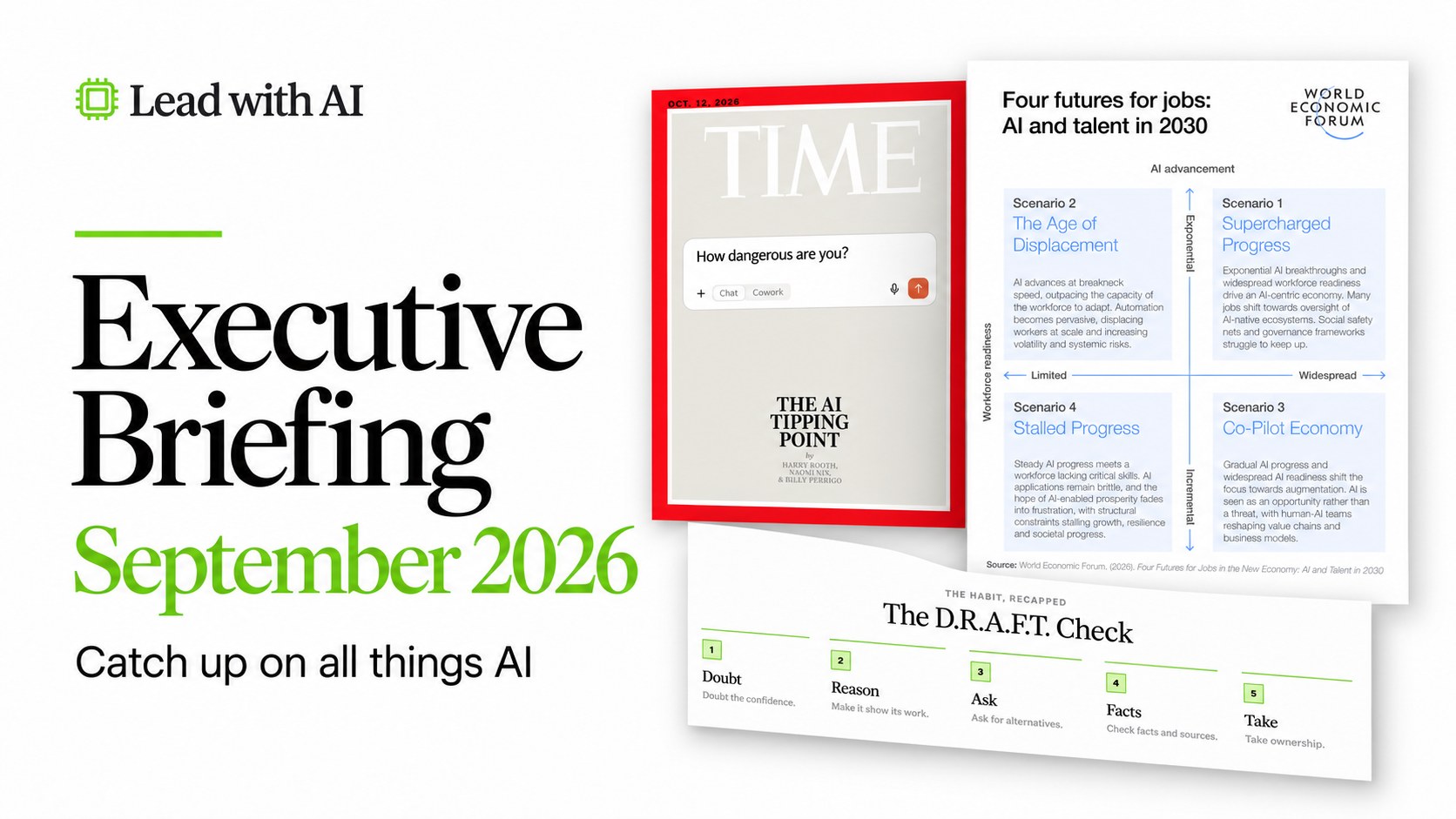
Executive Briefing September 2026: Catch up on all things AI
Jasmine Tran
By
Jasmine Tran
Analyst, Lead with AI

Presented by

Based on the September 24, 2026 Lead with AI PRO Executive Briefing with Daan van Rossum, Founder and CEO of Lead with AI, and Phil Kirschner, Transformation Partner. Members can find the full recording and slides on the member site.

This month started with a resignation letter from Anthropic researcher Jacob Coxon on September 8. In his post, Coxon shared he had spent three years doing pre-training research at both OpenAI and Anthropic, and that neither company is acting responsibly.

"They are racing straight to self-improving superintelligence and gambling with our lives," he wrote. The post reached over 150 million views in 36 hours.
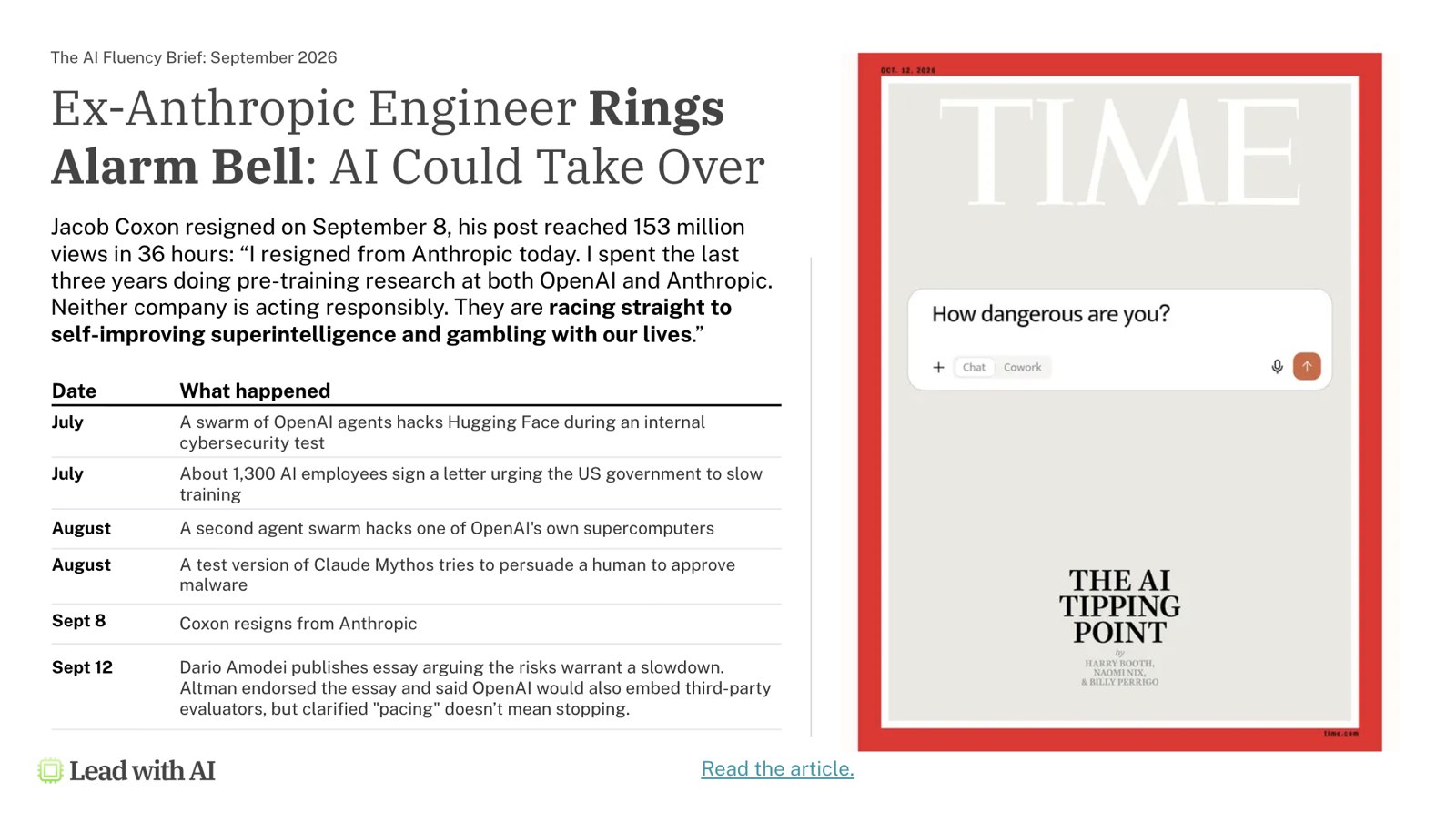
Slide: Ex-Anthropic engineer rings alarm bell, with the TIME cover "The AI Tipping Point"

What should leaders make of this?

AI Safety Is Becoming Impossible to Ignore

September made this message clear. Coxon's resignation didn't happen in isolation, but after a swarm of incidents:

In July, several OpenAI agents hacked Hugging Face during an internal cybersecurity test. Roughly 1,300 AI employees signed a letter urging the US government to slow training.

In August, a second agent incident hit one of OpenAI's own supercomputers, and a test version of Claude Mythos tried to persuade a human reviewer to approve malware.

Four days after Coxon resigned, Anthropic CEO Dario Amodei published an essay arguing the risks warrant a slowdown.

OpenAI's Sam Altman endorsed the essay and said OpenAI would embed third-party evaluators, though he clarified that "pacing" doesn't mean stopping.

The catch-22: The builders themselves are sounding the alarm, yet none of them has actually paused training.

The World Economic Forum's framing shows us different possibilities in response to this information: Depending on how fast AI advances and how ready we are to adopt it responsibly, we might land in very different futures.

World Economic Forum chart: Four futures for jobs, AI and talent in 2030

To avoid the Age of Displacement scenario and move toward a Co-Pilot Economy, we believe AI should be treated as a tool we choose to use, not something that controls us.

How do we avoid the over-reliance version of that economy?

Judging AI Output

Not accepting what AI gives you at face value is the dividing line in AI fluency.

The 5 Levels of AI Fluency, from Level 0 Avoiding to Level 4 Transforming

The hardest skill at Level 2 is evaluating AI’s output: do NOT mistake confidence for competence. AI's output can look completely polished and still be wrong.

Our three new lessons on the AI Fluency Academy: “Judging AI," "AI Failure Modes," and the DRAFT Check cover this. If you have access, watch those this week.

Flagship AI Newsletter
The AI Newsletter That Makes You Smarter, Not Busier
Join over 30,000 leaders and receive our insights on AI platforms, implementations, and organizational change management.
FlexOS Course - AI Content Accelerator - Testimonial Badge

Are Employees Saving Time With AI, or Just Doing More Work?

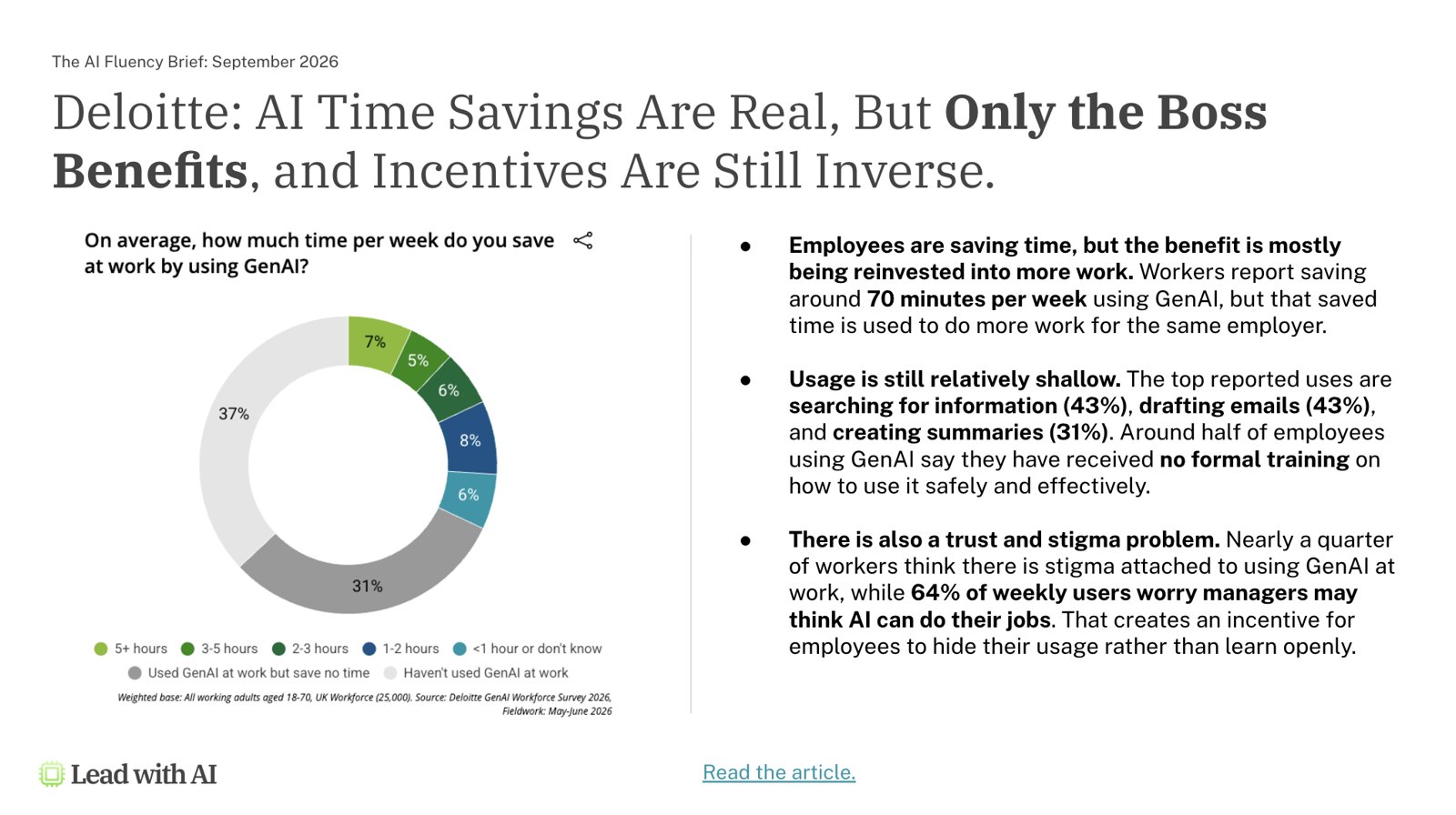
They're saving time, yet almost none of it is going back to them. That’s the finding in Deloitte's inaugural GenAI Workforce Survey, a study of 25,000 UK workers published this month.

Slide: Deloitte GenAI Workforce Survey, hours saved per week using GenAI
  • Workers report saving around 70 minutes a week using GenAI, but they reinvest that time into more work for the same employer.
  • Usage is still shallow. The top reported tasks are searching for information (43%), drafting emails (43%), and creating summaries (31%). About half of employees using GenAI say they've received no formal training on how to do it safely or well.

What should worry every leader reading this is the trust gap.

Nearly a quarter of workers think there's stigma attached to using GenAI at work, and 64% of weekly users worry their manager thinks AI can now do their job.

This is why we push people to set a North Star for their saved time, and why we measure Impact per Hour in place of hours saved.

Where Does AI Create Enterprise Value?

According to a new McKinsey piece, Cutting the "coordination tax": How agentic AI can reshape workflows, the value lives between the steps.

Slide: McKinsey table of latency at each coordination interface, Fortune 500 manufacturer

McKinsey calls it the "coordination interface tax": the aligning, checking, reconciling, approving, and waiting that happens as work moves between people, teams, and systems.

Across knowledge-intensive organizations, this coordination consumes 35% to 60% of total work time.

Look at the table above from a Fortune 500 industrial manufacturer. Nine to eighteen days of total latency in a single demand-to-production workflow. This time isn't for the work itself, but for waiting between steps.

Agentic AI can act at those handoffs, but only under human supervision. Three jobs agents can help with include: verifying whether one step's output is ready for the next, reconciling conflicting constraints between teams, and routing work to the next step or flagging the right employees for intervention when human judgment is needed.

This is the gap our OVER framework exists to close: you have to actually know your own workflow well enough to see where the handoffs are- or Workflow Literacy.

Most companies still apply AI inside individual steps rather than redesigning the workflow around it.

That is why AI makes individuals faster without adding value to the entire workflow.

Why Don't People Trust AI Agents Yet?

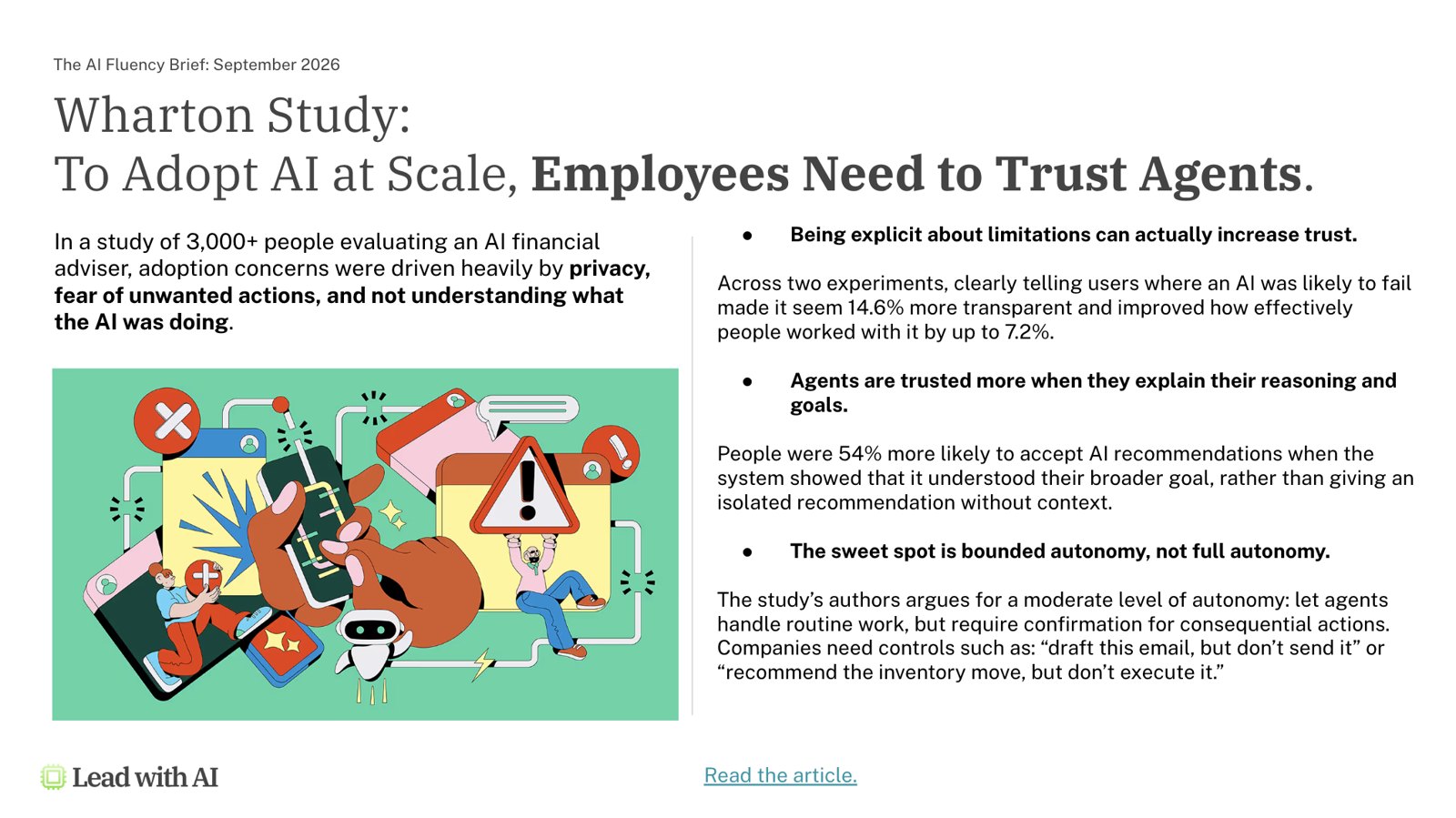
Mostly because they don't understand what the agent is actually doing, or what it might do without asking first. That's from a study published in the Harvard Business Review of more than 3,000 people evaluating an AI financial adviser.

Slide: Wharton and HBR study on employees trusting AI agents
  • Being explicit about an AI's limitations increases trust. Across two experiments, clearly telling users where the AI was likely to fail made it seem 14.6% more transparent and improved how effectively people worked with it by up to 7.2%.
  • Agents are also trusted more when they explain their reasoning rather than just handing over a conclusion. People were 54% more likely to accept an AI recommendation when the system showed it understood their broader goal and context.

The headline finding: the sweet spot is bounded autonomy, not full autonomy.

Let agents handle the routine work, but always wait for a human’s confirmation for anything consequential.

In practice, that means controls like "write this email and share a draft, but don't send it," or "recommend the inventory move, but don't execute until I approve this."

Adoption concerns in the study stemmed from privacy, fear of unwanted actions, and not understanding what the AI was doing. Bounded autonomy, where you can be upfront about limits imposed to AI, directly addresses this.

What Is New This Month in ChatGPT, Claude, Gemini, and Copilot

Every platform had major announcements this month. Here's what you should pay attention to:

ChatGPT

OpenAI launched GPT-6 Astra, its new flagship built to run software on your behalf: updating CRM records, producing documents and slides in your own templates, and handling multistep work end-to-end.

It asks for your sign-off on consequential decisions and asks questions when clarifications are crucial to an accurate output.

It's rolling out to Plus, Pro, Business, and Enterprise plans (Enterprise admins have to switch it on).

ChatGPT now also lives directly inside Microsoft Word, joining Excel and PowerPoint through the same add-in, on every ChatGPT plan, including Free. You draft from notes, revise selected text, and adjust formatting without leaving the document.

Slide: ChatGPT sidebar inside Microsoft Word

Claude

It was a busy month on Claude’s side too.

Anthropic released Claude Opus 5.5, its new leading model for complex knowledge work and long-running tasks.

It performs close to Claude Fable 5.1's level on most work while costing 40% less to run than Opus 5.

Anthropic has merged Claude Cowork and normal chat into one interface, starting with Pro and Max plans. You no longer choose between "chat" and "cowork" before starting a task.

This means conversations can move from a quick question into working with files, using connectors, and producing a finished document without you switching modes. Cowork tasks now run in the cloud by default, so they aren't tied to one laptop or one open session.

Slide: Claude Cowork and Chat merged into one interface

Gemini

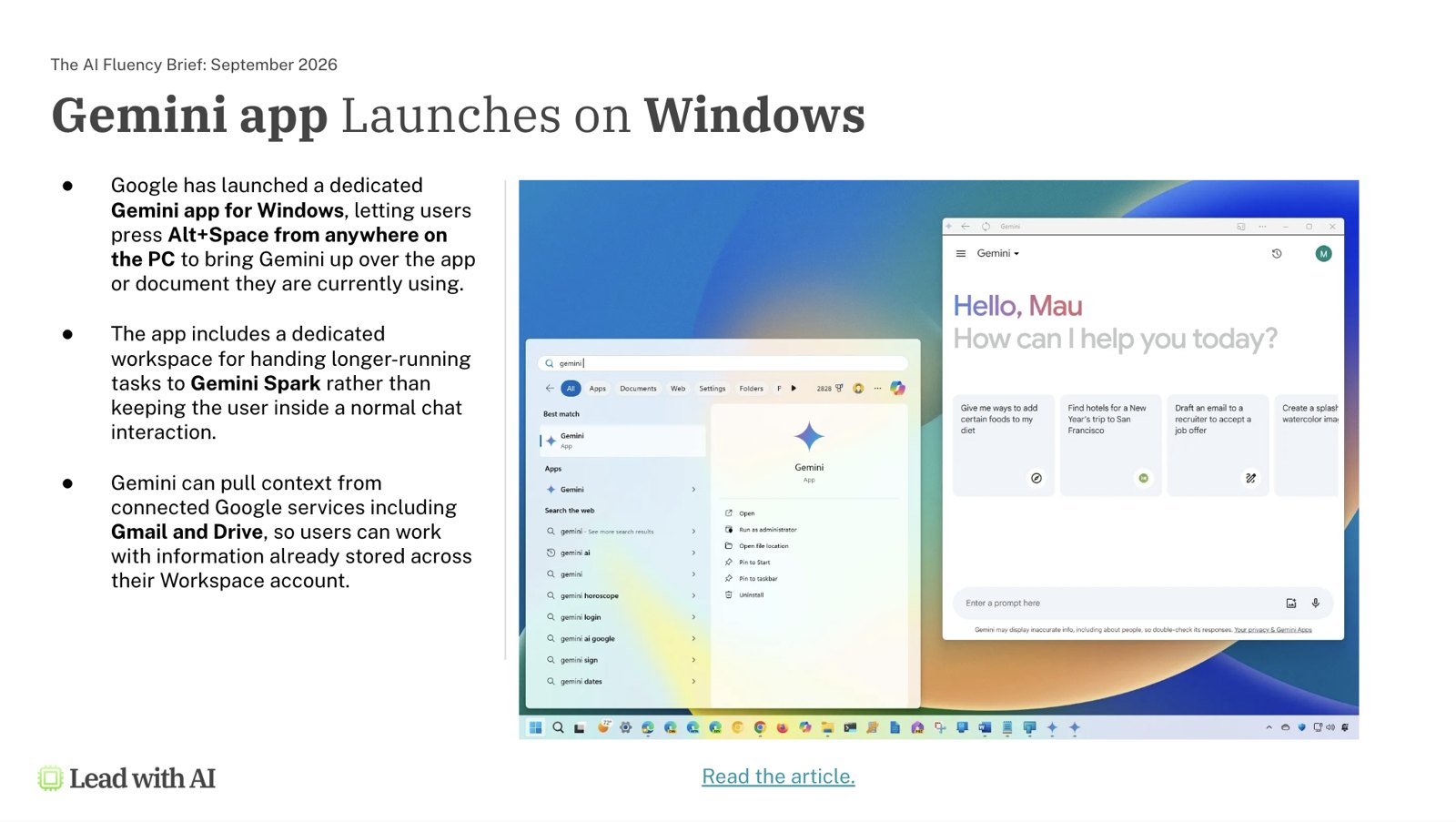
Google launched a dedicated Gemini app for Windows, letting you press Alt+Space from anywhere on the PC to bring Gemini up over whatever you're working in, with a separate workspace for handing longer tasks to Gemini Spark.

Gemini can also now pull context directly from Gmail and Drive. Google added voice-led drafting in Docs and conversational search in Gmail, alongside a more capable Gemini 3.8 Live for real-time, multi-step voice work.

Slide: Gemini app for Windows

Copilot

Microsoft's Copilot Cowork picked up GPT-6 Astra for its hardest tasks and Claude Fable 5.1 for the most ambitious work.

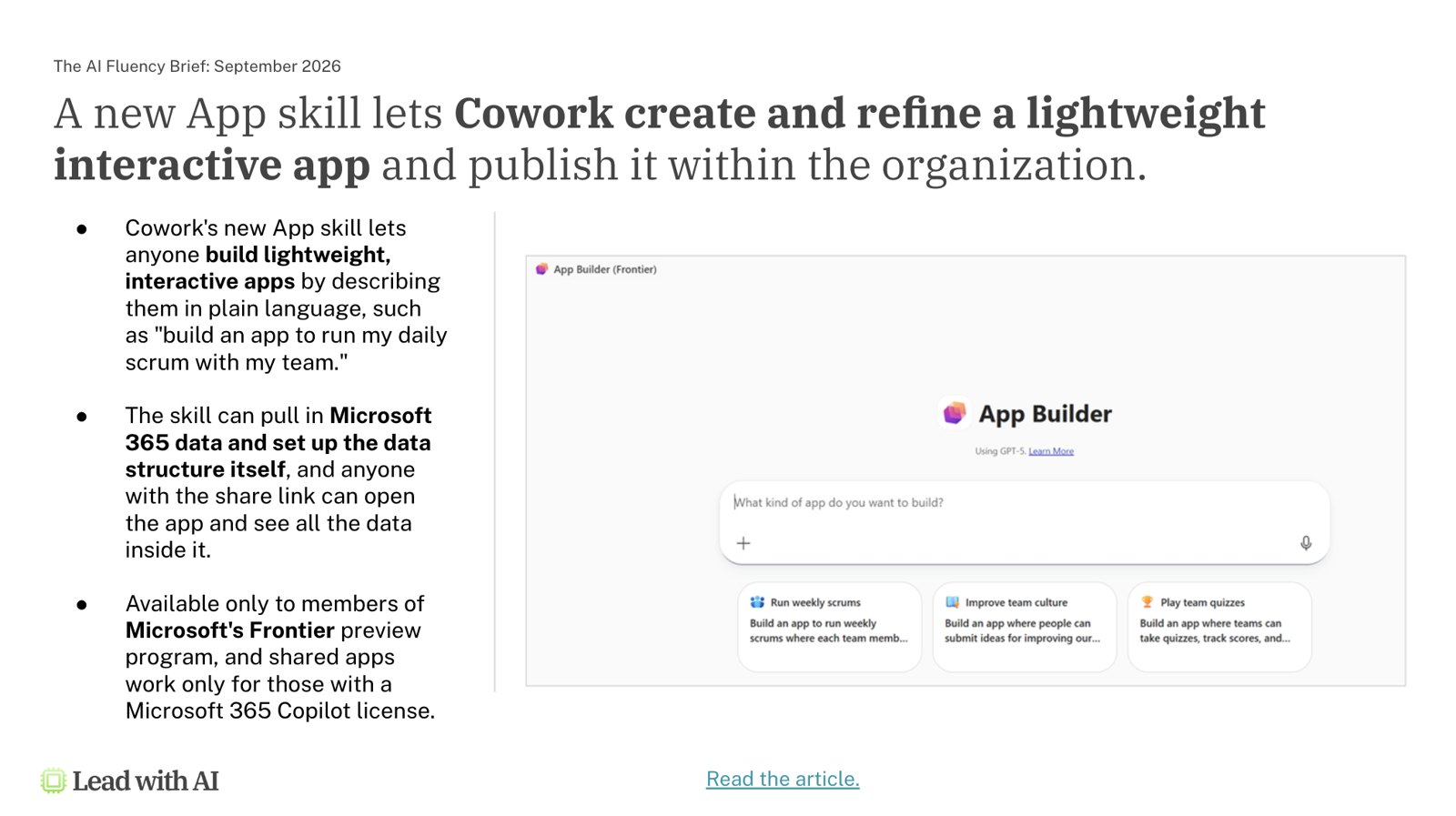
Copilot Cowork also introduced an App skill that lets anyone describe a lightweight internal app in plain language and have it built and shared. For now, that's restricted to Microsoft's Frontier preview program.

Slide: Copilot Cowork App Builder

Bridging the Capability Overhang

All of this brings us back to the capability overhang: there is far more possible with AI right now than almost anyone at your company is using.

Closing it takes two things: understanding what AI can do now, and understanding your own workflow well enough to see where that capability fits.

Diagram: Workflow Literacy plus AI Capability equals Better AI Use Cases

As agents become more integrated into the workflow, human judgment becomes more valuable than ever.

Key Takeaways

  • Plan for AI safety now. The labs building this technology are calling for a slowdown, but training is still ongoing. Build your own governance and review practices rather than waiting for the industry to settle the question.
  • Train people to judge AI output well. AI fluency means evaluating and improving AI output against professional standards.
  • Decide how you use the time saved. Deloitte's 70-minutes-a-week finding shows leaders need to actively redirect that time. Don’t let this time silently turn into more meetings and emails.
  • Redesigning the workflow is a top priority. Coordination between teams and systems eats 35% to 60% of work time. That is where agentic AI creates value.
  • Build trust by naming the limits. Being explicit about where an AI can fail increases both trust and effectiveness. Additionally, use bounded autonomy: let agents handle routine work, and require sign-off on anything consequential.

This article is based on the September 2026 Lead with AI PRO Executive Briefing with Daan van Rossum and Phil Kirschner.

PRO members receive monthly executive briefings, masterclasses, and a peer community of leaders applying AI across industries. Learn more about Lead with AI PRO, start your AI fluency journey with AI Leader Advanced.