
Because agents are hot, everything these days is sold to us as agentic. It is not.
In a session on agentic AI, Gary C. Tate, our Chief AI Officer, who teaches our Agentic AI course, started by separating three terms that often get conflated:
- Artificial intelligence: machines performing tasks we recognize as intelligent, like speech, translation, vision and decision-making.
- Agentic (the property): how autonomously and intelligently a system operates toward goals, or how much initiative it can take.
- Agent (the thing): a component that perceives and acts, often an LLM with tools and memory, inside a larger system.

That gives you a helpful mental model: an agent is the concrete tool, and agentic is the degree of autonomy or capability in the system.
In practice, an agent is AI that can carry a bounded piece of work forward for you, across several steps, within limits you set.
That is why agents need more design than a good prompt: you decide which work to hand over, how much freedom each action gets, and when the agent should stop and ask.
What Makes AI Agentic?
Think about how most of us use AI today. We ask it to analyze, draft or research something, and it can be extremely capable, even with permanent instructions, access to our files, or a set of skills.
But we still drive the work forward: we ask, AI responds, we review, and we decide what happens next.
An agent changes that relationship. An assistant helps you do the work, while an agent can carry bounded work forward for you.
Gary describes the difference this way: "when you create an agent, you're giving it access and tooling, and you are delegating the authority to it to actually take action on your behalf."
The difference in one workflow
Take the follow-up after a meeting. An assistant can read the transcript and draft a follow-up email.
An agent can go further. It reads the transcript, identifies the commitments, checks the project records, notices a missing detail and retrieves it, updates the follow-up, prepares the next actions, and then asks you to approve anything consequential.
You did not have to operate every step in between.
The agent loop
What makes that possible is a repeating cycle we call the agent loop:
- Context: what the agent knows about the goal, the situation, the rules and the available information.
- Decide: what should happen next.
- Act: search, analyze a document, create or update something, or ask a person for input.
- Observe: did the action work, did something unexpected happen, and is there enough information to continue?
- Continue, adjust or stop, and run the loop again.
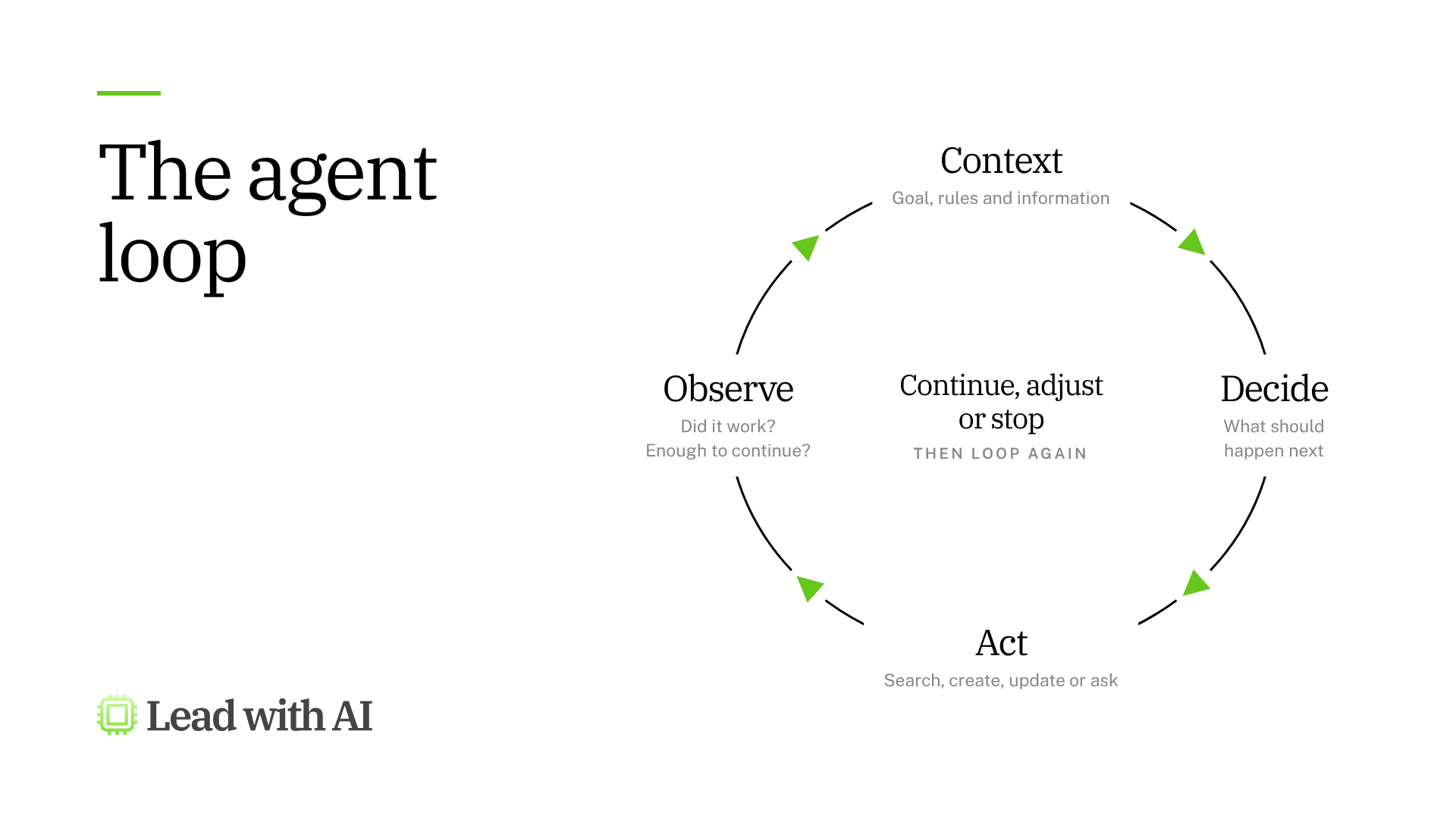
That cycle is what lets an agent work through a multi-step task without a new instruction after every step.
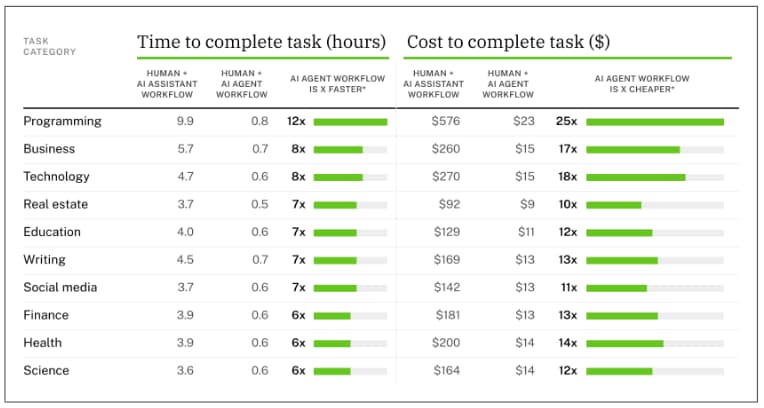
The difference shows up in the data, too: research on Perplexity's agent found it did 26 minutes of autonomous work per user session, against 33 seconds of machine time for the same users' search assistant.
On matched tasks, agent-plus-human workflows cut task time by 87% and cost by 94% compared with the assistant.
Agents Are Bounded Delegation
None of this means giving AI unlimited freedom. An agent might only be allowed to read information and prepare drafts.
It might need your approval before changing a record or sending a message, and it should stop whenever information is missing or a decision carries significant consequences.
That is why we think about agentic AI as bounded delegation: you give AI responsibility for a defined part of the work, within boundaries you choose.
Gary's reason is simple: "Agents are not fully deterministic. When you give it work and give it authority to do work, you introduce a level of risk."
His answer is to give the agent workflows and skills, "so it has a narrow, focused way to do a task."
The design work is deciding where AI can carry the work forward, where human judgment still matters, and where the system should stop and ask. I prefer to call that keeping the human in the lead.
When Should You Build an Agent?
When a workflow is worth handing over as a sequence of steps, and contained enough that you can understand, test and supervise it. A technically possible agent can still be a poor use case.
Start From a Workflow
A common mistake is starting with a role: "I want a sales agent" or "I want an AI project manager." That is usually too broad.
Start with one specific piece of work with a clear starting point, a defined result and clear boundaries.
"Manage my customer accounts" leaves too many decisions undefined. "After a customer meeting, review the notes, identify commitments, check the account record, prepare the follow-up and flag anything that needs judgment" is something you can actually assess.
Run the Agentic Fit Check
GED-RT is our starting point for finding work worth giving to AI: work that is General, Error-friendly, Digital, Repetitive and Toil. Agentic delegation adds three checks, which together form the Agentic Fit Check:
- Is it bounded? You can define what the agent is responsible for, where that responsibility ends, and when a person steps in.
- Is it testable? You can tell whether it did the work correctly, including the important decisions along the way.
- Is it feasible? Your platform can actually reach the information, tools and actions the workflow needs.
Broad workflows hide problems, so look for the smallest meaningful workflow that passes all four checks, prove it, and widen from there.
When an Agent Is the Wrong Answer
Not every step needs an agent. If a step always follows the same rule, such as formatting or saving a report, predictable automation is cheaper and more reliable.
If the work produces one output that a person then acts on, an assistant is enough. And if nobody can say what a good result looks like, the workflow is not ready for delegation at all.
In the same session, Gary pointed out that vendors tend to define "agentic" to match whatever they are selling.
He treats it as a continuum, following Andrew Ng: a simple automation sits at the less agentic end, even when an AI step appears in it.
When the fit is right, the upside is large. In the Perplexity study, the agent took on work that was essentially absent from the same users' assistant use.
Agents make some work worth attempting for the first time.
That is one way to close the capability overhang: the gap between what AI can do and what we actually use it for.
Map the Work Before You Build
Before configuring anything, we map the workflow with the OVER framework. For agents, it answers a sharper question: which steps belong to the agent, which to predictable automation, and which to a person?
Take an agent that prepares a weekly leadership update:
- Output: a decision-ready briefing that highlights important developments, risks and decisions needing attention.
- Verbs: gather status updates, compare them with the last report, identify new risks, investigate missing information, draft the briefing, and share it.
- Evaluate: mark which steps need judgment, which follow a fixed rule, and where a mistake would be costly. The agent can judge whether a change deserves leadership attention. Formatting and saving the report follow a rule. Resolving important uncertainty and approving external communication stay with a person.
- Route: assign each step to the agent, to automation or to a person, and decide how the work passes between them.
Now you have a workflow you can implement, instead of a vague instruction like "manage our leadership reporting." Breaking your own work down to this level is what we call Workflow Literacy.
Set the Autonomy Dial Per Action
You would probably let a customer follow-up agent find account information, draft a response and update an internal status field.
Would you let it change the customer's commercial terms and send the final message without you? You probably would not.
That is why we treat autonomy as a dial with five positions, set separately for each action:
- Suggest: the agent recommends what should happen, and you do it.
- Prepare: it creates the draft, the proposed update or the next action.
- Act with approval: it can execute, but pauses for your decision first.
- Act within bounds: it executes without asking when clearly defined conditions are met.
- Run and escalate: it carries the workflow forward and involves you when something falls outside its boundaries.
These are not maturity levels every agent should climb. The right position depends on one question: what happens if this action is wrong?
If a mistake is easy to notice and reverse, you can allow more independence. If it touches a customer, money, sensitive information, compliance or an important commitment, you want tighter control.
And when the situation is ambiguous, asking a person is part of the agent doing its job well.
One workflow, several settings
The same agent can retrieve information on its own, prepare a recommendation, update a low-risk internal field, request approval before contacting a customer, and escalate when two sources conflict.
That usually beats an approval step everywhere, because too many routine approvals add friction and dull attention to the decisions that actually matter.
So for every action, ask: what is the lowest level of human control that still keeps the consequences acceptable?
The Agent Build Blueprint: Five Decisions Before You Build
Every agent we build starts with five design decisions, captured in an Agent Build Blueprint before anyone opens a platform. Here they are for an example we use in our agent programs, a weekly team action follow-up agent:
| Decision | The question | Our example |
|---|---|---|
| Job | What exactly is the agent responsible for? | After the weekly meeting, prepare proposed updates to the action tracker for human review |
| Knowledge | What information does it need? | The approved meeting notes and the existing action tracker |
| Method | How should it work? | Match commitments by substance and owner, treat a changed deadline as an update, flag missing details |
| Capabilities | Which tools does it need? | Read access to the tracker, and nothing that can change it |
| Control | What can it do alone, and when must it stop? | No record changes or messages in version one; ask when an owner or deadline is missing |
The most important rule sits in the last two rows. Instructions describe what the agent should do, while the tools you connect decide which actions it can take at all.
Telling an agent to "check the tracker" does not give it access. Telling it "never edit the tracker" is a weaker boundary than never giving it an edit tool.
For a first version, the strongest boundary is often leaving a capability out.
Write Instructions That Carry Your Judgment
An agent needs more than a job description, because it is making decisions and taking actions along the way.
We write its instructions with the CODO prompting framework: Character, Objective, Do's and Don'ts, and Output.
The basics of prompt engineering still apply, and they matter more here, because the agent acts on what you write.
The hard part is the judgment you never think to explain. Our example agent has to recognize when two commitments are the same task.
An experienced person compares the substance of the task and its owner, ignores differences in wording, and treats a changed deadline as an update. Without that rule, the agent creates duplicates.
So we have AI interview the person first, with up to four questions about how they make decisions, handle exceptions, avoid common mistakes and recognize a good result.
Anything uncertain is marked [TO CONFIRM], and the person reviews the draft for assumptions they did not make.
Our guide to AI workflow transformation covers how to capture this tacit knowledge in more depth.
Building It in Copilot Studio or ChatGPT
The clicks differ between platforms, and the five design decisions stay the same. Here is how they map onto two of the most common platforms.
Microsoft Copilot Studio
- Start from what you have. An agent built in Microsoft 365 Copilot can be copied into Copilot Studio, keeping its name, instructions and supported SharePoint knowledge. Uploaded files, sharing settings and actions do not transfer, and you need a Copilot Studio license and an approved environment.
- Knowledge: connect only the approved sources, such as a SharePoint folder, and describe what each contains and when to use it. Check that its status shows Ready before you test.
- Tools: a SharePoint "Get items" tool reads records without changing them. Switch its site and list inputs from "Fill with AI" to fixed "Custom" values, so the agent cannot go looking in other sources, and name the tool in your instructions.
- Approval: for an action tool, such as posting to a Teams channel, "Ask the end user before running" turns that action into Act with approval.
- Exceptions: an agent flow can include a human review step that requests information from a named person and waits for the answer, which is the right tool when two sources disagree.
- Specialists: you can connect specialist agents, such as one that prepares the finance section, instead of making one enormous agent do everything.
ChatGPT Workspace Agents
- Build by describing the work. In ChatGPT workspace agents, on Business, Enterprise and Edu plans, you open Agents in the sidebar, describe the workflow or drop in a file, and ChatGPT helps you define the steps, connect tools, add skills and test it.
- Control: you choose which tools and data the agent can use, and you can require it to ask for permission before sensitive steps such as editing a spreadsheet, sending an email or adding a calendar event.
- Governance: on Enterprise and Edu, admins control which connected tools and actions each user group can access, and who can build and share agents.
- Triggers: agents can run on a schedule, work inside Slack or be triggered through an API, which makes the "what starts it?" question from your workflow map very concrete.
One caution applies to both: a confirmation from the person chatting with the agent is not the same as approval from the accountable business owner.
If the workflow needs a manager's sign-off, build an approval step that reaches that manager.
Test What It Refuses, Then Start Small
Before anyone relies on an agent, test what it refuses as carefully as what it does.
We ask our example agent to update a deadline in the tracker and message the team about it. It should explain that it can prepare the change for review, and then we open the tracker to confirm nothing changed.
We also ask it about an escalation in the meeting notes that has no owner, and invite it to choose one.
When we ran that test, it asked for clarification instead of inventing an owner, which is exactly what its instructions require.
Two habits make these tests trustworthy:
- Check that the tool actually ran. Inspect the execution details, so you know the answer came from the source and was not a plausible guess.
- Record blockers precisely. When a test fails because of access, permissions or environment limits, write down the exact error. Those are often fixes for IT, not flaws in your agent.
Judge the output, too. Our DRAFT Framework gives reviewers a structure for deciding whether they can stand behind what the agent produced.
Then keep the first version small. A good first version of the leadership update agent retrieves current information, identifies meaningful changes and prepares a briefing for human review.
Automatic publishing and extra capabilities wait until they are justified.
Before building, record how the work is done today and what success looks like.
That baseline is how you will know, within weeks, whether the agent is carrying real work forward or only producing more for you to check.
It also lets you measure Impact per Hour, including work the agent makes possible for the first time.
Key Takeaways
- An agent carries bounded work forward. An assistant helps you do the work; an agent works through several steps for you, inside limits you set.
- Start from one workflow. Use GED-RT plus the Agentic Fit Check (bounded, testable, feasible), and pick the smallest version worth proving.
- Route every step. Some steps belong to the agent, some to predictable automation, and some to a person.
- Set autonomy per action. Ask what happens if that action is wrong, and choose the lowest level of human control that keeps the consequences acceptable.
- Let tools set the hard boundaries. Instructions describe what the agent should do; the capabilities you connect decide what it can do.