This step-by-step guide is exclusively available for Lead with AI PRO membership. 🚀 With Lead with AI PRO, you’ll get: ✅ Access to expert-crafted step-by-step guides ✅ AI-powered workflows to boost productivity ✅ Exclusive tools and resources for smarter work Upgrade to Lead with AI PRO and access all premium content instantly.
AI Adoption Just Jumped Again. Are We Actually Using It Well?
Gallup's Q2 2026 data shows organizational AI adoption jumped to 47%. But the real story is the capability overhang: breadth of use, not access, is what drives productivity.
By
Daan van Rossum
Founder & CEO, Lead with AI
Presented by
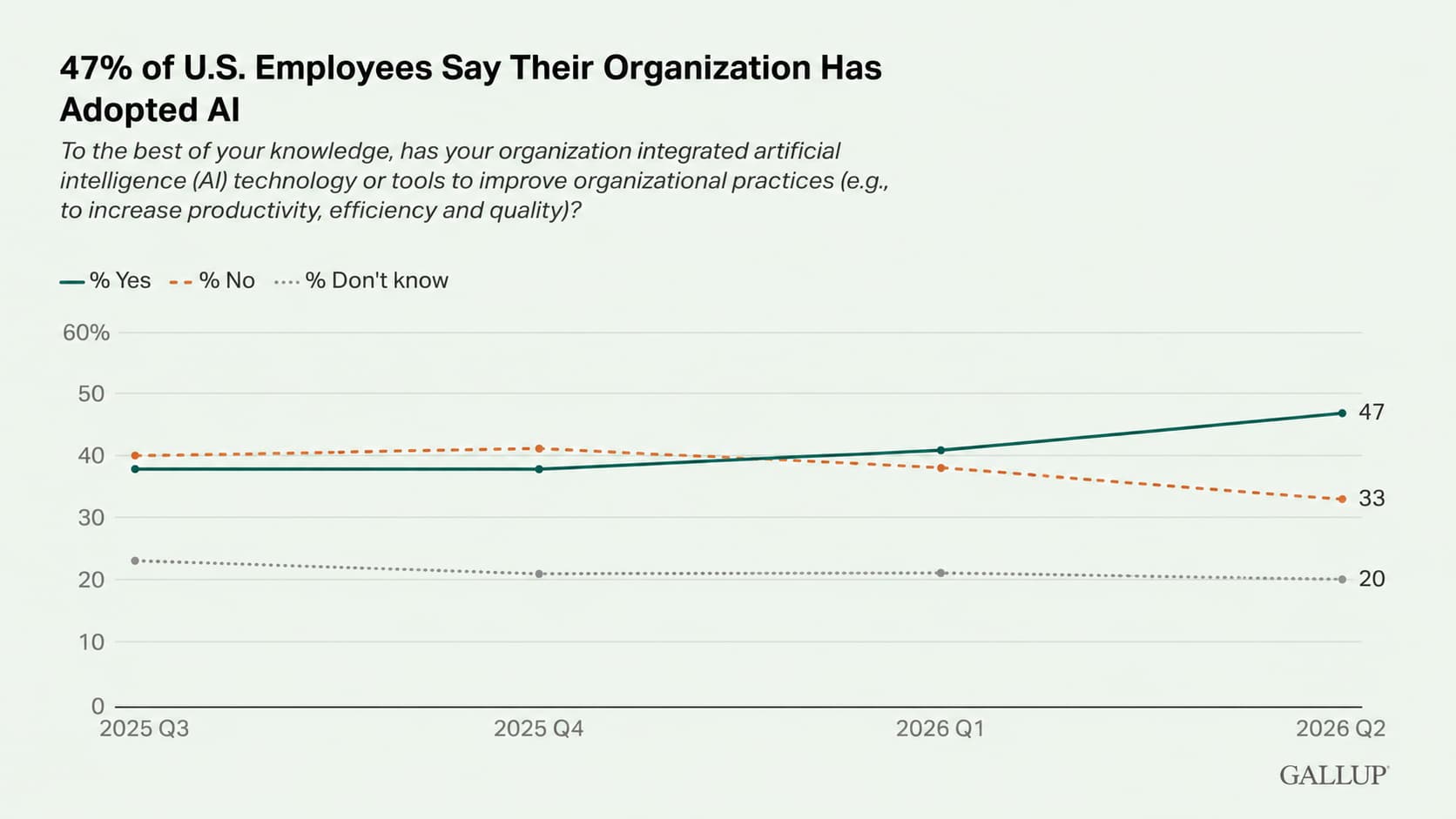
Gallup just released its latest workforce study, and the top-line result is encouraging. 47% of U.S. employees now say their organization has integrated AI tools to improve productivity, efficiency, or quality, up from 41% last quarter.
That is the sharpest quarterly jump Gallup has recorded, and it narrows the gap with how quickly individuals have been adopting AI on their own.
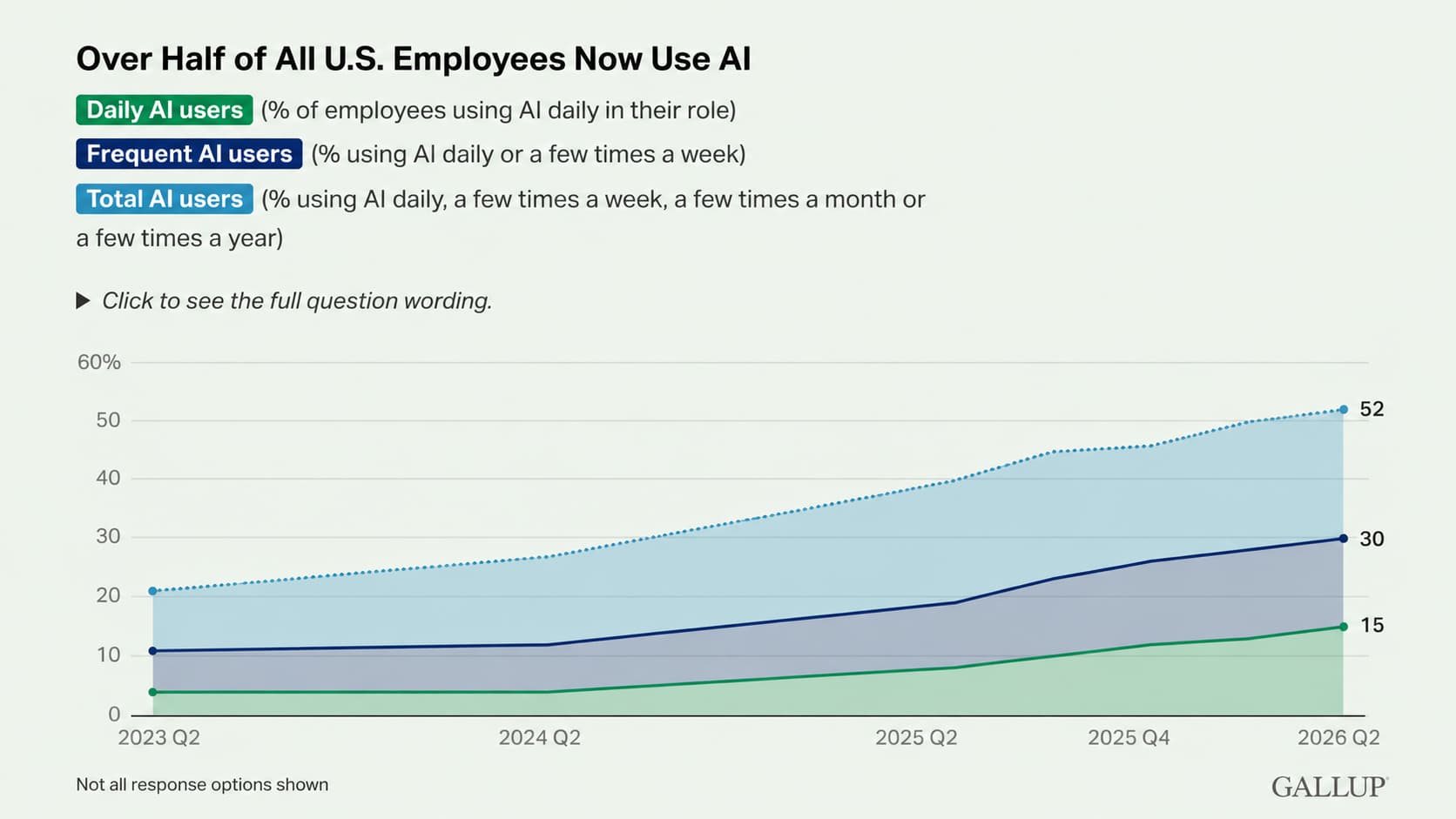
Individual use rose as well. More than half of U.S. employees (52%) now use AI at work, with 30% using it a few times a week or more and 15% using it every day.
The more important number, though, is not 47%, but one that's further down in the study and says a lot more about whether all this adoption is turning into value.
Flagship AI Newsletter
The AI Newsletter That Makes You Smarter, Not Busier
Join over 30,000 leaders and receive our insights on AI platforms, implementations, and organizational change management.
Key Highlights of the Latest Gallup Data
Organizational adoption is catching up to individual use.
For most of the past year, employees were adopting AI faster than the companies they work for, and this quarter the organizations closed much of that distance.
Because the share of employees who do not know whether their employer uses AI held steady, Gallup attributes the rise to genuine adoption rather than growing awareness.
Organizational AI adoption reached 47% according to Gallup data
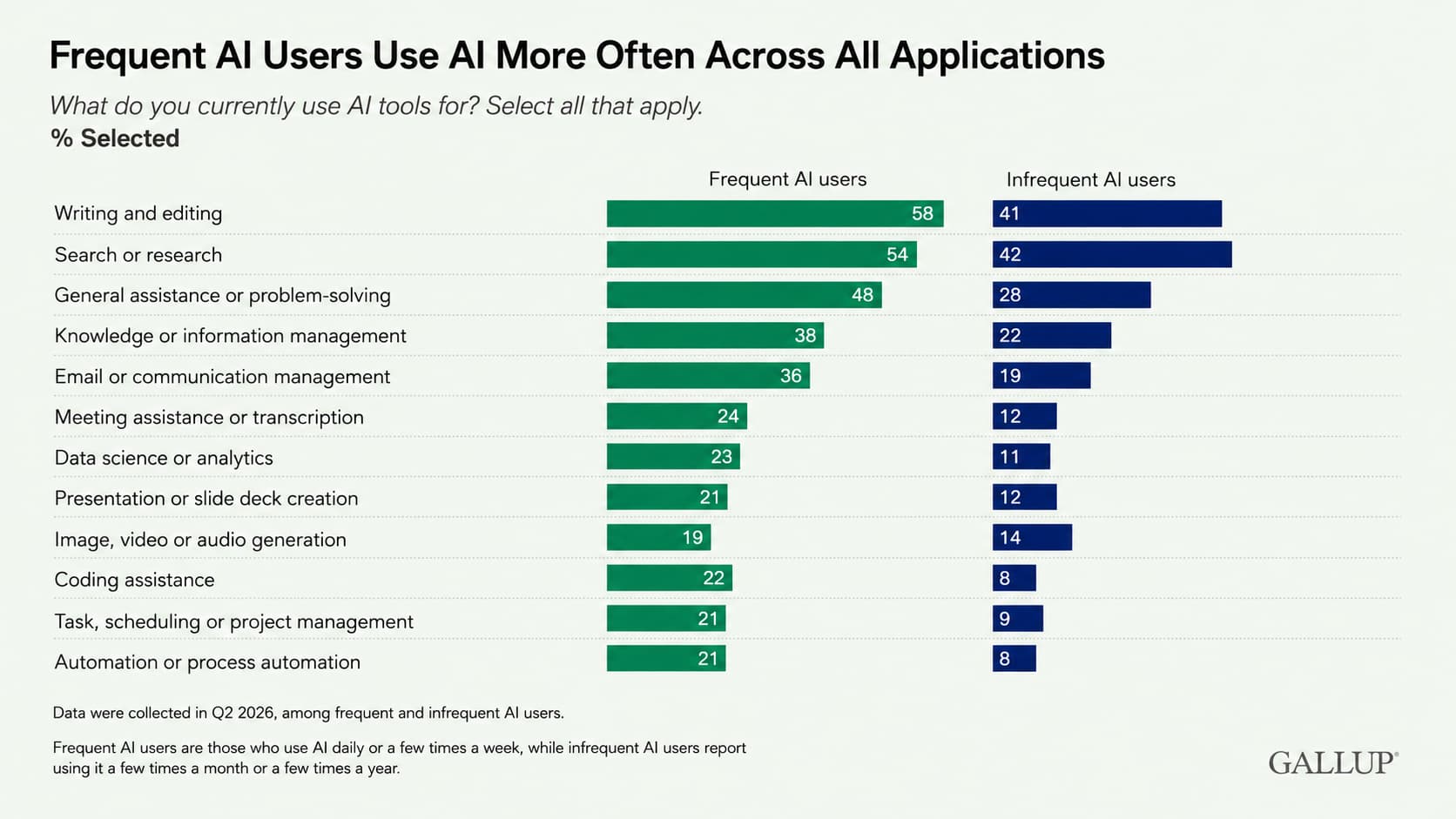
The most common uses are also the most basic.
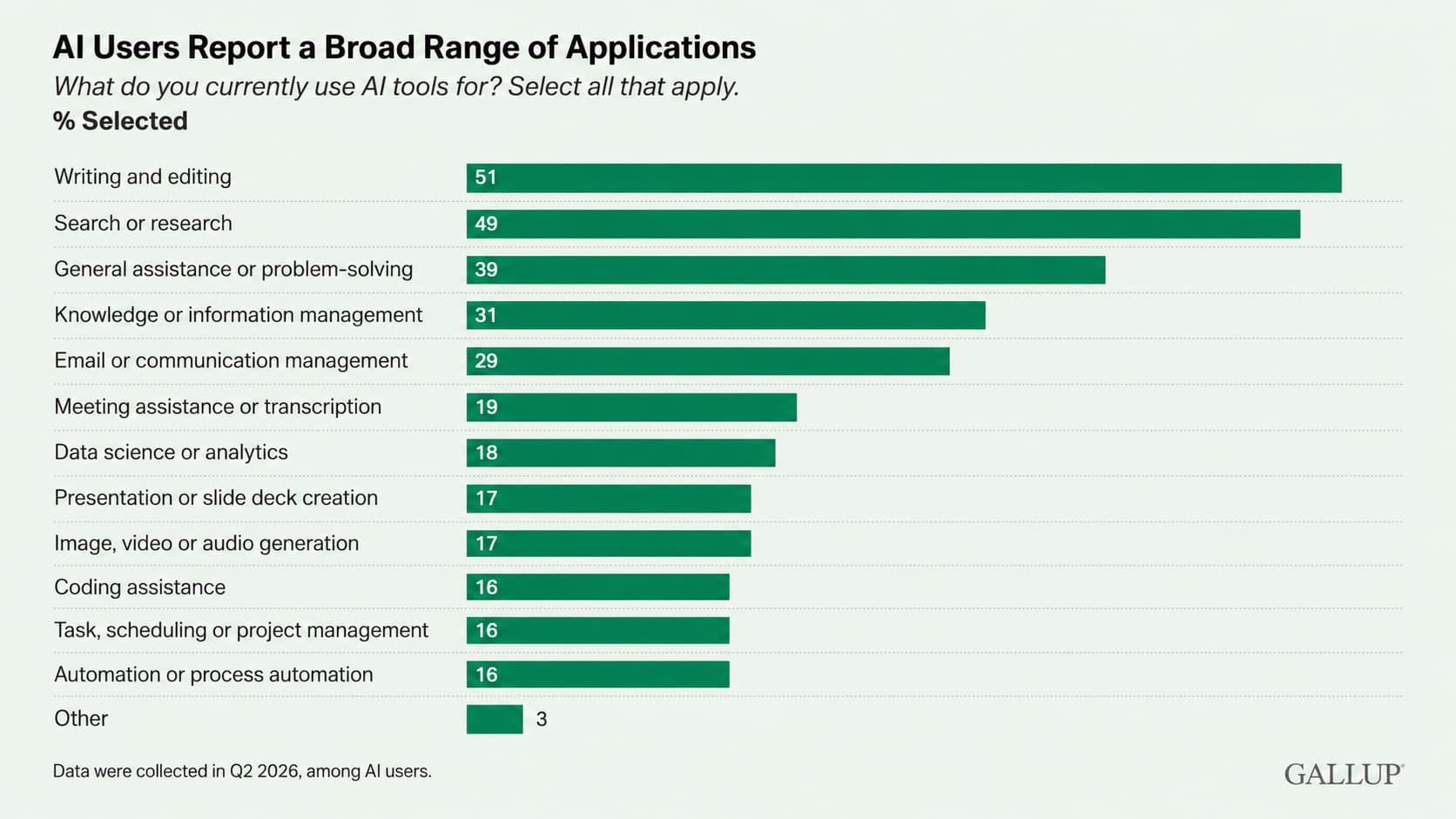
Among AI users, the top applications are writing and editing (51%), search and research (49%), and general problem-solving (39%), which are mostly the ask-a-question-get-an-answer tasks that help without changing how the work itself gets done.
Writing, research, and general assistance as the top use cases
The uses that drive the biggest productivity gains are very different ones.
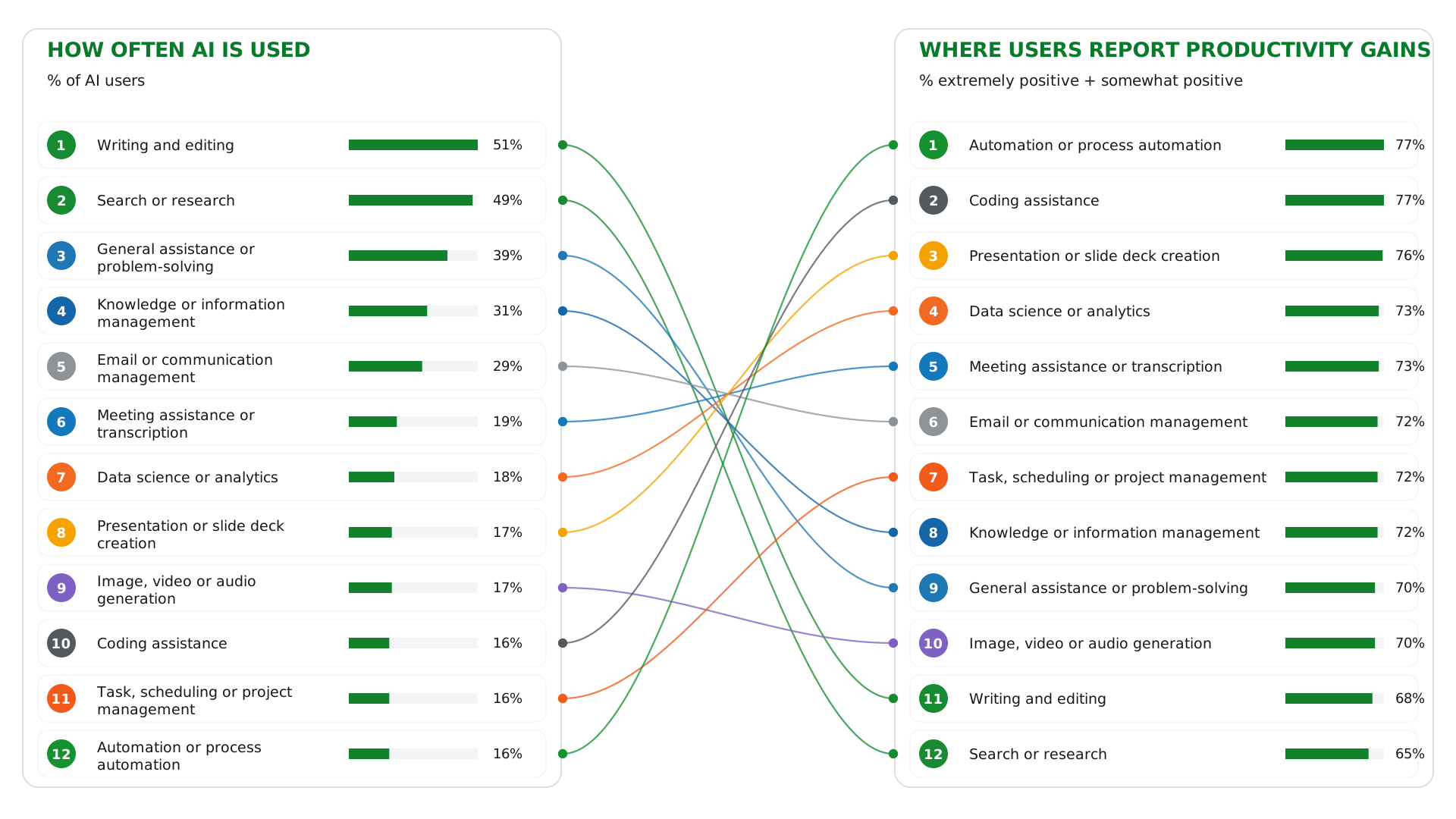
More than three-quarters of people who use AI for coding or automation (77%) say it has clearly improved their productivity, followed closely by presentation and slide creation (76%) (see our guide to AI PowerPoint generators) and data and analytics (75%). Writing, the single most common use, sits lower at 68%, and search and research lower still at 65%.
Gallup data: how often AI drives productivity versus where most people use it
Productivity is highest for people with the most use cases.
Among people using AI for one or two tasks, 45% report a productivity gain. That rises to 66% for three or four tasks, 78% for five or six, and 90% for seven or more. Employees who apply AI across many parts of their work are roughly twice as likely to see a benefit as those using it for only one or two.
The Gap Between What AI Can Do and What We Use It For
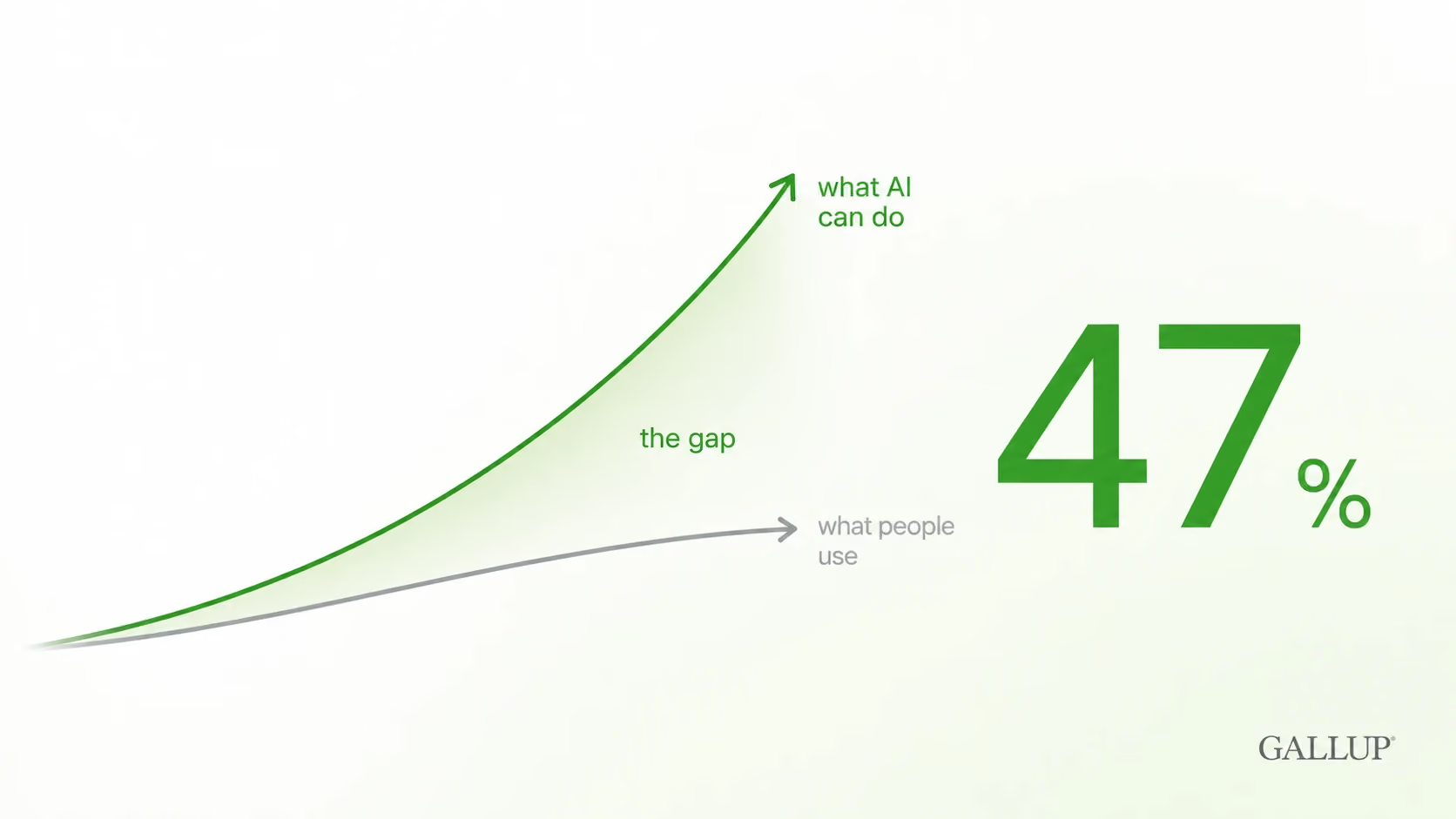
That last finding reflects what people in Silicon Valley call the capability overhang: the distance between what AI can already do and what people actually use it for.
Capability overhang: the gap between what AI can do and what leaders actually adopt
That distance is widening, because the technology is improving faster than the habits around it.
Other recent research points the same way.
Glean found that 87% of digital workers now use AI and report saving about 11 hours a week, while only 13% say their organization is performing meaningfully better as a result, a finding we covered in our June executive briefing.
The access is clearly there, but the value has not caught up.
McKinsey's latest study found that the single biggest factor separating companies that see real bottom-line impact from those that do is not the technology, but whether they redesign the underlying work.
That is Gallup's finding, viewed from the company's side.
A study of more than 100,000 software developers by researchers at MIT and Wharton makes the point even sharper. The amount of code written rose by more than 700% and pull requests by 65%, but the software actually shipped rose only 20% (see more AI statistics here).
All that extra output stalled at the one place AI cannot cover: a human still has to decide what is good enough to release.
This matches what we see with the leaders we work with. Almost everyone already believes AI is powerful.
They have watched someone else do something impressive with it and thought, "That is amazing; I wish I could do that." The hard part is the next step: working out how it applies to their own job.
So the breadth-of-use finding is really a finding about discovery. The question that unlocks it is not "what can AI do?" but "what can AI do for me, in the work sitting in front of me this week?"
This turns out to be one of the more solvable problems. In a single workshop, most leaders move from one or two use cases to a long list.
It takes two things together: workflow literacy, which is understanding your own work well enough to see where AI fits, and a clear sense of what AI is genuinely good at.
Workflow literacy creates better use cases
Our approach is straightforward. We have people describe their role, match it against a large library of real use cases from other leaders, and point them to the ones that will work for them.
Once someone gets a first real result, they start recognizing other openings on their own, because each use case points to the next one. That is where real adoption begins.
There is one more layer, and it is the one that separates AI that helps a little from AI that changes how much you actually get done.
Most people's instinct is to hand AI a whole task and let it run end to end, and that usually backfires. Our own analysis of people-centric AI transformation put numbers on why.
Used to support a task, AI leaves about 77% of the underlying workflow intact and speeds people up by roughly 24%. Pointed at the whole task before anyone understands that workflow, quality falls to around 40%, and people work more slowly.
What works is a split. You identify the parts AI is good at and the parts that still need you, then divide the work accordingly.
The goal is not "AI writes my deck." It is working out which specific parts of building a deck AI does well, and keeping the rest yourself.
That is the idea behind our OVER framework, which breaks a task into its smallest steps so you can give AI a narrow job with a clear output and a review gate.
Working at that level, rather than at "where could AI help," is what turns a light user into one of the seven-plus-use-case people reporting a 90% gain.
Flagship AI Newsletter
The AI Newsletter That Makes You Smarter, Not Busier
Join over 30,000 leaders and receive our insights on AI platforms, implementations, and organizational change management.
So Why Do I Think It Is Still Too Slow?
Six points in a quarter is a real gain, and I do not want to understate it.
But this is where our Co-Pilot Economy thesis comes in, which holds that AI is improving far faster than people are adapting to it.
When we updated our AI Fluency Matrix recently, we reviewed how much had changed in only six months, and the pace was striking.
Six months earlier, there was no Claude Cowork or ChatGPT Work that could complete real work on your behalf. The connectors that now let you instruct an AI while it reads from and writes into your own software were mostly absent.
On our own team, people now publish content without opening the CMS and update the CRM without opening it either, because the AI handles that step. None of that was normal six months ago.
That pace is what concerns me about the gap. A leader starting from scratch six months from now would struggle, because you cannot reach the agentic tools without the foundation beneath them.
We see it constantly: people get nowhere with agents when they have skipped the earlier steps.
Push for breadth, not just access. Giving people a tool is the easy part, and it is most of what the 47% measures. The value appears when they use AI across many parts of their work, so that is where to focus.
Start at the level of the task, not the tool. Instead of asking where AI could help in general, sit with the real work, break one workflow into its steps, and find the small jobs AI can do well today.
Treat the basic uses as a starting point, not the destination. Writing and search are where people begin. The larger gains sit in the more specific work, so no one should stop there.
None of this was ever really a technology problem. Every employee using AI across seven or more tasks reached that point the same way, by closing the gap between what AI can do and what they personally use it for, one use case at a time.
Each of those wins raised their Impact per Hour, the output and capability they get from the same amount of time. That is why we build everything around people and their real workflows rather than around tools and headcount.
The technology will keep improving whatever we do. The one thing a leader controls is how quickly their people learn to keep up.
That is the difference between AI literacy, which is knowing about it, and AI fluency, which is working with it.
It is the shift from watching AI to directing it, and it is what we spend our time building with leaders in AI Leader Advanced.







.jpg)