November 18, 2026

What Every Leader Needs to Know About AI Right Now (October 2026)

Employees need a say in how AI changes their work, and leaders need clear rules for what they delegate.
Executive Briefing cover: What leaders need to know about AI, October 2026
Jasmine Tran
By
Jasmine Tran
Analyst, Lead with AI

Presented by

Employees need a say in how AI changes their work, and leaders need clear rules for what they delegate.

This article draws on the October 2026 Executive Briefing for Lead with AI PRO members, hosted by Daan van Rossum.

Are we giving people the skills and support to use AI, and involving them in deciding how their work should change?

Teams need support learning what AI can do and deciding how to use it in their everyday work.

Why Do People Come First?

Only 29% of U.S. employees were engaged in the latest Gallup study, the lowest level since 2011. Just 46% strongly agreed they know what is expected of them, and 37% felt someone at work cares about them as a person.

The decline was sharpest among remote and hybrid employees in organizations adopting AI.

Slide showing the U.S. employee engagement trend from 2000 through Q3 2026, with 29% engaged, the lowest level since 2011
U.S. employee engagement · Gallup

The Charter study of 5,000 people points to what might help.

Among the conditions linked to benefiting from AI, feeling involved in how AI fits into your job ranked first, while running agents in the background ranked 25th. Ask employees which tasks AI could help with and involve them in deciding how the work should change. For an example, see Enel’s AI strategy, where a July 2026 union agreement gives employees a formal voice through a joint committee of six employee representatives and six executives.
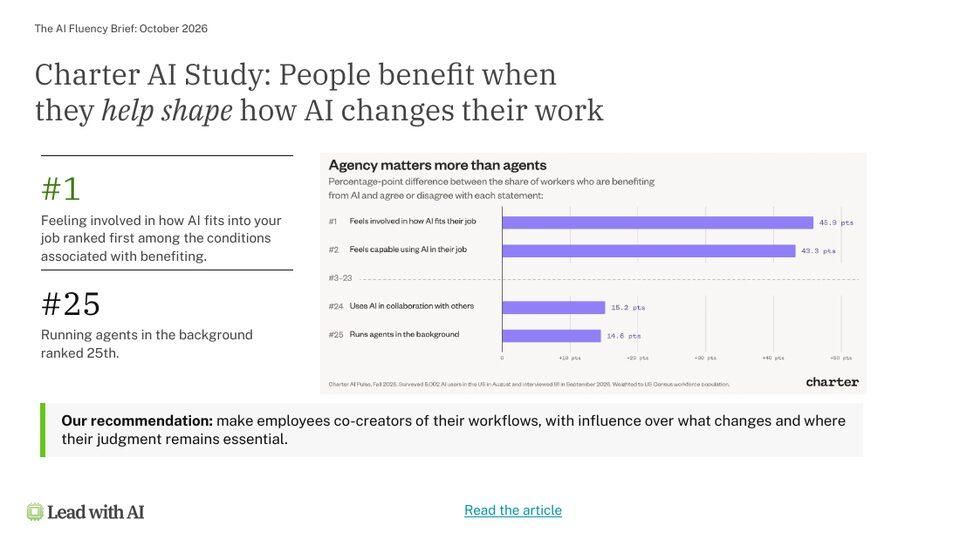
Slide on the Charter AI study: people benefit when they help shape how AI changes their work, with involvement ranked first and background agents ranked 25th
Employee involvement · Charter

McKinsey shows the organizational gap:

  • 80% say AI has improved their individual productivity.
  • 37% report a positive EBIT impact from AI.
  • 70% of people feel personally ready for AI, but only 27% say their organization is.
  • 6% qualify as AI high performers.
Slide showing McKinsey AI readiness figures: 70% personally ready versus 27% organizationally ready, 80% productivity gains and 37% positive EBIT impact
AI readiness · McKinsey

Ben Zweig, CEO of Revelio Labs, says: “The vast majority of transformation happens within occupations.” The job title stays the same while the work itself changes.

For each team, ask three questions:

  1. What should we stop doing? Identify tasks that AI could take over.
  2. What should we do differently? Identify which steps AI could prepare, and where a person still needs to check the work or make a decision.
  3. What do we get more time for? Decide how to use the hours saved.
Slide recapping that the job title can stay the same while the work changes, with three team questions: stop doing, do differently, and more time for

What AI Can Do Now

The updates fall into three areas: building tools from a description, delegating tasks to agents, and connecting AI to the information needed for the work. Voice offers another way to use these tools.


Slide showing three changes expanding what people can do with AI: Build, Delegate and Connect, with Voice as an enabling development
Flagship AI Newsletter
The AI Newsletter That Makes You Smarter, Not Busier
Join over 30,000 leaders and receive our insights on AI platforms, implementations, and organizational change management.
FlexOS Course - AI Content Accelerator - Testimonial Badge

Build: What Happens When an Idea Becomes a Tool?

AI is moving beyond text answers:

  • Interactive answers. ChatGPT Intelligent UI creates small interactive apps inside a response.
  • Presentations. ChatGPT Slides lets you and the AI edit a deck together, then export it to Google Slides or PowerPoint.
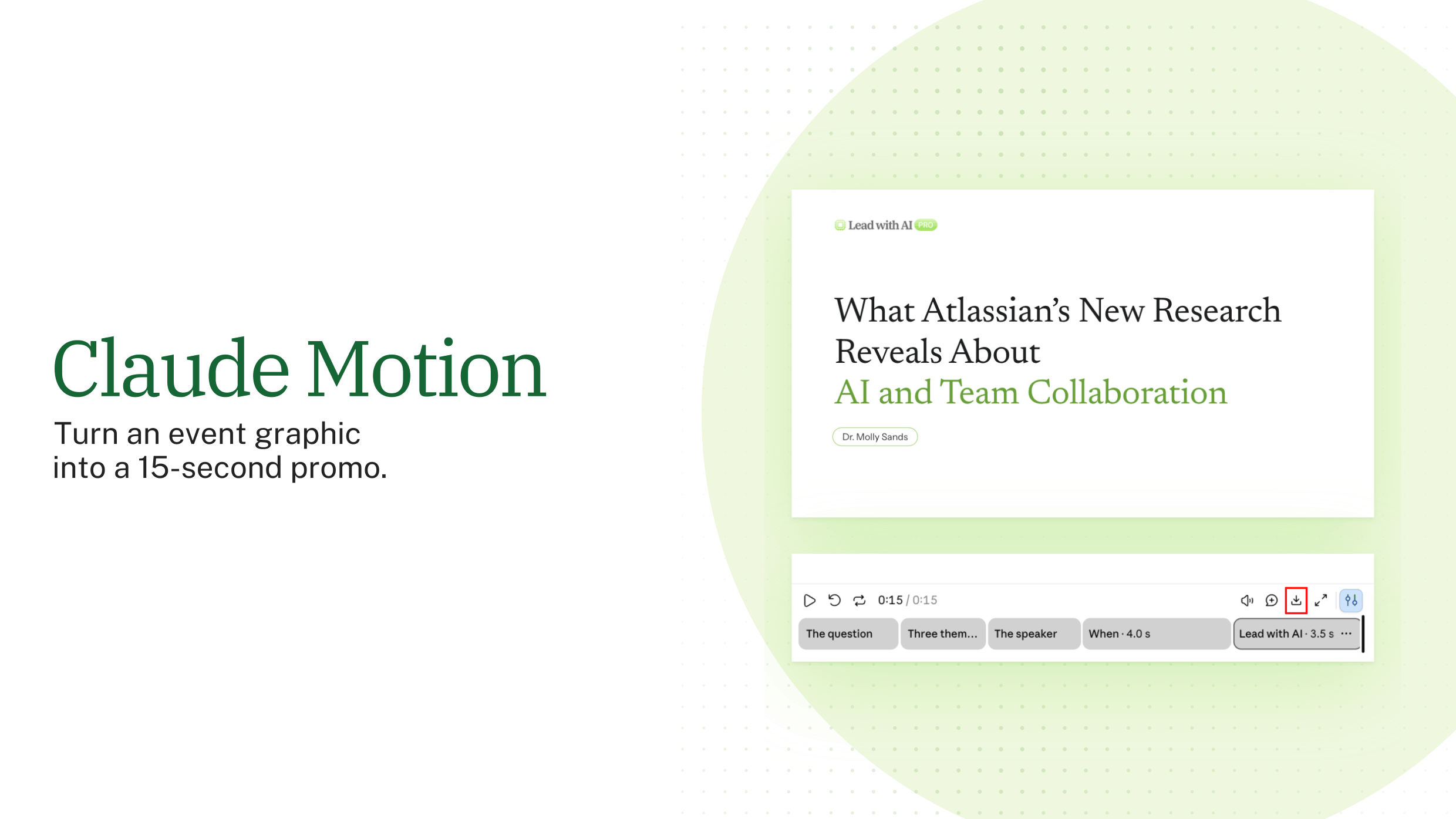
  • Dashboards and explainers. Claude Dashboards creates interactive views of data. Claude Motion creates short animations.
  • Whole websites. ChatGPT Sites builds shareable sites from your material.

AI can help you build a prototype quickly. However, before colleagues rely on it, test it on realistic tasks, check the information it uses, and decide who will maintain it and handle problems.

Delegate: How Do You Hand Work to AI Safely?

These tools offer different ways to delegate work:

  1. On demand. GPT-6 Pro runs parallel agents on a single request.
  2. Recurring. Copilot Studio agents start from an email or a schedule, with no new prompt each time.
  3. As a teammate, in the Copilot Studio Frontier program, agents get their own work account and permissions, can be tagged in Teams, and remember earlier work.

When AI can act on your behalf, be clear about what it may do independently. In a referral workflow, for example, an agent could add a potential customer to a database and alert the team, while a person approves any outreach before it is sent. BNY, for instance, assigns a human manager to each of its more than 140 digital employees (see BNY’s AI strategy).

What Does Delegation Require?

The research points to gaps in agent governance, output review, and leaders’ readiness to use AI:

  • Authority: only 1 in 5 organizations have a mature governance model for autonomous agents (Deloitte).
  • Review: only 18% of leaders say someone checks the quality of AI output (DDI).
  • Accountability: only 14% of leaders feel very prepared to use AI well, though 81% report productivity gains (DDI).

Set separate permissions for reading information, drafting content, updating records, contacting people, and spending money. Start with routine tasks where mistakes can be corrected, and assign someone to review each agent’s work. The DRAFT Framework gives reviewers a one-minute habit for judging AI output before they rely on it.

Slide on AI governance: delegation requires clear authority and human judgment, with 1 in 5 organizations having mature agent governance, 18% reviewing AI output and 14% of leaders very prepared
AI governance · Deloitte · DDI

Proactive Assistants

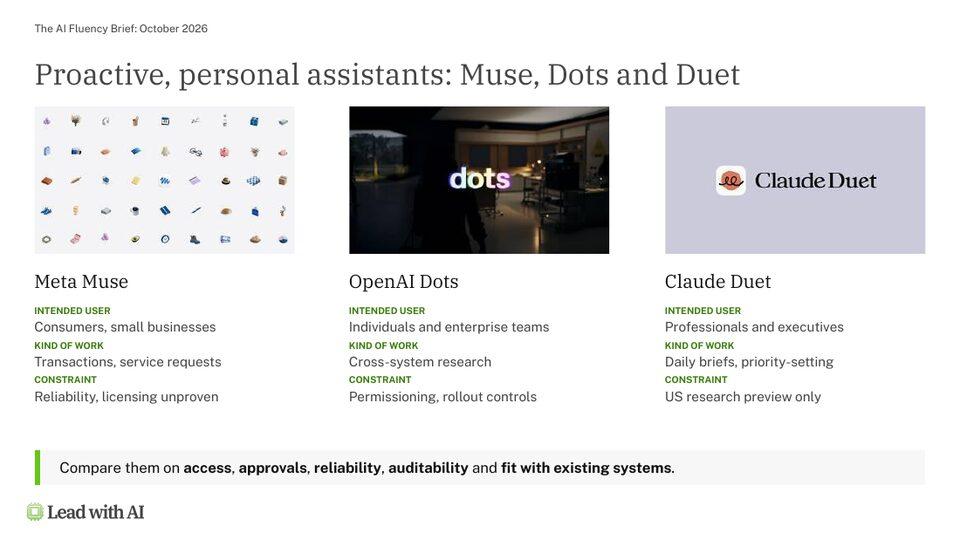
New proactive assistants include Meta Muse for consumers and small businesses, OpenAI Dots for individuals and enterprise teams, and Claude Duet for professionals and executives (US research preview only).

Before using a proactive assistant, decide what it may do without asking. For example, you might allow it to suggest changes to a presentation while requiring your approval before it edits the file. Check whether its settings and permissions support that boundary.

Slide comparing proactive personal assistants Meta Muse, OpenAI Dots and Claude Duet by intended user, kind of work and constraint
Proactive AI assistants · LWAI

Connect: Give AI the Information It Needs

These updates connect AI more closely to the files and conversations teams use at work:

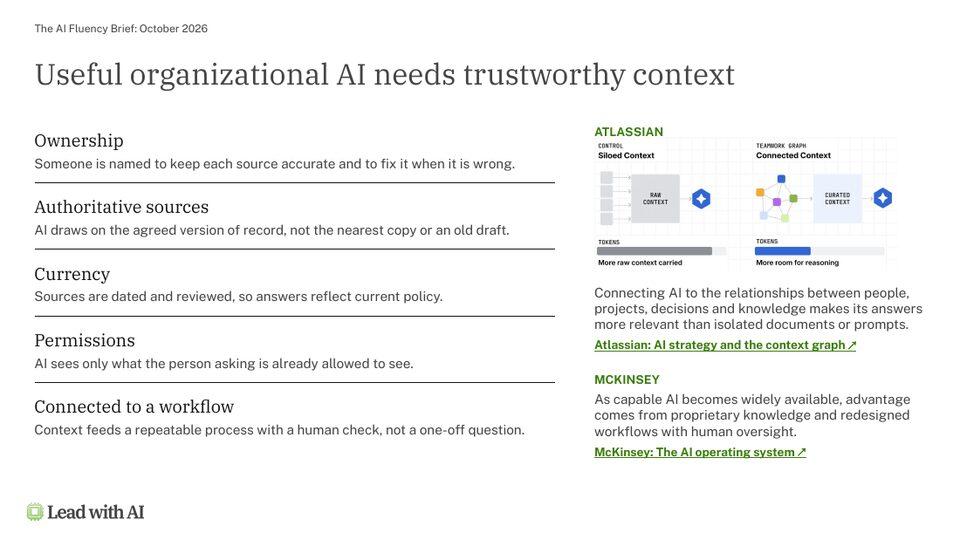
Choose sources that are reliable and relevant to the task.

An agent may keep using an outdated file unless someone updates it or removes it from the agent’s sources. Give each source a clear owner and set permissions that control which information an agent can access.

Slide on trustworthy AI context: ownership, authoritative sources, currency, permissions and connection to a workflow
Trustworthy AI context · Atlassian · McKinsey

As teams create more assistants, colleagues need a way to find useful ones and know who maintains them. A shared library can list each assistant’s purpose, owner, and last update. Our guide to reusable AI assistants compares the ChatGPT, Claude, Gemini and Copilot options.

Is Voice Becoming a Real Work Interface?

  • 63% of Gemini users talk to it (Google).
  • 150 million+ weekly Voice and Dictation users on ChatGPT (OpenAI).
  • 19% of AI users go voice first, while 27% mix voice and typing (Menlo).

Granola now joins Gemini and Wispr Flow in dictating into any app. ChatGPT Live 1.1 adds more natural accents and new voices for French, German, Hindi, Japanese, Korean, Mexican Spanish, and English. It handles pauses and interruptions, and developers can connect it to the Decisions API.

Slide showing voice AI adoption: 63% of Gemini users talk to it, 150 million+ weekly ChatGPT Voice and Dictation users, and 19% voice first plus 27% mixed
Voice AI adoption · Google · OpenAI · Menlo

What Should You Do About the Capability Overhang?

The capability overhang is the gap between what AI can already do and what your team uses in its everyday work. Building AI fluency helps people recognize where those capabilities could be useful.

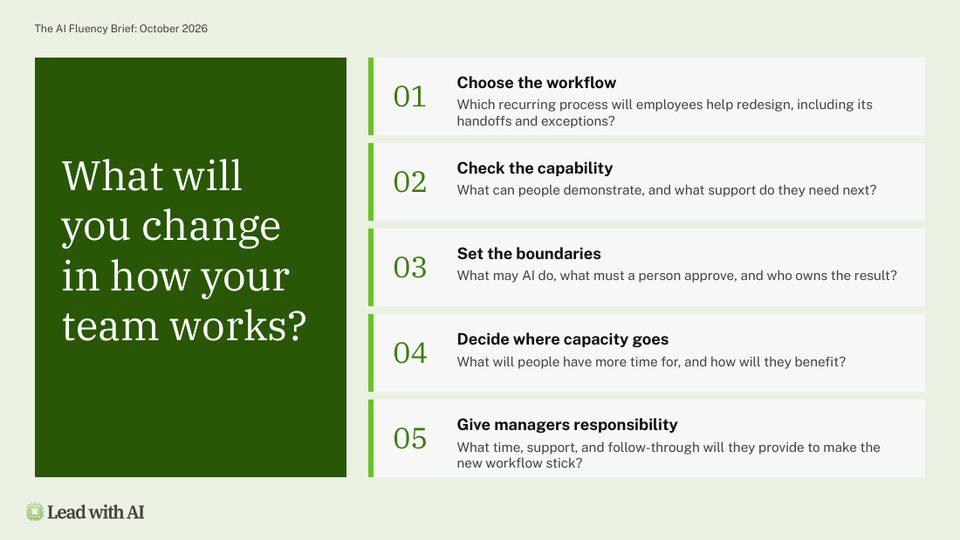
Start with one recurring process and involve the people who do it in deciding what should change. The OVER framework breaks a job down into the pieces of work you can actually redesign. Use these five questions to discuss a workflow with your team:

Slide titled What will you change in how your team works, listing five workflow redesign questions
Workflow redesign questions · LWAI
  1. Choose the workflow. Which recurring process will employees help redesign, including its handoffs and exceptions?
  2. Check the capability. What can people demonstrate, and what support do they need next?
  3. Set the boundaries. What may AI do, what must a person approve, and who owns the result?
  4. Decide where capacity goes. What will people have more time for, and how will they benefit?
  5. Give managers responsibility. What time, support, and follow-through will they provide to make the new workflow stick?

Key Takeaways

  • Involve employees. Ask the people doing the work where AI could help and how they want to use it.
  • Review responsibilities. Decide which tasks to hand over, which need a different approach, and how people will use the time saved.
  • Test before colleagues rely on a tool. Check its results and assign someone to maintain it.
  • Set approval rules. Decide which actions an agent may take independently and which need a person’s approval.
  • Keep information current. Name an owner for each source and set appropriate access permissions.

This article draws on the October 2026 Executive Briefing for Lead with AI PRO members.