
September 1, 2026

What Every Leader Needs to Know About AI Right Now (August 2026)

What's worth knowing about AI in August 2026: Atlassian's data says one AI super user per team is enough. Plus what frontier firms do differently.
Daan van Rossum
By
Daan van Rossum
Founder & CEO, Lead with AI

Presented by

Based on the August 2026 Lead with AI PRO Executive Briefing with Daan van Rossum, Founder and CEO of Lead with AI. Members can find the full recording and slides here.

AI is a very blurry picture, and every month that we pull the research and the insights together, it gets a little sharper.

This month it got sharper in a direction most of the headlines are missing: the differentiator is no longer access to AI, as almost everyone is paying roughly the same twenty dollars a month for roughly the same capability.

What separates the companies getting returns from the ones still waiting is narrower and more practical than that: the workflow, the context, and who is standing behind the output.

Is AI Actually Taking Jobs? The Hiring Data Says Something Else

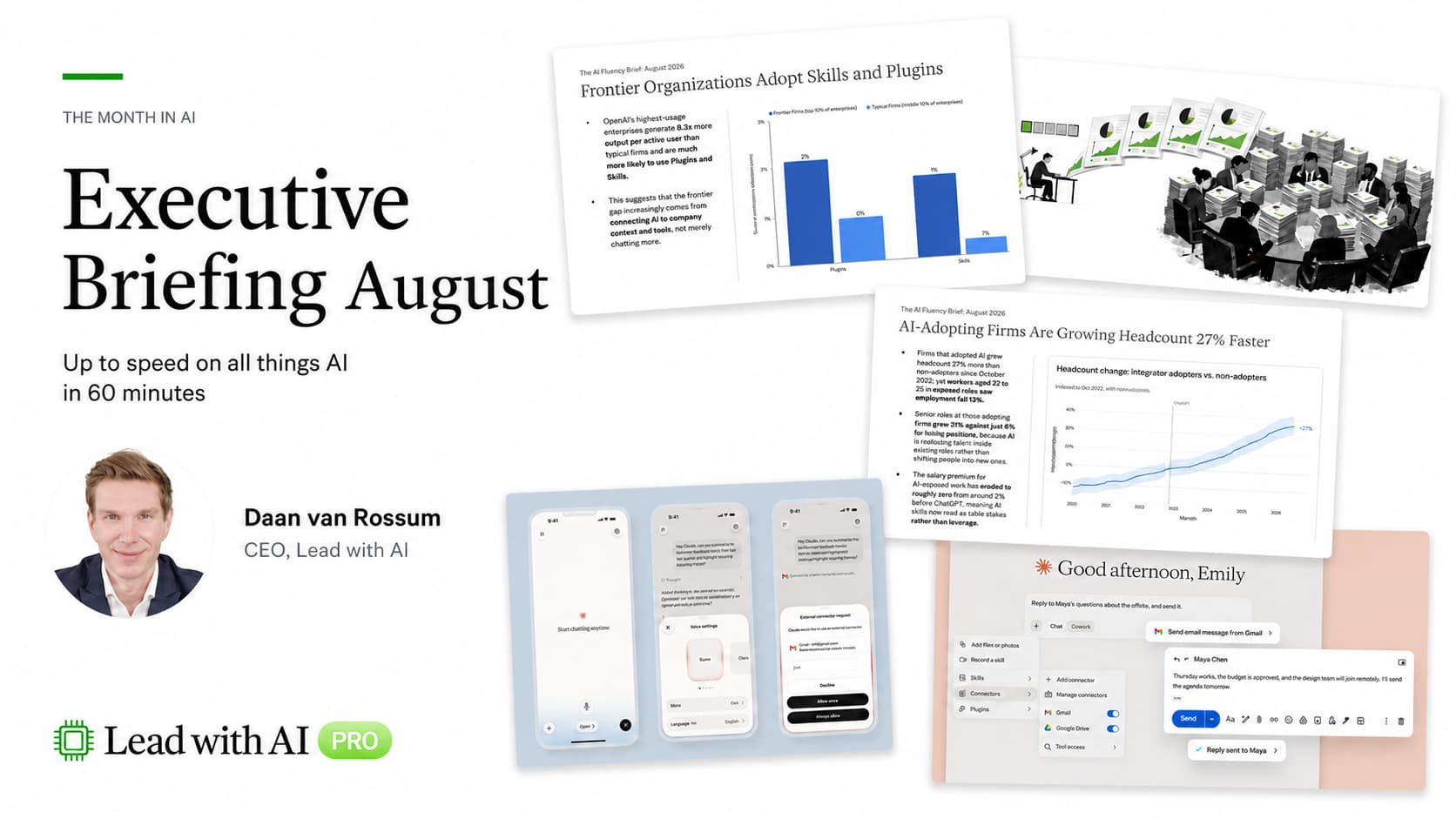
Companies leaning hardest into AI are hiring more people, not fewer. That is the finding from Revelio Labs, whose July 2026 AI Labor Market Tracker shows AI-adopting firms have grown headcount 27% more than non-adopters since late 2022.

The catch is in the distribution. Employment at adopting firms grew 31% in senior roles against only 6% in junior roles.
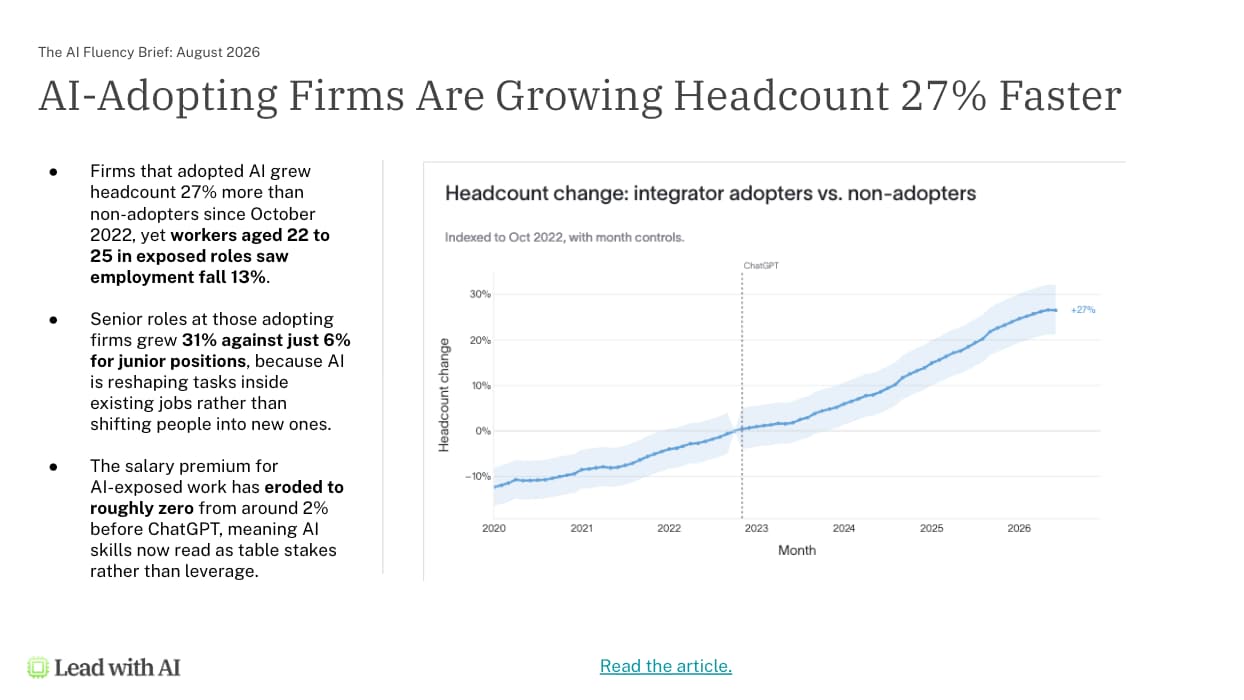
That tracks with what I see in our own business. The more we understand what AI is capable of, the more people we need to direct it, which is why five new people joined Lead with AI in the last two months.

So the honest read is this: experience plus AI fluency is the combination that wins right now.

It is not good news for everyone.

The downstream effect on entry-level roles is real, and it is one of the harder problems in this whole transition. I am currently working with a university on exactly this gap between what graduates have to offer and what companies now need. (We wrote about the shape of that problem in The Entry-Level Crisis.)

How Many AI Super Users Does a Team Actually Need?

One. That is the most useful piece of research I read this month, and it comes from Dr. Molly Sands and the Teamwork Lab at Atlassian, who studied 1,271 teams during an internal hackathon.

Going from zero super users to one raised a team's likelihood of a top-scoring outcome by 18 percentage points. Adding a second and third super user showed diminishing returns.
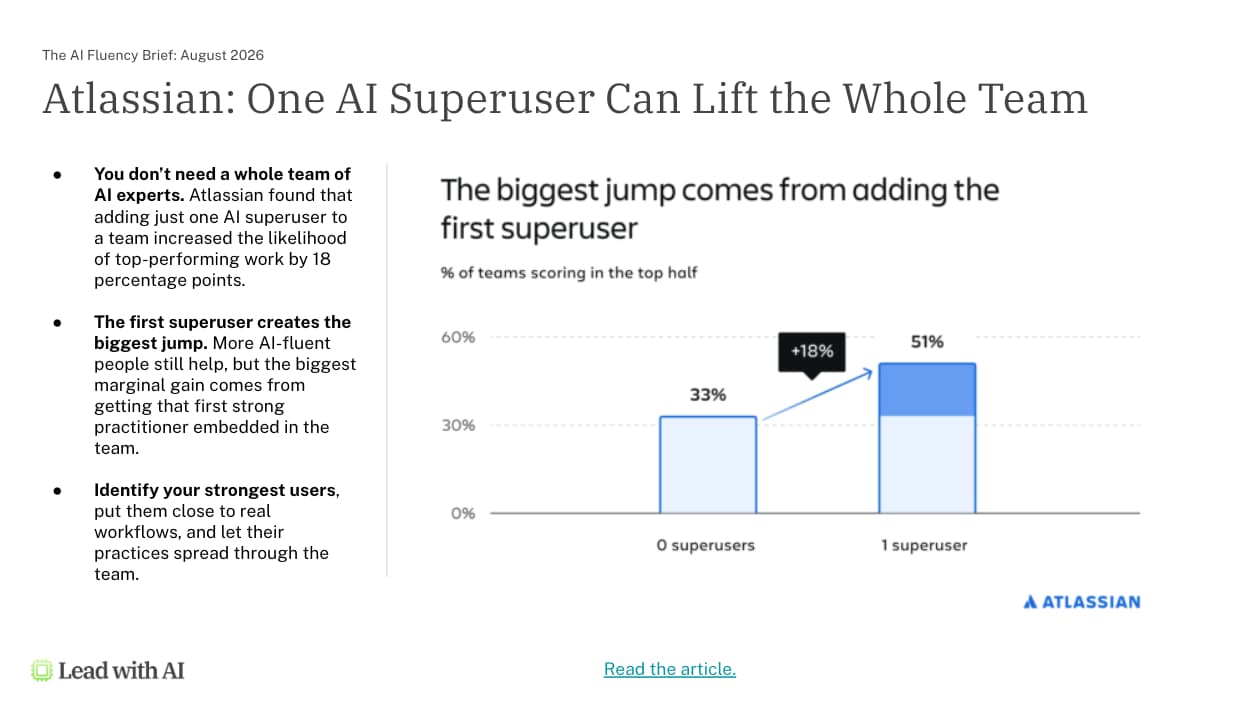
As I've mentioned before, AI fluency is a portfolio, not a ladder. This stat underscores that you do not need to turn everyone into a power user, but just to get the first one into every team.

Why does that first one matter so much? Because they demonstrate what is possible, and the people around them start trying things. It is the zero-to-one that moves the team, which is exactly the argument behind AI champion programs: find those people, put them into real workflows, and let the practice spread socially. (People copy people, as we have put it before.)

Flagship AI Newsletter
The AI Newsletter That Makes You Smarter, Not Busier
Join over 30,000 leaders and receive our insights on AI platforms, implementations, and organizational change management.
FlexOS Course - AI Content Accelerator - Testimonial Badge

Why Is AI Still Not Showing Up in Company Results?

Because most companies are still searching for where AI belongs in their work.

That is the conclusion of How Organizations Use AI, a new paper from OpenAI chief economist Ronnie Chatterji and his team, based on more than 17 million messages across 1,500 organizations.

Their framing is that adoption is only the beginning of deployment. Usage is climbing steeply (output tokens up roughly sevenfold in under a year), while firms are still "actively learning how to integrate AI into organizational workflows."

This is why I keep coming back to the same point: the workflow is becoming the unit of transformation. Not adoption. Not fluency scores. The workflow.

And it is genuinely a search process. In every project we run now beyond training, the hard part is mapping how the work actually gets done today, deciding how it should get done in an AI-forward organization, and then answering the governance questions nobody has answered yet. If agents do the work, what permissions do they have, and where are the gates?

That is the work our OVER framework exists to do, and it starts with knowing your own work well enough to break it into workflows in the first place. (AI works best when you understand your workflow.)

What Do the Top 10% of AI Companies Do Differently?

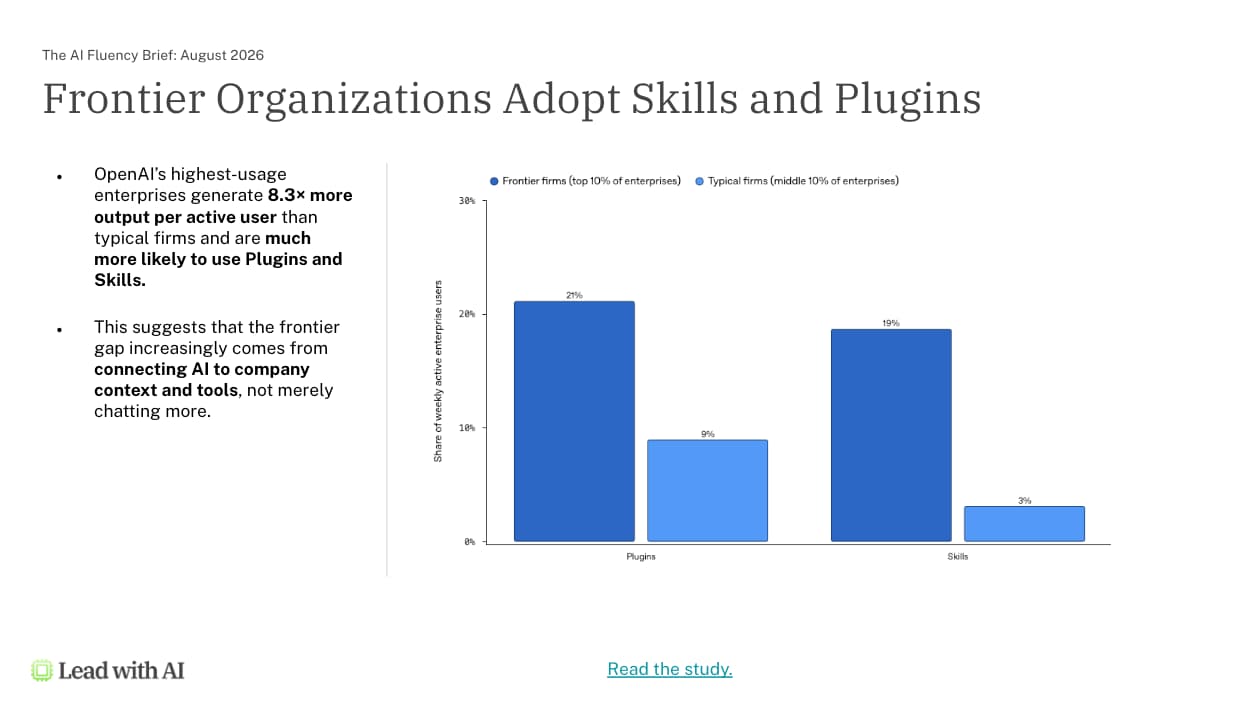
They connect AI to their own context, and they package their workflows as skills. OpenAI published a second report this month, Signals from the enterprise, looking specifically at frontier firms, meaning the top 10% of enterprises using ChatGPT.

Two behaviors stood out. Plugin use at frontier firms runs at 21% of weekly active users against 9% at typical companies. And skills use runs at 19% against 3%, a more than sixfold gap.

The output difference is not subtle: frontier firms generate 8.3 times more output tokens per active user, up from 2.6 times in January.

So again, we all have access to the same models, but the moment you unlock your context, organizational or personal, is the moment the gap opens up.

Which is why moving off GPTs and projects and onto skills is the single highest-leverage housekeeping job on your list right now. A skill knows when to trigger itself, it stacks with other skills inside one workflow, and when you improve the skill, every automation that calls it improves too.

What Can Agents Do That a Chatbot Never Could?

Work you would never have handed to a chatbot in the first place. The clearest evidence comes from research covered in Harvard Business Review by Jeremy Yang of Harvard with Kate Zyskowski, Noah Yonack and Jerry Ma of Perplexity, comparing how the same people used an AI assistant versus an AI agent.

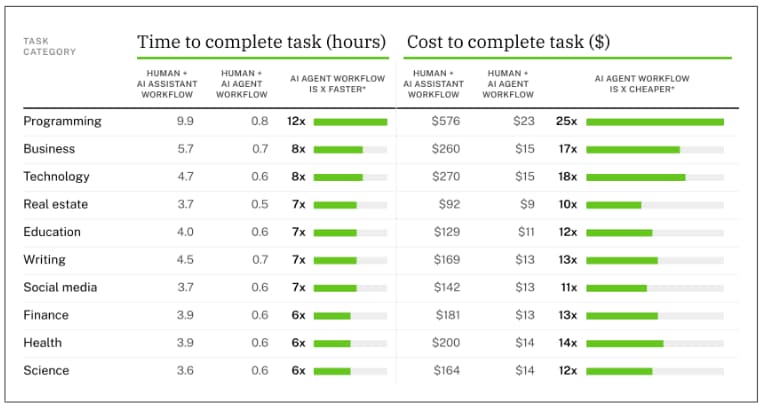
The efficiency numbers are large. The agent-plus-human workflow cut task time by 87% and cost by 94%, with the agent working autonomously for 26 minutes on tasks where the assistant had 33 seconds of machine time.

But the detail I found most interesting is about scope, not speed. Roughly 23% of agent queries involved job tasks that never appeared in those same users' assistant queries at all. The work was not worth giving to AI until AI could actually execute it.

Asana is the cleanest example of that shift I have seen. They had a deprecated testing framework called Enzyme threaded through their entire codebase, and removing it was scoped at five years and roughly six million dollars, so of course they never did it.

Then they pointed agents at it. It took about two calendar weeks and around twelve thousand dollars in model and infrastructure costs, with engineers reviewing changes twice a day. As Asana CTO Amritansh Raghav put it, agents "can give engineers more room for craft, and make once-impossible work worth attempting."

There is a warning buried in all of this for anyone measuring AI by hours saved. An hours-saved metric is completely blind to work that was never on the books. This is why we measure impact per hour instead: AI does not only make you faster at your own job, it gives you capability in fields that were never yours.

The Cost of Abundance: When Your AI Output Becomes Someone Else's Work

There is a flip side to AI being this good, and it's causing overwork and overwhelm for anyone with direct reports.

Amy Webb of NYU Stern, who spoke with well over a hundred CEOs over the past year, described it well in reporting from Fortune.

Her observation is the through line of the last several briefings: in that individuals are more productive, while companies still are not.

Part of it is that AI savings evaporate into more meetings, more email, and more Slack, which is why we start every program with defining North Stars.

The part I found sharper is what she calls insta-decks: a deck that used to take a week now takes a day, so leadership teams receive five times as many of them.

They read well, but they also leave the reader with more work, not less. Last year we covered the BetterUp and Stanford research on workslop and the AI rework tax. In June, it was the Glean Work AI Index and botshitting, where 69% of AI users admit to shipping work they have not verified.

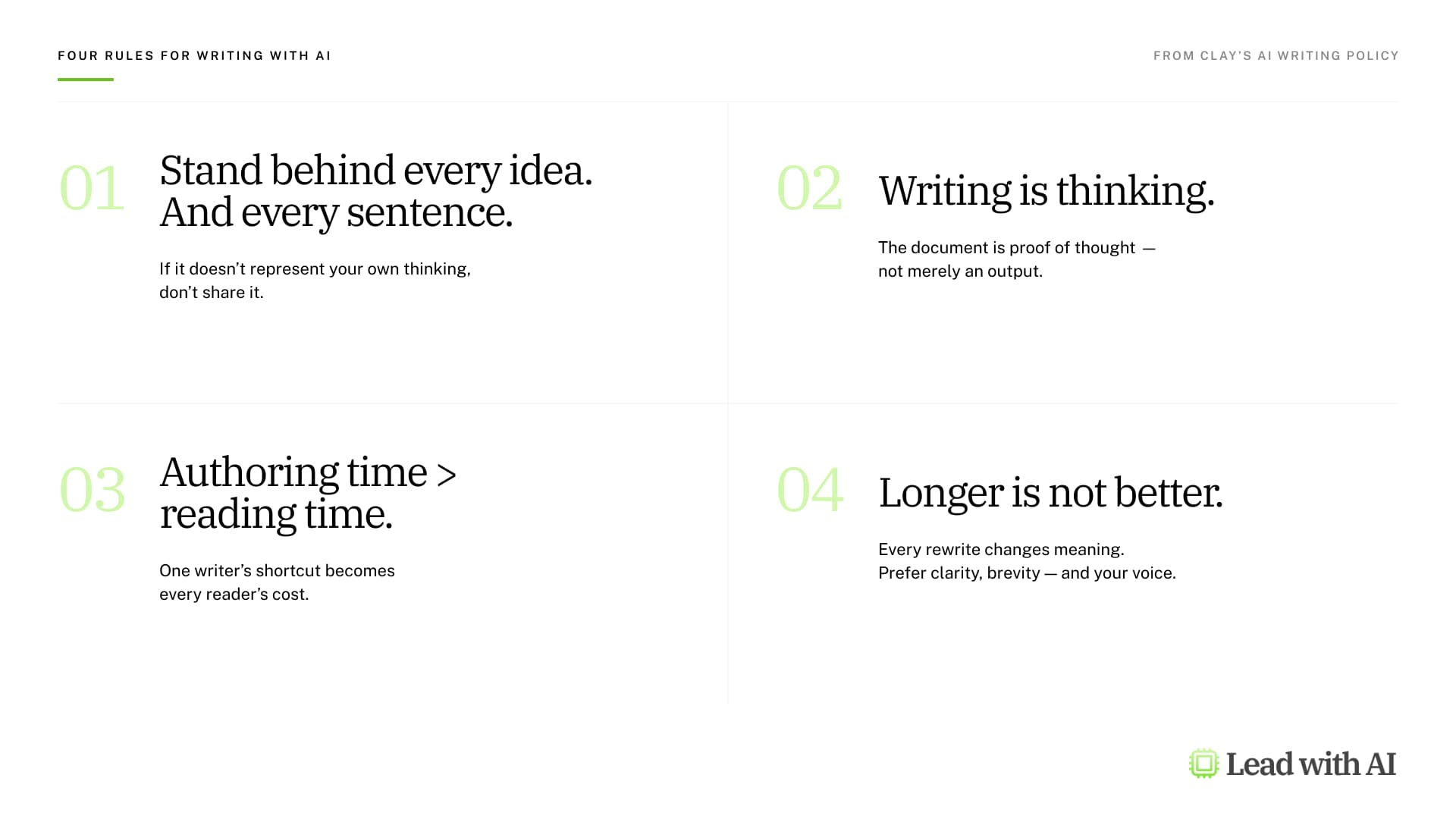
The best antidote I have read comes from Sophie Alpert, an engineer at Clay, and we are adopting it internally. Her rule is that you must stand behind every idea and every sentence in anything you send.

Clay's AI writing policy

The litmus test is simple: someone should be able to go line by line and ask what you meant by this, and you should have an answer every time. "Sorry, AI wrote that, ignore it" is not an acceptable reply.

What Is New This Month in ChatGPT, Claude, Gemini, and Copilot

Every platform shipped tons of new features, but here's what's worth trying:

ChatGPT

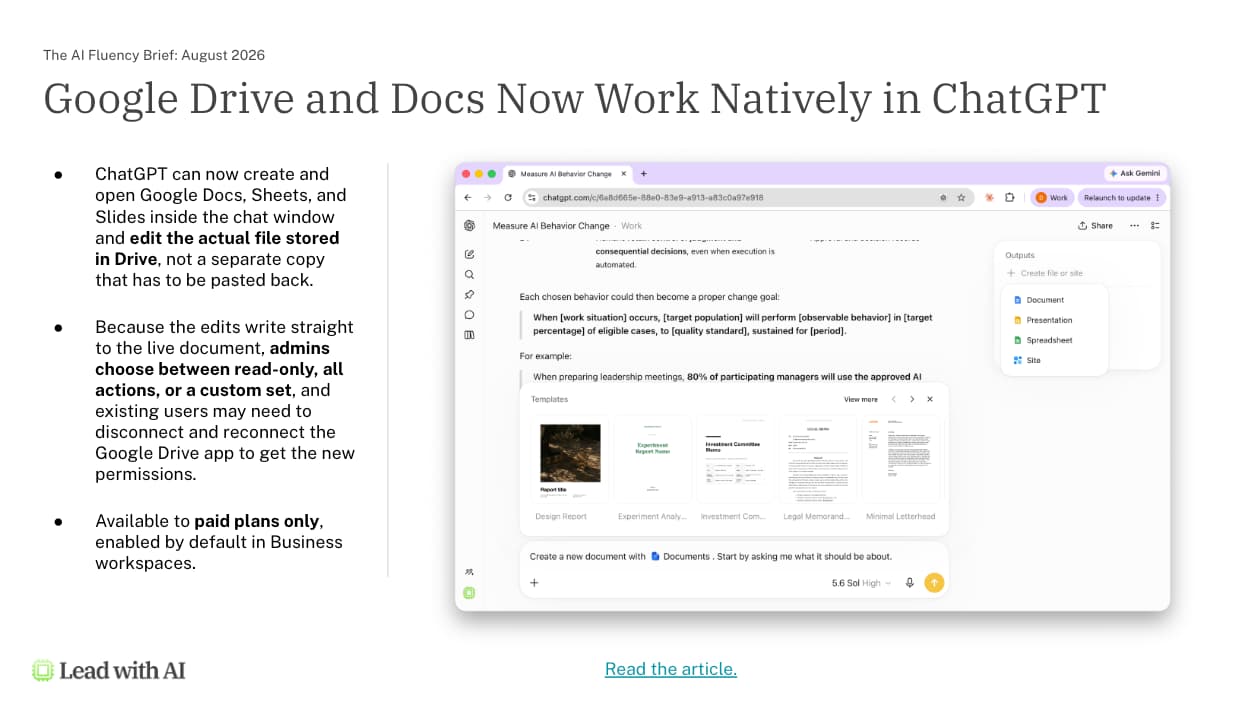
Google Drive, Docs, and Sheets now work natively inside ChatGPT, so you can browse Drive from the Library, work with files alongside a conversation, and have ChatGPT update the source file directly. In ChatGPT Work, you can turn a long chat into a document, spreadsheet, presentation, or a ChatGPT Site from the outputs panel.

Computer History on macOS builds a searchable timeline of your activity that ChatGPT can reference. Paired with Record and Replay, it will suggest skills based on work it has watched you do. I would not leave that running permanently, but pointing it at a week of non-sensitive work is a genuinely useful way to find my workflows to AI.

Claude

Claude can now send, reply to, and forward Gmail with approval, so drafting and sending no longer live in two places. The bigger change is that the Chrome extension has been replaced entirely: Claude in Chrome is now a full Cowork session, sharing your history, skills, and connectors, which means you can group a set of tabs, ask Claude to read through all of them, and have it build a file on your machine.

Voice mode also stopped being the weak spot. Opus and Sonnet now run in voice mode instead of only Haiku, with your connectors and skills available, which puts most of your working setup on your phone.

Gemini

The headline for Google Workspace companies is that Gemini skills, invoked with an "@" in Docs, Slides, Drive, Chat, and Gmail.

The caveat is that it is a beta program feature and Google has put it inside Workspace Studio rather than in Gemini generally. That placement does have one real benefit: skills plug into your flows, so improving the skill upgrades the automation.

Gemini can now also act on comments in Google Docs, including summarizing what is still unresolved. Gemini can take notes in in-person meetings from your phone or laptop and produce a transcript and summary (ask for permission first). And Workspace Studio flows can now take real actions such as sending email, with an admin dashboard where each agent can be suspended or have its access revoked.

Microsoft Copilot

You can now pull the Word, Excel, and PowerPoint agents into a Copilot conversation to turn it into a real file, in a specific style, with a skill attached. One thing to know if you administer this: those agents run exclusively on Anthropic models, so if Claude is disabled in your tenant, they disappear entirely.

And for anyone who misses meetings, the Audio Recap feature stitches up to eight meetings into a podcast you can choose the style of, so you can catch up on the way somewhere.

The Capability Overhang Is Still the Real Story

Everything above sits inside standard subscriptions. When we started running trainings, we were demonstrating twenty different AI platforms. Now it is all in the tools you already have, inside your existing security perimeter.

That is what makes the capability overhang the defining problem rather than budget or procurement. There is far more possible with AI than any of us are adopting, and the people around us who are less fluent are further behind that line still.

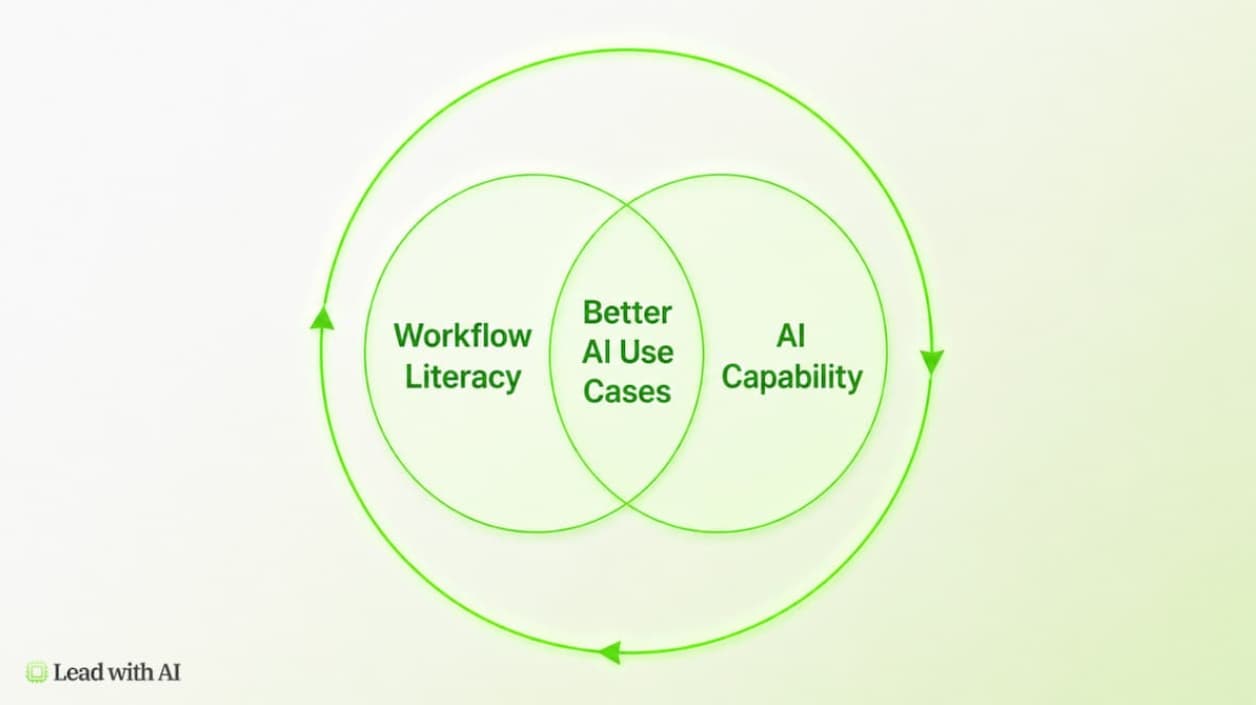
Closing it takes two things at once. You need to understand what AI is now capable of, and you need to understand how your own work actually breaks down into workflows. Where those two overlap is where AI starts doing real work for real returns.

We have done the experimentation. The question now is whether AI can do real work with real results, and the answer this month came from three members with a sales project, a dashboard, and a training plan.

One more thing, because it is the part I care most about. As agents take on more, the value of human judgment goes up, not down. I do not much like "human in the loop." I prefer the human in the lead.

Key Takeaways

  • Get one AI super user into every team, not fluency across everyone. Atlassian's research puts the zero-to-one jump at 18 percentage points of team performance, with diminishing returns after that. Budget accordingly.
  • Convert your prompts, GPTs, and projects into skills this month. Frontier firms use skills at six times the rate of typical companies. Skills trigger themselves, stack inside a workflow, and upgrade every automation that calls them.
  • Connect AI to the context it cannot see. Call transcripts, CRM records, handbooks, personal data. Joe's second brain and Bivash's 252,000-line dashboard are both context plays, not tool plays.
  • Stop measuring AI in hours saved. That metric is blind to work that was never economically feasible before, which is exactly where agents create the most value. Measure impact per hour instead.
  • Adopt a stand-behind-it rule before AI abundance costs you more than it saves. If you cannot answer "what did you mean by this" for every line you send, do not send it. Send the prompt instead.
  • Record one recurring click-heavy task as a skill this week. If there is no API and no connector, the browser is the connector now.

Frequently Asked Questions

Is AI reducing headcount at the companies adopting it fastest?

Not according to Revelio Labs. Their July 2026 AI Labor Market Tracker shows AI-adopting firms grew headcount 27% more than non-adopters since late 2022. The growth is concentrated at the top, though: 31% in senior roles against 6% in junior roles, which makes the combination of experience and AI fluency unusually valuable and puts real pressure on entry-level pathways.

How many AI power users does a team need?

One. Research from Atlassian's Teamwork Lab across 1,271 teams found that going from zero super users to one raised the likelihood of a top-scoring outcome by 18 percentage points, while adding further super users showed diminishing returns. The first one matters most because they demonstrate what is possible and the people around them start experimenting.

Why are companies not seeing ROI from AI when individuals report saving time?

Because the work has not been redesigned. OpenAI's own research describes firms as still "actively learning how to integrate AI into organizational workflows," and Amy Webb's conversations with CEOs land in the same place: individuals are more productive, companies are not. Savings dissipate into more meetings and more AI-generated documents that create downstream work for everyone who receives them.

What is the difference between an AI assistant and an AI agent in practice?

Scope, not just speed. In research covered by Harvard Business Review, agent workflows cut task time by 87% and cost by 94%, but the more important finding was that about 23% of agent queries involved job tasks users never brought to an assistant at all. Agents make previously infeasible work worth attempting, which is how Asana turned a five-year, six-million-dollar codebase cleanup into a two-week job.

What should executives actually do about AI skills?

Move your existing prompts, GPTs, and projects into skills on whichever platform you use, since ChatGPT, Claude, Gemini, and Copilot now all support them. Skills trigger themselves based on context rather than requiring you to open a specific tool, they stack together inside one workflow, and when you improve a skill, every automation that uses it improves at the same time.

This article is based on the August 2026 Lead with AI PRO Executive Briefing.

PRO members receive monthly executive briefings, masterclasses, and a peer community of leaders applying AI across industries. Learn more about Lead with AI PRO or start your AI Fluency Journey with AI Leader Advanced.