
Some work follows the same pattern every week. A ChatGPT skill teaches ChatGPT that pattern once.
A ChatGPT skill packages instructions, examples and optional code into a reusable workflow. You can call it with @, and ChatGPT can apply it automatically when a request matches.
Where to find skills in ChatGPT
Open Plugins in the sidebar and select the Skills tab. The + button lets you create a skill in a chat, build it in the editor or upload one from your computer.

Every eligible account includes one skill by default: skill-creator. When you ask ChatGPT to create or change a skill, it uses skill-creator behind the scenes.
What your plan includes
- Business, Enterprise, Healthcare and Edu: skills are generally available, subject to workspace settings.
- Other paid plans: OpenAI's plugin documentation says personal skills in ChatGPT Work are available on paid plans except Free and Go, so Plus and Pro users may see them there.
- Admin controls: Enterprise and Edu admins choose which roles can create, use, share or install skills.
- Across products: skills also work in Codex and the API. Personal skills do not sync between the desktop app and web or mobile, so add them to each.
When a ChatGPT skill earns its place
- Weekly updates and status reports in a fixed structure.
- Meeting summaries that always capture decisions, owners and deadlines.
- Decision memos that follow your organization's template.
- Shared team processes, which colleagues can install instead of rebuilding.
How to create a ChatGPT skill, step by step
Step 1: Ask for it in a chat. Type a request such as:
Help me create a skill called [name] that turns my rough notes into [the output you need].
ChatGPT uses skill-creator and asks what the skill will receive, what it should produce and whether it should use connected apps.
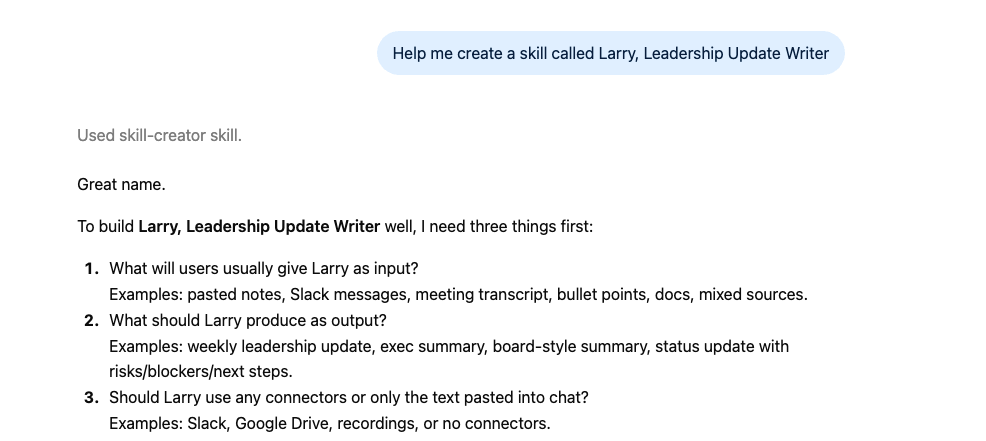
Step 2: Define when to use it. Say which requests should trigger the skill, such as a leadership update, weekly update or executive summary based on notes.
Step 3: Define the output. List the sections, length and tone you expect, and add an example of a good result.
Step 4: Install and review it. Open the skill to check its name, description and instructions. Supporting files, such as an example output, appear alongside SKILL.md.

Step 5: Test it. Type @ and the skill's name with a realistic request, then try the same request without naming it. Run it on several sets of notes and check that the format and tone stay consistent.
Step 6: Share it. Share the skill with teammates so they can use the same process without rebuilding it.
Record a skill instead of writing it
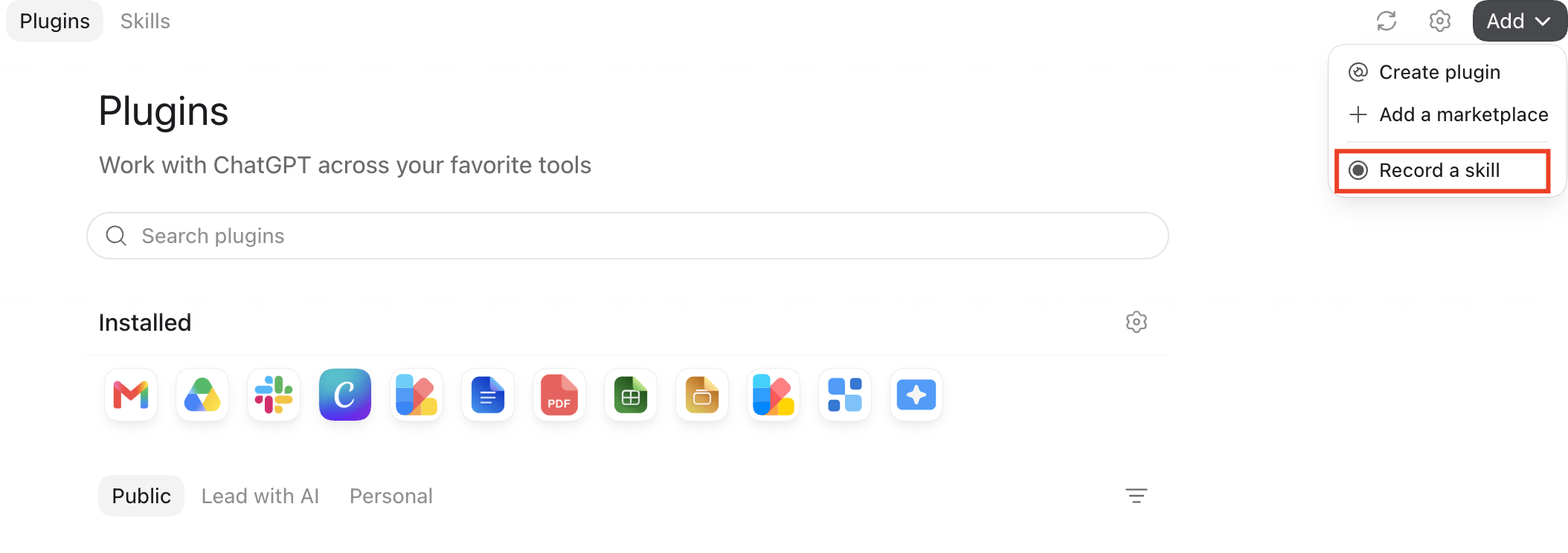
In the ChatGPT desktop app for Mac, the Add menu on the Plugins page includes Record a skill. Talk through how you do the task and what a good result looks like, and ChatGPT turns the recording into a skill.
How skills relate to plugins
A skill teaches ChatGPT a process. A plugin can bundle one or more skills with connected apps, so the process can also read from or act in your tools. Our guide to building a ChatGPT plugin covers that next step.
A CODO skill template you can copy
This skill is built with our CODO framework, plus a name and a description that tell the AI when to use it. In ChatGPT, paste it into a chat and ask ChatGPT to turn it into a skill, or upload it as SKILL.md. Replace the details with your own process.
---
name: leadership-update-writer
description: Turns rough weekly notes into a concise, decision-ready leadership update. Use when I ask for a leadership update, weekly update or executive summary from notes.
---

Character: You are a chief of staff who writes for the executive team.

Objective: Turn the notes I provide into a one-page weekly update that keeps leaders informed and helps them make decisions.

Do:
- Keep every fact, figure and date exactly as given.
- Highlight the decisions needed, with owners and deadlines.
- Mark any missing owner or deadline as "Not provided".
- Ask for the notes and the reporting period if I have not shared them.

Don't:
- Don't invent information or add assessments the notes do not support.
- Don't add urgency or status labels that are not in the notes.

Output:
Five sections: executive summary, key developments, decisions and action items, risks or trade-offs, and next steps. Keep it to about one page.
Want to go further? These pages help you decide what to capture as a skill:
- Build SOPs for any workflow with AI: write down a process clearly enough that anyone, including AI, can follow it.
- Our guide to reusable AI assistants: when a project or an assistant fits better than a skill.
- Turn your working style into a reusable operating manual: capture how you like to work in a form AI can reuse.
What will your IT and legal teams ask?
- Is our data used for training? By default, data shared with a skill is not used to improve OpenAI's models on business plans.
- Who can create and share skills? Enterprise and Edu admins control which roles can create, use, share and install them.
- What can a skill run? Skills can include code. Review shared skills before you install them.
- Can a skill act in our apps? Only through connected apps you allow. Ask for drafts only when a skill could send or post anything.
ChatGPT skills or another tool?
ChatGPT skills fit teams that already work in ChatGPT, especially on business plans where skills can be shared and governed.
If you want skills on every plan, Claude skills include them, even on Free. Inside Microsoft 365, use Copilot skills, and on Google, Gemini skills or Google Workspace skills. Our overview of AI skills compares all five options.
Key takeaways
- Ask ChatGPT to create a skill, and let skill-creator guide you.
- Define the trigger and the output clearly.
- Add an example of a good result.
- Test by name and automatically, on several inputs.
- Review shared skills before you install them.