
ChatGPT is the most widely used AI tool in the world, and it changed shape twice in the past month. If your mental model of it is still "a chatbot that writes things," you are working with a 2024 picture of a 2026 product.
In July 2026, OpenAI shipped a new model family and a new product built on top of it. One of those changes is interesting. The other one changes what you should be asking your team to do.
This guide covers what ChatGPT actually is right now, how the model lineup works, what ChatGPT Work means for how work gets done, and how to choose between ChatGPT and its serious competitors. I have updated it to reflect the GPT-5.6 release and the launch of ChatGPT Work.
What Is ChatGPT and How Does It Work?
ChatGPT is the product. The model is something else, and confusing the two is where most leaders get lost.
ChatGPT is the interface. Underneath it sits a family of models that OpenAI swaps out every few months. As of July 2026, that family is GPT-5.6, released on July 9 in three tiers: Sol, Terra, and Luna.
Here is what actually answers you when you press send, according to OpenAI's own documentation: GPT-5.5 Instant remains the default for fast, everyday responses, GPT-5.6 Sol powers the Medium, High, and Extra High reasoning options on eligible plans, and GPT-5.6 Sol Pro powers Pro.
That is worth reading twice. The flagship model is not what you get by default. You get it when you select a reasoning level, or when ChatGPT decides your request is complex enough to escalate. (You can turn that automatic switching on or off under Configure in the model picker.)
The old "knowledge cutoff" worry is mostly obsolete. ChatGPT searches the web, browses, and reads your files now. The question is no longer whether it knows about last month. The question is whether you gave it the context it needed.
The Three Tiers, Plainly
OpenAI describes Sol as the flagship, Terra as a lower-cost model with performance competitive with GPT-5.5, and Luna as the fastest and most affordable. The generation number identifies the release, while Sol, Terra, and Luna are described as durable capability tiers that advance on their own cadence.
That naming choice matters more than it sounds. OpenAI is telling you the tiers are permanent and the numbers will keep moving. Learn the tiers once and you stop relearning the lineup every quarter.
Terra and Luna are not selectable in standard ChatGPT conversations. Depending on your plan, they are available in Work and Codex, and developers can reach them through the API.
Why would OpenAI hold the cheaper models back from chat? Because chat is where people judge quality, and Work is where cost compounds across thousands of automated runs.
How ChatGPT Is Actually Trained
The mechanics have not changed as much as the capabilities have. Training still happens in two broad phases.
- Pre-training: the model is exposed to enormous amounts of text and learns to predict what comes next, which is how it absorbs the structure and patterns of language.
- Post-training: the model is then shaped on more specific tasks and human feedback, which is what turns raw pattern matching into something that follows instructions and holds a conversation.
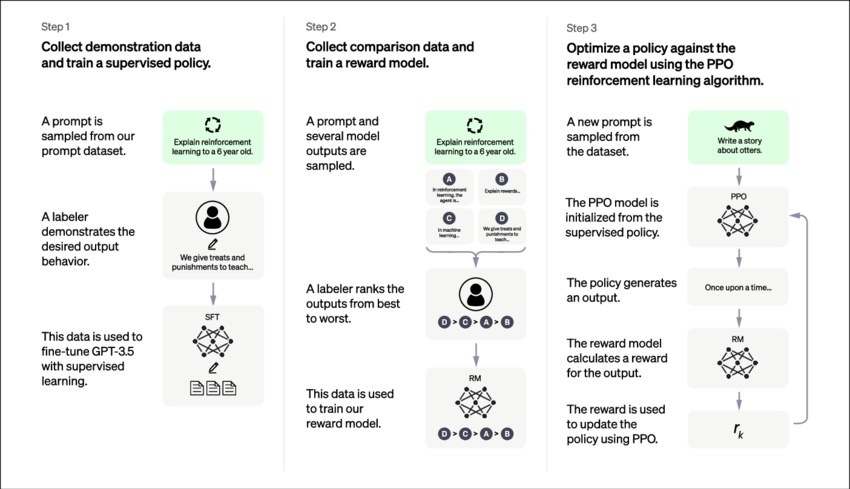
This matters for one practical reason. The model is not looking anything up when it answers from memory. It produces the most probable next thing given everything you gave it. That is exactly why context quality drives output quality, and why hallucination remains a real risk rather than a solved problem.
The Real Story Is Cost per Unit of Work
OpenAI's stated goal with GPT-5.6 was to get more useful work from every token, which the company frames as stronger performance per dollar: more successful work for the same spend, or comparable results at a lower total cost.
On Agents' Last Exam, an evaluation of long-running professional workflows across 55 fields, OpenAI reports Sol setting a new high of 53.6, ahead of Claude Fable 5 by 13.1 points, and beating Fable 5 by 11.4 points even at medium reasoning at roughly one-quarter the estimated cost.
API pricing tells the same story. Per million tokens, Sol runs $5 input and $30 output, Terra runs $2.50 and $15, and Luna runs $1 and $6. (Source: OpenAI, July 2026.)
I want to be careful here, because these are OpenAI's own benchmarks on OpenAI's own blog. Treat them as a claim, not a finding. What is not in dispute is the direction: the industry has moved from "which model is smartest" to "which model finishes the job for the least money."
That shift is what I wrote about in Token Maxing vs. Budget Maxing, and it is the reason impact per hour is a better metric for your team than seats deployed.
For the fuller picture on this release, see GPT-5.6 Is Here, and It Is Already Inside Your Copilot and GPT-5.6 Arrives Under Tight Access.
ChatGPT Work: From Answering to Finishing
This is the biggest change to ChatGPT since GPTs launched, and most leaders have not registered it yet.
ChatGPT Work launched on July 9, 2026, alongside GPT-5.6. OpenAI describes it as bringing together context from your tools to turn scattered notes, drafts, and ideas into finished work, gathering context, planning the approach, and taking action across your tools, files, and desktop apps to create polished spreadsheets, docs, and slides.
For two years the pitch was that ChatGPT could answer almost anything. The pitch now is that it finishes the job.
What ChatGPT Work Actually Does
With more than 1,400 plugins available, ChatGPT can pull context from the tools and workflows you already use. In practice that means Slack, Teams, Google Drive, SharePoint, email, calendars, and CRMs. (Source: OpenAI, July 2026.)
Four features are worth knowing by name:
- Plan mode. ChatGPT gathers context, asks questions, and creates a step-by-step plan. You can suggest changes or approve the plan before work begins.
- Sites. Turns ideas, plans, and data into interactive websites and web apps, including dashboards, project trackers, launch calendars, and reports that stay current as information changes.
- Scheduled tasks. One-time or recurring tasks you can monitor and check on from your phone.
- A built-in browser. Multiple tabs inside the desktop app for richer agentic workflows.
Availability is all plans on macOS and Windows desktop, and Plus, Pro, Business, Enterprise, and Edu on web and mobile.
Plan mode is the feature I would point a skeptical executive to first. It is the one that respects the reality that delegation without a review step is just hoping.
What Early Users Are Actually Doing With It
I find named examples far more useful than benchmarks, and OpenAI published several.
Nathan Bolt, Head of Digital Products at Virgin Atlantic, used it for competitive benchmarking of customer journeys. He describes a competitor analysis cycle that would normally take weeks now taking hours, moving the team from insight to product decisions faster.
Will Daney, Go-to-Market Manager at NVIDIA, rebuilt his GTC event reporting. He says about 40% of his time used to be reserved for manual number crunching and analysis, and that process now runs twice a week in ChatGPT, freeing him to work with the field team on strategy.
Angela Ferrante, Head of Enterprise Marketing at Zapier, built a lead triage system. A single lead used to take 35 to 45 minutes to inspect across HubSpot, Gong, and email touchpoints, and the resulting system helped Zapier identify and hand off seven figures in pipeline every month.
Notice what all three have in common. Not one of them replaced a person. Each one took a workflow that was already understood and compressed the manual middle of it. That is the pattern I keep seeing, and it is why AI works best when you understand your workflow.
For the full breakdown, and how it compares to Anthropic's competing product, see ChatGPT Work Is Here: OpenAI's Answer to Claude Cowork.
The Governance Question Nobody Wants to Own
Here is the part I would not let slide past your risk team.
ChatGPT Work gets standing access to your files, your email, and your desktop apps. That is what makes it useful. It is also a genuinely new category of exposure, because the thing holding those credentials is not a person and does not appear on any org chart.
OpenAI is transparent about the tradeoff. The company states that GPT-5.6 is more capable than earlier models in both biology and cybersecurity but does not cross its Critical threshold in either category, and that its Sol cyber safeguards block roughly ten times more potentially harmful activity than previous models, while acknowledging those measures can create friction for legitimate use.
My advice is simple. Treat every agent instance as an identity with a named human owner, scoped permissions, and logging that traces back to a person rather than a service account. Do that before the pilot, not after.
Projects, GPTs, and Skills: Three Containers, Three Jobs
There are now three ways to package repeatable work in ChatGPT, and leaders keep picking the wrong one.
The plainest way I have found to explain it:
- A Custom GPT is an app. You configure instructions, attach knowledge files, and it lives in your sidebar. It is the right choice when you want a persistent, shareable thing your team opens by name. The onboarding GPT that already knows your tone and your policies is the canonical example, and we collected 50 examples of GPTs worth building.
- A Project is a workspace. It holds chats, files, instructions, and its own memory scoped to that project. It is the right choice for long-running work with accumulating context, like a client engagement or a product launch.
- A Skill is a procedure. It is a plain-text playbook, written in a SKILL.md file, that you invoke by mentioning it in any chat. It is the right choice when the problem is not "what should the output be" but "what are the steps."
Why does the third one matter most right now? Because when a team complains that AI output is inconsistent, they are almost never describing a prompting problem. They are describing a missing procedure.
Skills are also built on an open standard rather than a proprietary format, which means the same playbook can travel between tools. Rollout has been uneven, with OpenAI's documentation listing Personal Skills as generally available for Business, Enterprise, Healthcare, and Edu, and not mentioning Plus, Pro, or Free. Check your own Plugins area before you build a plan around it.
This is Workflow Literacy in product form, and it is a good signal of where a person sits on the AI Fluency ladder. People who reach for Skills have stopped thinking in prompts and started thinking in processes.
Prompt Engineering: Less Scaffolding, More Context
Better prompts still get better outputs. What changed is which part of the prompt does the work.
Frontier models need far less structural hand-holding than the GPT-4 generation did. OpenAI's own framing on GPT-5.6 is that you give it an outcome and it navigates ambiguity, adapts as work unfolds, and delivers polished outputs with less prompting.
So the leverage has moved. Elaborate role-play preambles and formatting incantations matter less. Context and a clear definition of done matter more.
This is also why prompting has always come more naturally to senior leaders than to juniors. A good prompt looks almost exactly like good delegation: here is the outcome, here is the context you are missing, here is what finished looks like, here is what to check before you bring it back.
That is what the CODO framework encodes, and it still holds:
- Context: what you know that the model does not
- Objective: the outcome, not the task
- Details: constraints, format, audience, tone
- Output: what finished actually looks like

For the model-specific differences, and they are real, see How to Prompt GPT-5.5, Claude Opus 4.8, and Claude Fable 5. For the full method, see our guides to prompt engineering and the CODO prompting framework, or run a draft through our prompt enhancer.
Ways to Use ChatGPT at Work
There is a gap between access and use that keeps widening. Organizational AI adoption reached 47% in Gallup's Q2 2026 data, and yet the thing that predicts productivity is not whether people have a license. It is how many different kinds of work they bring to it. I unpacked that in AI Adoption Just Jumped Again. Are We Actually Using It Well?.
The highest-value uses are still unglamorous:
- Research and analysis. Gather and summarize information on complex topics, and pull patterns out of large sets of text or data.
- Content creation. Draft outlines, first versions, job descriptions, briefs, and campaign material. See our roundup of AI writing tools for executives.
- Editing and review. Check for clarity, consistency, and errors before anything leaves your desk.
- Brainstorming. Generate alternatives and counterarguments when you are stuck, which is often the fastest way to unstick a decision.
- Data analysis. Turn a messy set of numbers into a chart, a model, or a readable summary.
- Training material. Build the tutorials, onboarding docs, and reference material your team keeps asking for.
For department-level detail, see our guides to AI for email, AI presentation tools, and AI use cases for business leaders.
Top Departments Using AI
Certain functions are consistently further along. Focusing on them tends to produce faster wins, which aligns with expert advice on AI change management:
- Customer service. Answering common questions, guiding enrollment, and triaging issues so people handle the genuinely complex cases.
- Marketing and sales. Analyzing customer feedback, drafting campaign material, and recommending next steps. (See the best AI marketing tools.)
- Human resources. Streamlining recruitment and improving access to policy information. (See more on AI in HR and AI in HRIS.)
- Finance. Analyzing trends, building models, and accelerating reporting cycles. (See our AI accounting tools.)
- Operations. Assessing risk, simplifying procurement, and generating operational reporting.
Driving Adoption Is a Leadership Problem, Not a Tooling Problem
McKinsey's newest work on AI returns lands somewhere uncomfortable for most executives: the bottleneck is leadership behavior, not tooling. Redesigning workflows, building fluency, and earning trust are what produce value. I wrote that up in Real AI ROI Starts With Leaders.
The practical playbooks live in our guides to AI change management and AI champion programs, and you can see how other organizations actually did it in our collection of AI implementation case studies.
One more thing I see constantly. Your best AI users are probably hiding. They are getting real leverage and not telling anyone, because the incentive to disclose is negative. I call them Secret Cyborgs, and finding them is usually faster than training anyone.
When you are ready to decide which workflows to change first, that is the GED-RT conversation.
Limitations and Risks Leaders Should Actually Track
ChatGPT is powerful and it is not infallible. Three risks are worth your attention, and the third one is newer than the other two.
Hallucination. The model produces plausible text, which is not the same as accurate text. It is at its most convincing precisely when it is wrong, so any output that will inform a decision needs a human who owns its accuracy. We cover the mechanics in preventing AI hallucinations.
Bias. Models learn from human text and reproduce what is in it, including demographic skew and the tendency to confirm whatever framing you brought to the conversation. One practical countermeasure is who is in the room: as experts told me in our conversations about women in AI, better outcomes start with adding more perspectives to your AI projects.
Agentic risk. This is the one that has changed. When AI only produced text, the worst case was a bad draft. When AI takes action across your systems, the worst case is a bad action taken quickly and repeatedly. Scope permissions narrowly, keep a review step for anything irreversible, and log everything.
None of this argues for keeping AI out of your organization. View it as a tool that raises what your people are capable of, and hold them accountable for the output either way.
ChatGPT Alternatives
ChatGPT is not the only serious option, and for some organizations it is not the right one. Here is how the field looks now. (For a deeper comparison, see our guide to the best AI models.)
Microsoft Copilot
The most important fact about Copilot in 2026 is that it may be running the same model as ChatGPT. OpenAI announced GPT-5.6 as the preferred model in Microsoft 365 Copilot on the same day GPT-5.6 launched.
Charles Lamanna, EVP for Copilot, Agents and Platform at Microsoft, said the model produced outputs that were highly cohesive, accurate, and ready for use across a wide range of productivity scenarios.
So the choice is not really about model quality. It is about where your data already lives and which surface your people already have open.
Anthropic Claude
Claude is the strongest competitor on knowledge work, and Anthropic ships a genuinely different product philosophy. Its agentic desktop product, Claude Cowork, is the direct counterpart to ChatGPT Work, and Claude Design covers slides, sites, and branded assets.
OpenAI's own benchmark tables put Claude ahead on several coding and long-context evaluations even while claiming the overall lead. Claude Fable 5 scores 80% on SWE-Bench Pro against Sol's 64.6%, which is a large enough gap to matter if engineering is your primary use case. (Source: OpenAI, July 2026.)
Our Claude coverage: the full Claude guide, plus Claude Cowork for beginners, Claude Cowork goes mobile, Claude Design, and Claude across Microsoft 365.
Google Gemini
Gemini's advantage remains distribution and the Workspace ecosystem rather than any single benchmark. If your company runs on Google, that is most of the argument. See Manage your business with Gemini and Google brings a 24/7 AI agent into Gemini.
How to Actually Choose
I asked Matt Kropp, CTO at BCG X, this exact question, and his answer has held up better than any benchmark:
"The deployment of AI tools for your employees like ChatGPT Enterprise, Office 365 copilot, or Google's Gemini, I would make that choice based on what productivity software you are already using."
AI thrives on context, and your context lives in your productivity suite. Start there. Then let the people doing the work tell you where the tool is failing them.
Frequently Asked Questions About ChatGPT
Which ChatGPT model should I use?
For everyday questions, the default is fine. For anything with real stakes, manually select a reasoning level. On Plus, Pro, Business, and Enterprise, Medium and above route to GPT-5.6 Sol rather than the faster default.
Is ChatGPT Work the same as ChatGPT?
No. Chat answers questions. Work completes multi-step tasks across your connected apps and files, and produces finished documents, spreadsheets, slides, and web apps.
What is the difference between a GPT, a Project, and a Skill?
A GPT is an app you share. A Project is a workspace that accumulates context. A Skill is a written procedure you invoke inside any chat.
Does ChatGPT still have a knowledge cutoff?
Every model has one, but it matters far less now because ChatGPT searches the web, browses, and reads your files.
Is ChatGPT safe for company data?
It depends on your plan and configuration. Business and Enterprise plans offer admin controls, workspace management, and model restrictions. With agentic tools, the bigger risk is not training data, it is standing access to your systems.
What is the best ChatGPT alternative?
The one that sits closest to where your work already lives. Claude for knowledge work depth, Copilot for Microsoft organizations, Gemini for Google organizations.
ChatGPT for Work: The Bottom Line
- ChatGPT is the product, GPT-5.6 is the model. Sol, Terra, and Luna are durable tiers, and the flagship is not your default.
- The competition moved from smartest to cheapest-to-finish. Cost per completed unit of work is now the number that matters.
- ChatGPT Work is the real shift. It moves the tool from answering to finishing, and it needs governance before it needs a pilot.
- Pick your container deliberately. GPTs for apps, Projects for workspaces, Skills for procedures.
- Prompting leverage moved to context and definition of done. Elaborate scaffolding matters less than it did.
- Your tool choice follows your productivity suite. Your adoption problem follows your leadership behavior.
If you want to move from knowing this to doing it, that is what AI Leader Advanced is built for. And if you try one thing this week, make it Plan mode on a task you would normally delegate. Message me about what it gets right and what it gets wrong.